
Dvorak and Colemak: Learning Curve Explained
[ Back to Mechanical Keyboards 101 ]If you want the easier switch, I’d pick Colemak. If you want a bigger break from QWERTY, I’d look at Dvorak.
Here’s the short version: both layouts can cut finger travel, but their learning curves are not the same. From the numbers in this article, a 78 WPM QWERTY typist may drop to about 25 WPM on Colemak and 12 WPM on Dvorak on day one. Both often get back to about 30+ WPM in 1–2 weeks, but full recovery tends to take about 4–6 weeks for Colemak and 8–12 weeks for Dvorak.
What I’d keep in mind:
- Dvorak moves more keys: 33
- Colemak moves fewer keys: 17
- Colemak keeps common shortcuts like Ctrl+Z, X, C, and V
- Dvorak changes more of your old habits, so the first days often feel harder
- Programmable keyboards can make testing either layout less disruptive by keeping QWERTY on another layer
Bottom line: if you type for work and need the smoothest path, Colemak usually feels easier to learn. If you want a more complete reset and don’t mind a longer relearning period, Dvorak may still fit.
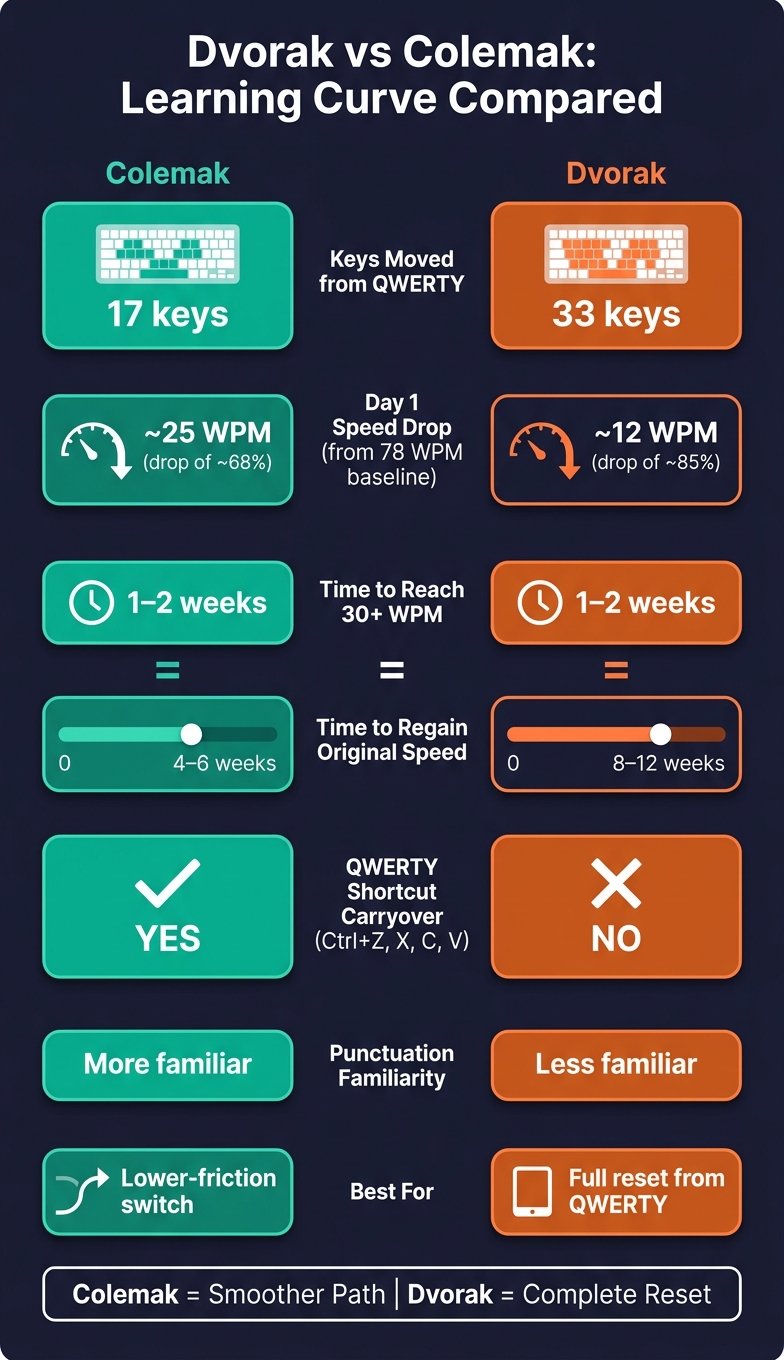
Dvorak vs Colemak Learning Curve: Key Stats Compared
QWERTY vs Dvorak vs Colemak
If you are new to the hobby, check out our mechanical keyboards 101 guide to understand the hardware basics before switching layouts.
sbb-itb-3cb9615
Quick Comparison
| Point | Colemak | Dvorak |
|---|---|---|
| Keys moved from QWERTY | 17 | 33 |
| Day 1 example from 78 WPM | ~25 WPM | ~12 WPM |
| Time to reach 30+ WPM | 1–2 weeks | 1–2 weeks |
| Time to regain old speed | 4–6 weeks | 8–12 weeks |
| QWERTY shortcut carryover | More | Less |
| Punctuation familiarity | More | Less |
| Best fit | Lower-friction switch | Full reset |
So if you’re comparing speed drop, error rate, shortcut friction, shared-computer use, and recovery time, the main split is simple: Colemak keeps more of what you already know, while Dvorak asks you to relearn more from scratch.
How Dvorak and Colemak differ before you start learning
The main split comes down to how much QWERTY muscle memory each layout keeps.
Dvorak: more keys changed and a more complete reset
Dvorak changes 33 keys from QWERTY. It puts all five vowels on the left home row and common consonants on the right. In plain English, that means much less of your old QWERTY habit carries over.
Colemak: fewer moved keys and more QWERTY familiarity
Colemak keeps more of what your hands already know. It moves 17 keys, leaves punctuation where it is, and keeps common shortcuts like Ctrl+Z, X, C, and V in their QWERTY spots.
That gap matters right away. In the first few days of learning, typing speed usually drops and mistakes go up. With Dvorak, the reset tends to feel bigger. With Colemak, the switch often feels a bit less jarring.
Learning curve comparison: first days, first weeks, and long-term progress
The gap between Dvorak and Colemak becomes most obvious after you start typing. What matters isn't just the first shock. It's how hard your speed drops, how soon accuracy comes back, and how long it takes before typing feels normal again.
Early adaptation: speed loss, mistakes, and frustration
You feel the difference right away in the first few days. A typist who does 78 WPM on QWERTY might fall to about 12 WPM on Dvorak or 25 WPM on Colemak. That's a steep drop, and if you type for work, you notice it fast.
A big reason is how much more Dvorak changes. Punctuation moves around, and shortcuts like Ctrl+Z or Ctrl+C end up in different places. Colemak leaves those common shortcuts alone, so part of the keyboard still feels familiar.
Most of the early frustration comes from one simple thing: finding keys. Dvorak users often tape a layout chart to the monitor during the first week. Colemak users run into the same issue, just not as much.
For some people, Dvorak feels like wiping the slate clean. For others, that's exactly what makes it hard.
Medium-term progress: getting back to usable speed
After the first slowdown, the main issue is recovery. In most cases, it happens in a pretty predictable order: speed drops first, accuracy comes back next, and speed builds after that. The difference between these layouts is the timeline.
Colemak users often get back to an everyday typing speed - around 30+ WPM - within 1–2 weeks. Dvorak users usually reach that same mark in about the same time, but getting all the way back to their old QWERTY speed tends to take longer:
| Metric | Colemak | Dvorak |
|---|---|---|
| Time to 30+ WPM | 1–2 weeks | 1–2 weeks |
| Time to regain former speed | 4–6 weeks | 8–12 weeks |
| Early WPM drop (Day 1) | ~68% (78 → 25 WPM) | ~85% (78 → 12 WPM) |
If you need to keep working while you switch, Colemak is usually easier to deal with.
Long-term use: comfort and returning to QWERTY
Once the learning period is behind you, both layouts can feel comfortable. The bigger split shows up when you have to move back and forth between layouts.
Colemak is often easier to use alongside QWERTY because more familiar shortcuts and punctuation stay where you'd expect them. Dvorak changes vowel placement so much that even a short return to QWERTY can feel clumsy at the keyboard.
That matters most when daily habits, shortcut use, and device support shape how hard the switch feels.
What makes each layout easier or harder for mechanical keyboard users
Shortcut-heavy work, shared computers, and office habits
Speed loss is only one part of the switch. In day-to-day use, workflow friction is often what decides whether a layout feels easy or like a slog.
If you write code, live in spreadsheets, or edit documents all day, Colemak has a clear edge because common shortcuts stay more familiar. Dvorak doesn't give you that. When you're using Ctrl+Z, Ctrl+C, and Ctrl+V over and over, you're not just learning new letter positions. You're also retraining shortcut muscle memory at the same time, and that can make the change feel a lot heavier.
Shared computers make this even more noticeable. Colemak leaves about 10 out of 26 keys in their original QWERTY positions, so using a coworker's machine or your work laptop is still manageable. With Dvorak, even a few short words can feel alien. That gap matters most if you bounce between your own keyboard and a shared one during the day.
Using programmable keyboards to lower the learning barrier
For mechanical keyboard users, hardware remapping can make the switch much less disruptive.
With QMK or VIA firmware, you can program the layout directly onto the keyboard. So your Dvorak or Colemak setup moves with the board itself. No software installs. No OS-level changes. And fewer compatibility headaches on a borrowed machine or in a remote session.
Programmable boards from KeebsForAll can store the layout on the board, which cuts down on setup friction. You can keep a dedicated layer for Colemak or Dvorak and leave QWERTY on another layer for gaming or for the moments when a coworker needs to borrow your keyboard.
Blank keycaps or hidden legends can also help in the first few weeks by pushing you to touch type instead of hunting for letters.
That kind of flexibility often makes one layout easier to live with than the other.
Which layout has the better learning curve for you
Neither layout is flat-out better. It comes down to how much change you can handle without throwing off your work. Colemak is the easier switch. Dvorak asks for more retraining. So the choice is pretty simple: go with a bigger reset in Dvorak, or take the smoother path with Colemak.
Choose Dvorak if you want a clean break from QWERTY keyboards
If you can deal with the disruption, Dvorak gives you a cleaner break from QWERTY. Pick it if you want a full reset and don’t mind taking longer to get back to your normal typing speed.
Choose Colemak if you want a smoother transition
If you want less friction, Colemak is the easier move. Pick it if you want the least disruptive switch and need familiar shortcuts to stay where they are.
FAQs
Which layout is easier for programmers?
Colemak is usually the easier pick for programmers. It moves fewer keys away from QWERTY, keeps common shortcuts like Ctrl+C/V/X in familiar spots, and leaves punctuation where you expect it. That means less friction when you write code day to day.
Dvorak can still offer efficiency gains, but it tends to be harder to switch to for programming. The learning curve is steeper, and key positions feel less familiar, which can slow you down more at the start.
Will switching hurt my QWERTY typing?
Switching from QWERTY to Dvorak or Colemak can slow you down and feel awkward at first. That’s normal. Your fingers are learning a new layout, so speed and comfort often dip for a while.
The good news is that this change usually doesn’t damage your ability to type in QWERTY later. In most cases, your old muscle memory comes back when you switch back, especially if you still use QWERTY from time to time.
So the main downside isn’t permanent loss. It’s the short-term learning curve while your brain and hands adjust.
Can I test Colemak or Dvorak without changing my whole setup?
Yes. Most operating systems let you switch between multiple keyboard layouts, so you can try Colemak or Dvorak without making any permanent hardware changes.
Just turn on the layout in your system settings, use it for a bit, and switch back to QWERTY whenever you want. That makes it easy to compare them and see which one feels most comfortable.