
Keycap Profiles and Materials: Buying Guide 2026
[ Back to Mechanical Keyboards 101 ]If I had to keep this simple, I’d say this: pick your keycaps based on feel, sound, and fit first. In 2026, most budget keycap sets start around $20, while enthusiast sets often cost $100+. For most people, Cherry or OEM profile with PBT is the safe choice. If I want a deeper sound, I’d look at SA or MT3. If I need row-swapping freedom for layouts like Colemak or ortholinear boards, I’d go with DSA or XDA.
Here’s the short version:
-
Profiles change typing feel and sound
- Cherry: lower, sculpted, common for customs
- OEM: a bit taller, familiar on prebuilt keyboards
- SA: tall, rounder top, deeper sound
- MT3: tall, deep scoops, strong finger guidance
- DSA: low, flat row setup, same shape on every row
- XDA: wider top, same row shape across the board
-
Materials change texture, wear, and tone
- ABS: smoother, lower cost, shines faster
- PBT: more textured, resists shine better, often lower-pitched
- POM: very smooth, muted sound, less common
- Polycarbonate: lets more light through, sharper sound
-
Legend printing matters just as much as plastic
- Doubleshot and dye-sub usually last the longest
- Pad-printed and laser-etched tend to wear down sooner
-
Fit problems are common
- Many 65% and 75% boards need a 1.75u Right Shift
- Some boards need a 6.25u spacebar, others need 7u
- Most sets fit MX-style switches, but the kit still needs the right key sizes
If I were buying today, I’d check three things before anything else:
1) profile height, 2) plastic type, and 3) kit compatibility.
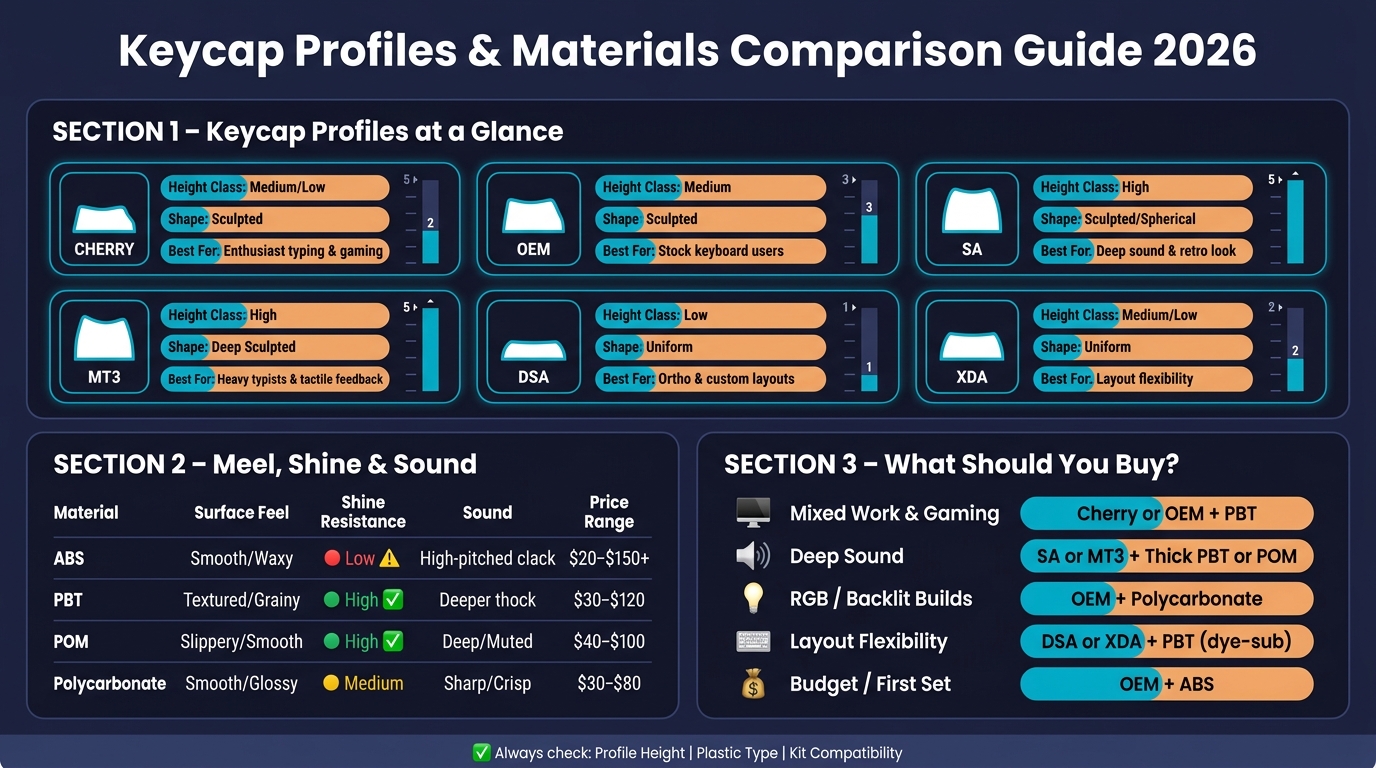
Keycap Profiles & Materials Comparison Guide 2026
Ultimate Guide to Custom Keycap Sets for Mechanical Keyboards | ABS vs PBT, GMK, Profiles, and more!
sbb-itb-3cb9615
Quick Comparison
| Item | Main Trait | Best For | Main Watch-Out |
|---|---|---|---|
| Cherry | Medium-low, sculpted | Typing and gaming | May conflict with some north-facing setups |
| OEM | Medium, sculpted | Stock keyboard users | Less change from a prebuilt feel |
| SA | Tall, spherical | Deep sound, retro look | Tall height can take time to get used to |
| MT3 | Tall, deep scoop | Strong row guidance | Very tall profile |
| DSA | Low, uniform | Layout swaps, ortho boards | Flat feel may not suit everyone |
| XDA | Low-medium, uniform | Large top surface, row freedom | Less row guidance |
| ABS | Smooth plastic | Lower-cost sets, bright colors | Shines faster |
| PBT | Textured plastic | Daily use | Fewer options in some styles |
| POM | Smooth, muted | Niche sound and feel picks | Harder to find |
| Polycarbonate | Translucent | RGB/backlit boards | Can sound sharper |
Bottom line: I’d buy for fit first, then feel, then sound. A great-looking set is useless if it doesn’t include the keys your board needs.
Keycap Profile Basics: Height, Shape, and Typing Feel
The fastest way to compare keycap profiles is to start with height and row shape. Those two traits shape most of what you notice when you type. They affect how your hands sit, how the keys meet your fingers, and even how the board sounds. Once you have those basics down, the Cherry, OEM, SA, MT3, DSA, and XDA comparison gets much easier to follow.
Low, medium, and high profiles
Profile height changes wrist angle, comfort, and sound. Low-profile caps like Cherry and DSA keep your hands closer to the desk, which can help cut wrist extension during long typing sessions. They also tend to sound tighter than taller profiles. Medium-profile caps, with OEM as the best-known example, sit in the middle and show up on most mass-market keyboards. High-profile caps like SA profile keycaps are some of the tallest you can buy, and that added height often gives the board a deeper, fuller sound.
Sculpted vs uniform keycaps
Sculpted profiles change height and angle from one row to the next. Cherry, OEM, and SA all fall into this group. That row-by-row shaping helps each row meet your fingertips in a more natural way, so many people find them easier to get used to for daily typing. Cylindrical tops like Cherry and OEM also make side-to-side movement feel easier when you're typing fast. Uniform profiles like DSA and XDA keep every row the same. That's handy for non-standard layouts like ortholinear boards, since you can swap caps between rows without changing the feel.
Profile tradeoffs table
| Profile Category | Common Examples | Relative Height | Design | Typing Feel | Sound Character |
|---|---|---|---|---|---|
| Low | Cherry, DSA | Low to medium-low | Sculpted or uniform | Fast, ergonomic | Crisp, muted |
| Medium | OEM | Medium | Sculpted | Standard, familiar, high compatibility | Balanced |
| High | SA, MT3 | Tallest | Sculpted, spherical | Retro, spacious | Deep, full |
With height and row shape in place, the next section looks at the main profiles one by one.
Popular Keycap Profiles Compared
Once you know the basics, the main keycap profiles are pretty easy to sort out.
Cherry and OEM for everyday typing and gaming
Cherry is the profile many keyboard hobbyists lean toward. It has a medium-low height and a gentle sculpt, so it feels a bit tighter and more controlled. OEM sits a little taller and has more row sculpt. Since OEM comes on most prebuilt keyboards, it usually feels familiar right away and takes less time to get used to.
Put simply: Cherry is the usual pick for custom builds, while OEM is the safer move if you're switching from a stock keyboard.
SA, MT3, DSA, and XDA for specific feel and layout needs
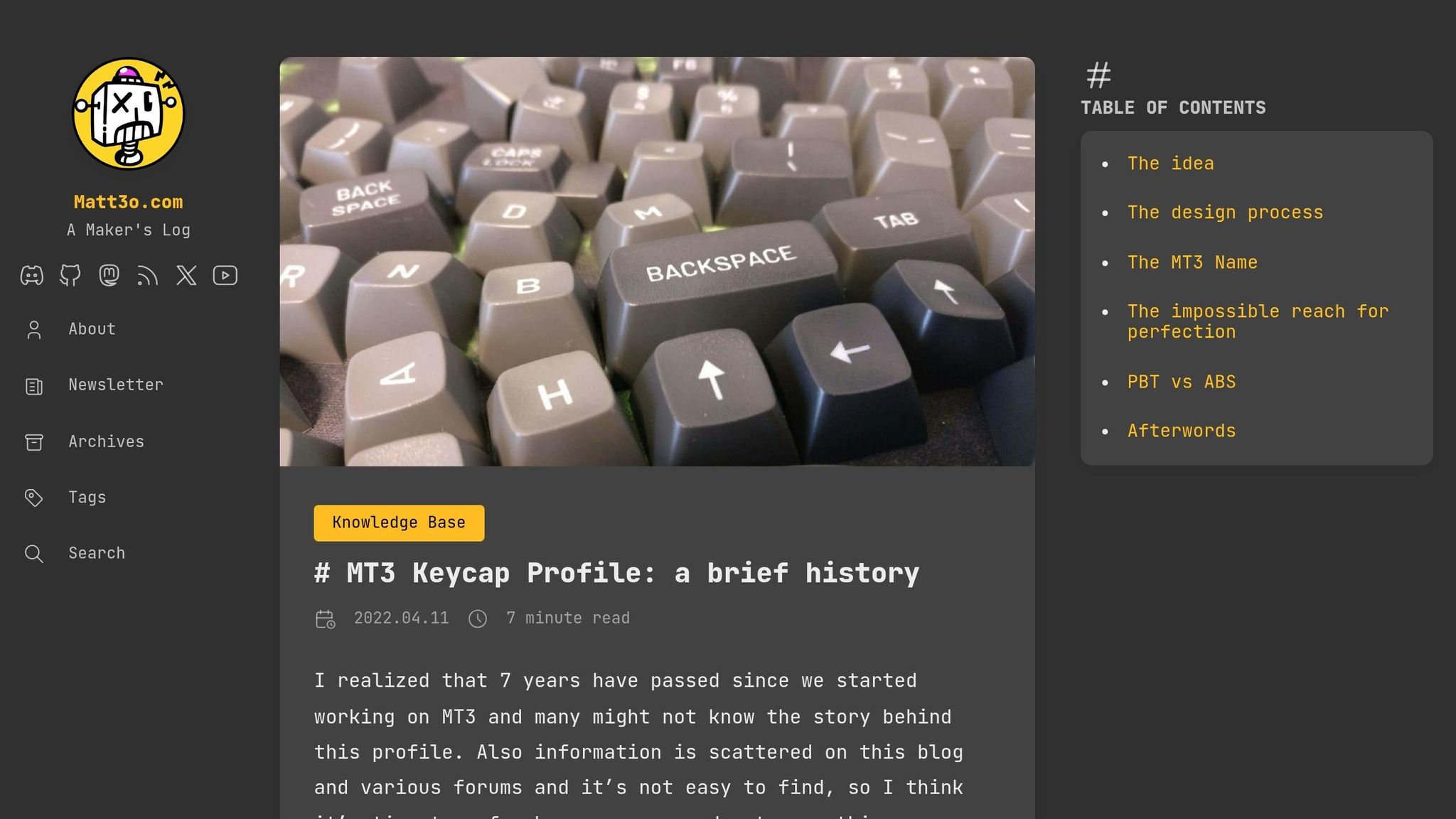
SA and MT3 sit on the taller end and use sculpted rows. People often choose them for a deeper sound and a typing feel that guides the fingers more clearly. SA has spherical concave tops, which give each key a bowl-like shape under your fingertip. MT3, based on vintage IBM beamspring terminals, has an even deeper sculpt than SA, which helps keep your fingers centered on each key. Both usually sound deeper than Cherry or OEM, and using a wrist rest can help.
DSA and XDA take the opposite path. Both are uniform profiles, which means every row has the same height and shape. DSA is low-profile and uses a small spherical top. XDA has a larger, flatter top surface that gives it a more modern low-profile feel. Because the rows are uniform, both work well with non-standard layouts like Dvorak and Colemak.
Profile comparison table
| Profile | Height Class | Shape | Top Shape | Sound Tendency | Best Use Case | Main Drawback |
|---|---|---|---|---|---|---|
| Cherry | Medium/Low | Sculpted | Cylindrical | Sharper | Enthusiast typing, gaming | Can interfere with north-facing LEDs |
| OEM | Medium | Sculpted | Cylindrical | Balanced | General typing, stock keyboard users | Less sculpted than Cherry |
| SA | High | Sculpted | Spherical (concave) | Deep, full | Retro aesthetics, deep sound | High learning curve; may require wrist rest |
| MT3 | High | Sculpted | Deep spherical | Deep, deeper | Heavy typists, tactile feedback | Very tall; steep learning curve |
| DSA | Low | Uniform | Spherical | Higher-pitched | Custom layouts (Dvorak, Colemak) | Can feel too flat for some typists |
| XDA | Medium/Low | Uniform | Spherical (flatter) | Balanced | Layout flexibility, modern aesthetics | Lack of row distinction can lead to typos |
A profile changes the shape and typing feel. The material changes texture, shine, and how the caps wear over time.
Keycap Materials: ABS, PBT, POM, and Legend Quality
If profile shapes the keycap, material shapes how it feels, sounds, and wears over time.
ABS vs PBT: texture, shine, and price
The two main plastics used for keycaps are ABS and PBT.
ABS feels smooth and a little waxy right out of the box. It usually gives off a higher-pitched clack, and with use, it tends to pick up shine.
PBT feels more matte, with a light grainy texture. It holds that look for much longer and usually sounds deeper and lower-pitched than ABS.
POM, polycarbonate, and legend quality
POM (polyoxymethylene) shows up less often, but it’s good to know what it brings to the table. It feels very smooth and tends to produce a deep, muted sound. POM keycaps also hold up well against shine, and they’re often sold as blank caps or with laser-etched legends.
Polycarbonate keycaps are naturally translucent, which makes them a solid pick for backlit builds. The tradeoff is medium shine resistance and a sharper, crisper sound.
Legend quality is a separate issue from material quality, and people mix the two up all the time. A keycap can use a good plastic and still have weak legends.
- Doubleshot legends use a second layer of plastic, so they hold up well and work nicely for RGB shine-through designs.
- Dye-sublimation (dye-sub) uses heat to bond ink into the plastic itself, though the process is usually limited to darker legends on lighter-colored PBT.
- Pad-printed legends sit on top of the surface and wear out the fastest.
- Laser-etched legends are common on lower-cost shine-through caps, but they can fade or collect grime.
If you want the longest-lasting legends, doubleshot and dye-sub are usually the best bets.
Material comparison table
| Material | Surface Feel | Shine Resistance | Typical Sound | Common Legend Methods | Usual Price Range (USD) |
|---|---|---|---|---|---|
| ABS | Smooth / Waxy | Low (shines quickly) | Higher-pitched clack | Doubleshot, Pad-printed | $20–$150+ |
| PBT | Textured / Grainy | High (resists shine) | Deeper thock | Dye-sub, Doubleshot | $30–$120 |
| POM | Slippery / Smooth | High | Deep / Muted | Laser-etched, Blank | $40–$100 |
| Polycarbonate | Smooth / Glossy | Medium | Sharp / Crisp | Pad-printed | $30–$80 |
With profile and material mapped out, the next step is matching both to your layout and use case.
How to Buy the Right Keycaps in 2026
Match profile and material to your use case
Now that the main profile and material differences are on the table, the next step is simple: match them to how you type and what your board needs.
For daily typing or a mixed work-and-gaming setup, Cherry or OEM with PBT is the safe bet. It’s the kind of combo that just works for most people.
If you want a deeper sound, go with SA or MT3 paired with thick PBT or POM. Taller caps tend to give off that lower, fuller sound many keyboard fans want.
For ortholinear or remappable layouts, DSA or XDA with dye-sub PBT makes life easier. Since the rows are uniform, you can swap keys around without fighting the profile.
Check compatibility, kit support, and where to buy
Once you’ve picked a profile and material, make sure the kit actually fits your layout.
Before buying, check the layout, switch mount, and key sizes. The set should fit MX-style switches, which covers most boards. This is where a lot of people trip up: layout support.
A standard base kit usually covers full-size and TKL boards. But if you’re using a 65% or 75% board, there’s a good chance you’ll need a 1.75u Right Shift. Many base kits leave that out.
You should also check your modifier keys and spacebar size. Most boards use a 6.25u spacebar, but some custom boards need a 7u bar or a split spacebar setup.
KeebsForAll sells in-stock keycap sets and single parts, which helps if you don’t want to sit through a group buy.
Final buying checklist and summary table
Set a budget before you start browsing. Mid-range dye-sub PBT sets usually cost $30–$60, while premium sets like SA or MT3 can go well past $100.
| Buyer Priority | Suggested Profile | Suggested Material | Why It Works |
|---|---|---|---|
| Mixed work & gaming | Cherry or OEM | PBT | Ergonomic sculpt and resistance to shine |
| Deep sound | SA or MT3 | Thick PBT or POM | Taller profiles create deeper acoustics |
| RGB / backlit builds | OEM | Polycarbonate | Best light transmission |
| Layout flexibility | DSA or XDA | PBT (dye-sub) | Uniform height works across any row |
| Budget / first set | OEM | ABS | Lowest cost, widely available |
Before you hit buy, look closely at the kit’s layout diagram. Count the keys, check the unit sizes, and make sure your exact board is covered.
FAQs
Which keycap profile is easiest to adjust to?
Uniform profiles like DSA and XDA are usually the easiest to get used to. Because each row has the same height and shape, the board feels flat and predictable.
Sculpted profiles like OEM can feel familiar too. But for people trying new keycap styles, uniform profiles are often seen as the easier starting point.
How do I know if a keycap set will fit my keyboard?
Check three things: your switch stem type, keyboard layout, and key sizes.
Most sets fit Cherry MX-style cross-shaped stems. In the U.S., most keyboards use ANSI, though some use ISO.
You should also check your bottom-row key sizes and spacebar. Compact layouts like 65% or 75% can use non-standard modifiers or a 7u spacebar, which can trip people up fast.
Before you buy, always review the product’s layout diagram.
Are expensive keycaps worth it?
It comes down to what matters most to you.
For daily use and long-term wear, mass-produced sets are a safe bet. Many are made from PBT, which tends to hold up well, and they usually give you good value for the price.
When prices climb, you're often paying for better materials, more involved production methods like double-shot molding, or handmade artisan designs. Artisan keycaps can cost $20 to $200+ per key, and they’re often bought more as collectible or decorative pieces than as practical tools for typing.