
How to Choose Keycaps for Your Keyboard
[ Back to Mechanical Keyboards 101 ]Keycaps are more than just a functional part of your keyboard - they define its look, feel, and sound. Picking the right keycaps involves understanding your keyboard's switches, layout, and your preferences for material, profile, and aesthetics. Here's a quick breakdown:
- Switch Compatibility: Most keyboards use Cherry MX-style stems (cross-shaped), but some, like Topre or low-profile switches, need specialized keycaps.
- Layout: Check if your keyboard is ANSI (common in the U.S.) or ISO (used in Europe) and its size (full-size, TKL, 60%, etc.) to ensure the keycaps fit.
- Materials: ABS keycaps are smooth but prone to shine over time, while PBT keycaps are textured, durable, and resist wear.
- Profiles: Choose between sculpted profiles (e.g., Cherry, SA, or OSA) for comfort or uniform profiles (e.g., DSA, XDA) for versatility.
- Aesthetics: Consider the color scheme, legends (text style), and compatibility with RGB lighting, such as pudding or double-shot keycaps.
Before buying, review the product details to confirm compatibility, especially for non-standard layouts or north-facing switches. Prices range from $25 for basic sets to over $100 for premium designs.
With the right keycaps, you can transform your keyboard into a tool that matches your style and enhances your typing experience.
Watch this before purchasing your first keycaps | Keycaps Guide for Beginners
Step 1: Check Your Switch Type
Before diving into the world of keycaps, you need to figure out what type of switches your keyboard uses. The key element here is the stem - the plastic post on top of each switch. This determines which keycaps will fit your keyboard. If you misidentify the stem type, you might end up with keycaps that simply won’t work.
Cherry MX-Style Stems
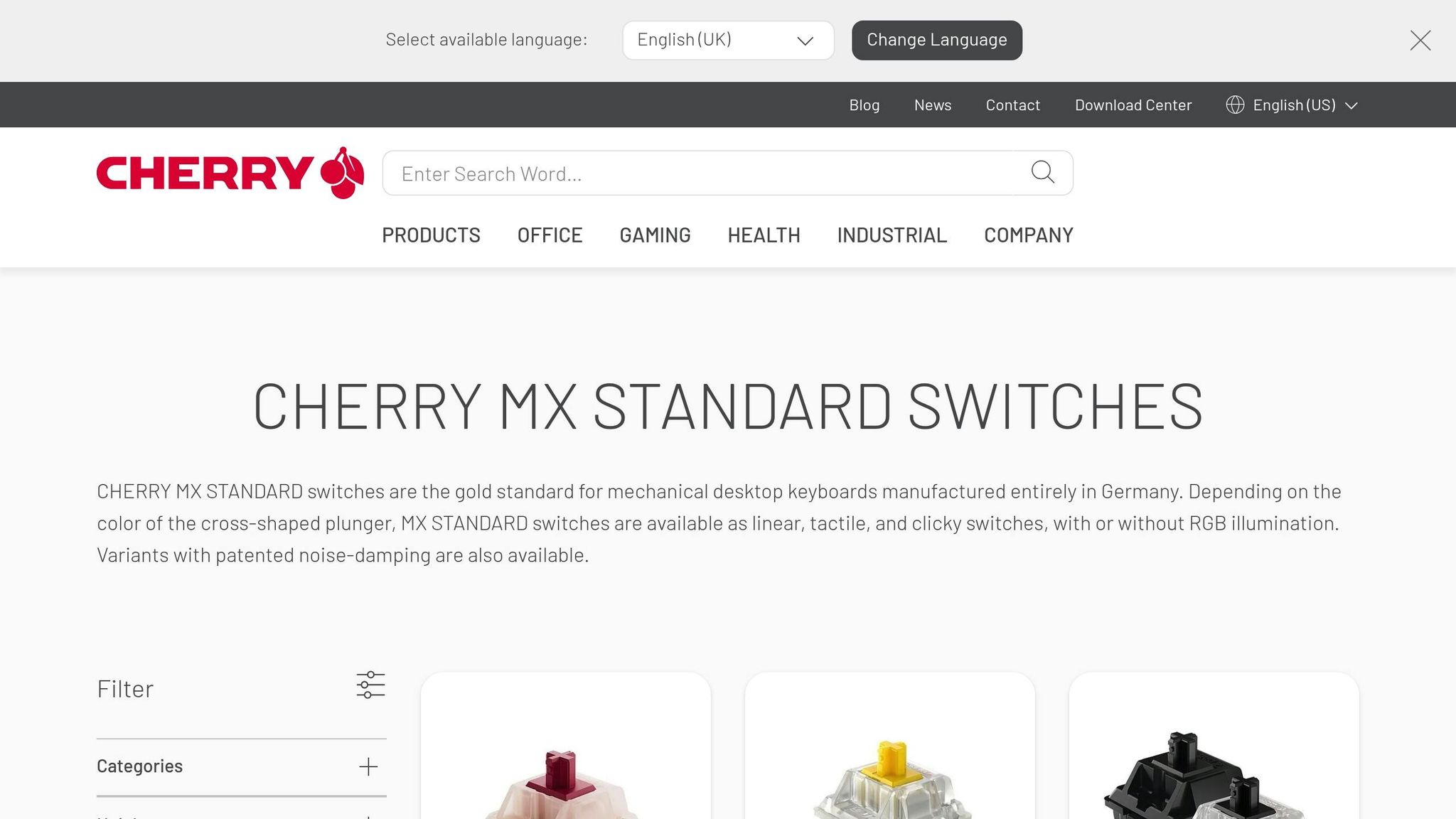
The most common stem design is the cross-shaped (+) stem, which has become the industry standard. This design is used by popular manufacturers like Cherry, Gateron, and Kailh. Most aftermarket keycap sets are designed to fit this type, so your options are practically endless if your keyboard uses these switches.
To check, grab a keycap and switch puller and remove a keycap - start with something simple, like the Escape key. Look at the top of the switch. If you see a cross shape, good news: your keyboard is compatible with a wide range of custom keycaps. When shopping, look for terms like "MX-compatible" to confirm compatibility.
Once you've confirmed the stem type, the next step is to evaluate your keyboard layout to ensure the keycap set will fit all your keys.
Non-Standard Switches
Not all keyboards stick to the Cherry MX standard. Some have non-standard stems that require specialized keycaps. For instance, keyboards with Topre switches, like those in the HHKB Professional series, use a circular housing instead of a cross-shaped stem. These require Topre-specific keycaps, which are less common.
Another variation is low-profile switches. Even though some of these have cross-shaped stems, their shorter height means standard keycaps won’t fit. You’ll need keycaps specifically designed for low-profile switches. If you’re unsure and can’t remove a keycap, look up your keyboard’s model number online to verify the switch type. Some brands, like Razer, use proprietary designs, so double-check before making a purchase.
| Stem Type | Visual Identifier | Keycap Compatibility |
|---|---|---|
| Cherry MX-Style | Cross-shaped (+) | High (fits most aftermarket sets) |
| Topre | Circular housing | Low (requires Topre-specific sets) |
| Low-Profile | Short cross or proprietary | Low (requires low-profile sets) |
Step 2: Know Your Keyboard Layout
Once you've nailed down your switch type, the next step is understanding your keyboard layout. This is crucial because your layout determines the sizes of the keycaps you'll need.
"Keycap widths are measured in units (u). Compatibility depends on layout standards (ANSI, ISO), form factor (60%, 75%, TKL, full-size), and bottom-row size." – Aksara, Mechanical Keyboard Expert
One of the first things to check is whether your keyboard uses an ANSI or ISO layout. ANSI, which is the standard in the United States, features a wide, rectangular Enter key and a 2.25u left Shift. ISO, more common in Europe, has a tall "upside-down L" Enter key and a shorter 1.25u left Shift. Most keycap base kits are designed for ANSI layouts, so if you have an ISO keyboard, you might need to buy an additional ISO kit to ensure compatibility.
Standard Layouts
Keyboards come in a variety of standard layouts, and each has specific keycap size requirements:
- Full-size keyboards (around 104 keys): These include a number pad, function row, and navigation cluster. If you're using a full-size board, double-check that your keycap set includes the number pad, as some budget sets sell it separately.
- TKL (Tenkeyless) keyboards: These omit the number pad but keep the function row and navigation keys.
- Compact layouts (75% and 65%): These reduce key spacing and may require non-standard sizes like a 1.75u right Shift or 1u bottom-row modifiers (e.g., Ctrl and Alt).
- 60% keyboards: With about 61 keys, these drop the function row, navigation cluster, and arrow keys but often still use standard key sizes in most base kits.
Non-Standard and Custom Layouts
If you're working with a custom or non-standard layout, things get a bit trickier.
Ortholinear keyboards, for instance, arrange keys in a straight grid rather than staggered rows. These work well with uniform keycap profiles like DSA or XDA, where every key has the same shape and height. Sculpted profiles (like Cherry, SA, or MT3), which vary by row, can be more challenging to use with these layouts because key positions are shifted.
Split keyboards and ergonomic designs often require specialized keycaps. These might include multiple smaller spacebars or unique thumb cluster keys. In such cases, a spacebar kit with different sizes - such as 2.25u and 2.75u - may be necessary. Some niche layouts, like the Happy Hacking Keyboard (HHKB), have even more specific needs. As WIRED contributor Henri Robbins explains:
"The HHKB Studio... has unique G, H, and B keys, plus a shorter-than-average spacebar, none of which are included in the 'standard' keycap set".
If you're unsure about your layout's measurements, a caliper can be a handy tool to measure your bottom-row keys and ensure a proper fit.
Step 3: Select Keycap Profiles and Materials
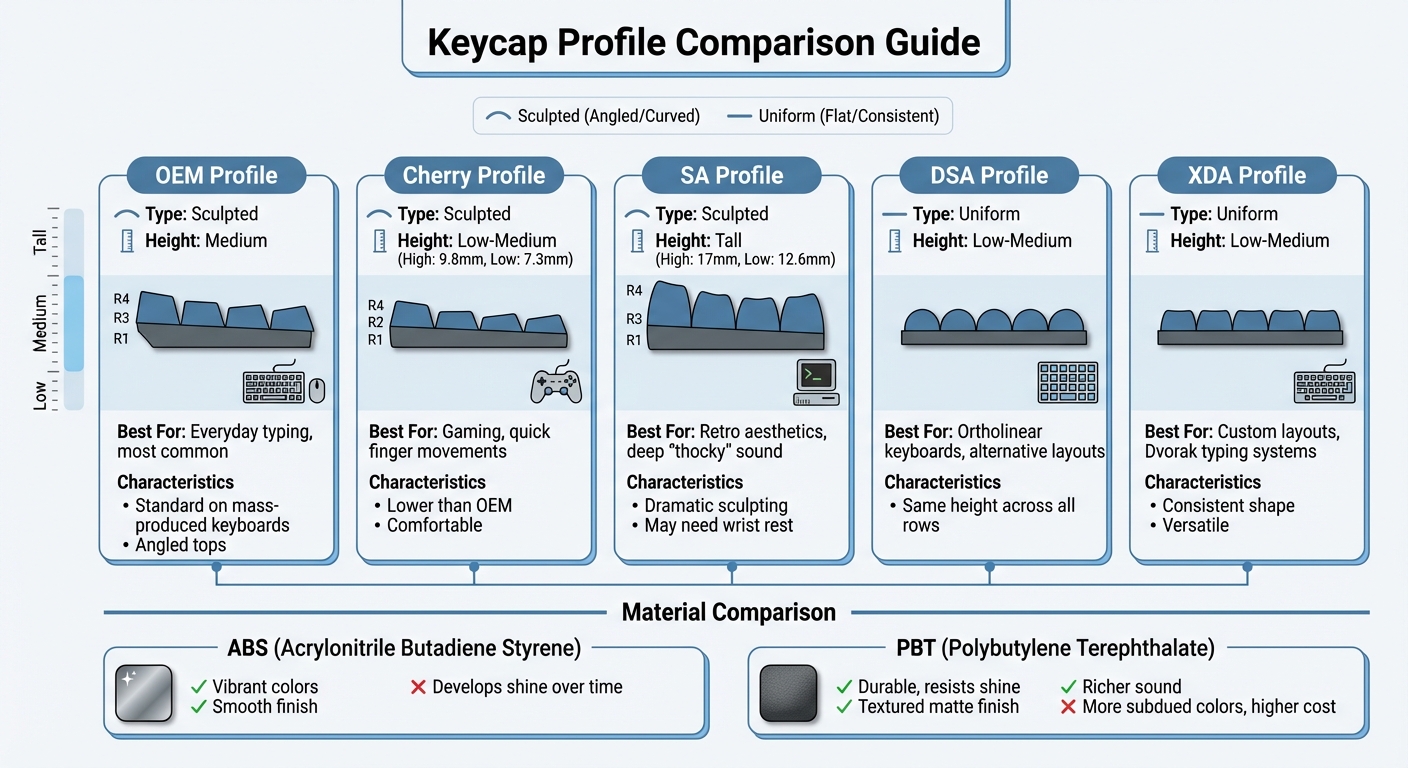
Keycap Profile Comparison Chart: Heights, Shapes, and Best Uses
Once you've nailed down your layout and compatibility by understanding mechanical keyboard basics, it's time to focus on the finishing touches: keycap profiles and materials. These choices can shape your typing comfort, speed, and even the sound of your keystrokes.
Keycap Profiles
Keycap profiles generally fall into two types: sculpted and uniform. Sculpted profiles, like Cherry, OEM, and SA, are designed with varying heights and angles across rows to fit the natural arc of your fingers. On the other hand, uniform profiles, such as DSA and XDA, maintain consistent height and shape across all rows, making them a good fit for custom layouts or alternative typing systems like Dvorak.
OEM is the standard profile found on most mass-produced keyboards. It offers medium height and angled tops, providing a familiar and comfortable experience for everyday use. Cherry, slightly lower than OEM, has a high point of 9.8 mm and a low point of 7.3 mm. This lower height makes it a favorite for gaming, as it allows for quicker finger movements with less effort. Profiles can have a surprising impact on how typing feels.
SA keycaps are tall, ranging from 17 mm at their highest point to 12.6 mm at their lowest. They feature spherical tops and dramatic sculpting, which gives them a retro look and a deep, "thocky" sound. However, their height might require a wrist rest for comfort. For those who prefer uniform profiles, DSA and XDA are great choices. These low-to-medium height keycaps with spherical tops are ideal for ortholinear or split keyboards, where row-specific sculpting isn’t necessary.
Once you’ve decided on a profile that suits your typing habits, it’s time to pair it with a material that complements your durability and style preferences.
ABS vs. PBT Materials
When it comes to keycap materials, the two most common options are ABS (Acrylonitrile Butadiene Styrene) and PBT (Polybutylene Terephthalate). Each brings its own set of advantages and trade-offs.
ABS keycaps are known for their vibrant colors and smooth finish. However, they tend to develop a shiny surface over time with heavy use.
"ABS plastic will almost inevitably shine over time the more you type on it - some people avoid it for this, while others see having 'shined' keycaps as a badge of honor".
PBT, on the other hand, is more durable and has a textured, matte finish that resists shine. It also produces a richer sound when typing. The downside? PBT keycaps often come in more subdued colors, and high-quality sets can be expensive. If you’re after long-lasting texture and durability, PBT is the way to go. But if you’re drawn to bright, eye-catching designs - especially from premium brands like GMK, where sets can exceed $100 - ABS might be your top choice.
sbb-itb-3cb9615
Step 4: Confirm Compatibility Before Buying
Before you hit "buy", double-check the compatibility of your keycaps. Even if you've nailed down your switch type and keyboard layout, product listings often include crucial details that could make or break your purchase. This step builds on your earlier research and ensures your new keycaps will fit perfectly.
Review Product Listings
Product descriptions are your go-to resource when shopping for keycaps. Most listings clearly state whether a set is compatible with "MX-style" switches or other types like Alps or Topre. But don’t stop there - dig deeper into the details.
"I have seen an influx of keycap sets that sell the number pad separately in exchange for a lower base price, and the same has even been the case for arrows and function row keys." - Henri Robbins
Many manufacturers now offer modular kits to keep costs down. For example, a "Base Kit" might cover the main typing area but leave out the number pad, arrow keys, or function row. These modular kits often start at around $17.00, while full sets can cost up to $70. If you’re using a 65% or 75% keyboard with non-standard key sizes, you might need to grab additional "Extension" or "Child" kits, which typically range from $17.00 to $28.00. These kits are designed to include keys for unique layouts, like non-standard shift keys or bottom rows.
To avoid surprises, carefully review the layout diagram in the product listing and count your keys. This simple step ensures you won’t end up missing essential keys for your specific setup.
North-Facing vs. South-Facing Switches
Here’s a lesser-known issue that can trip up buyers: the direction your switches face can impact how certain keycap profiles fit. North-facing switches have their LED slots pointing toward the top of the keyboard, while south-facing switches point toward you. This difference matters because some sculpted profiles - like Cherry profile, which has a medium-low height of 9.4mm - can interfere with north-facing switches, especially in certain rows.
If you’re buying Cherry profile keycaps, check the product listing for notes on compatibility with north- or south-facing switches. Some keycap sets are optimized to avoid interference, but if the listing doesn’t specify, consider reaching out to the seller or checking online forums for advice from the community. A little extra research here can save you from frustrating fit issues later.
Step 5: Match Appearance with Function
Keycaps are the most visible part of your keyboard, so their look plays a big role in your setup. Now that you've nailed down the switch type, layout, and material, it's time to focus on aesthetics. But this isn't just about picking colors that catch your eye - it's about blending style with practical features like readable legends and lighting compatibility.
Colors and Legends
Keycaps are what give your keyboard its personality. The color scheme you choose can set the tone for your entire desk setup: beige and gray tones bring a retro vibe, matte monochrome offers a sleek, minimalist feel, and bold multi-colored sets add a splash of energy to your workspace.
Keep in mind that the material finish can slightly alter how colors appear. If you're aiming for a cohesive look, consider matching your keycap colors with other desk accessories, like colorful deskmats, for a unified theme.
Legends, or the text on each key, add another layer of customization. Centered legends offer a classic style, side-printed text leans modern, and blank keycaps give an ultra-clean, minimalist aesthetic. For durability, double-shot legends are a great choice - they’re molded directly into the keycap, so they won’t fade or wear off over time. By aligning your keycap visuals with your overall desk theme, you can achieve a polished look without sacrificing usability.
Backlighting and Transparency
If your keyboard features RGB lighting, the type of keycaps you choose will influence how the lighting shines through. Pudding keycaps, with translucent sides and opaque tops, allow more light to spill out, creating a bright and lively display. On the other hand, double-shot shine-through keycaps focus the lighting on the legends, offering a cleaner, more professional appearance while keeping the text legible in the dark.
"Using Double-Shot or Pudding Keycaps actually brings our RGB Mechanical Keyboards a new life with an exciting new look." - Mech Keys
Opaque keycaps, often found in premium enthusiast sets, block most of the light, creating a subtle halo effect around each key. These are perfect if you prioritize color richness and texture over RGB integration. However, if you frequently type in dim lighting, translucent keycaps are the way to go - opaque legends can be tough to read without sufficient ambient light.
Step 6: Shop at KeebsForAll
Once you've confirmed compatibility, KeebsForAll makes the upgrade process seamless by keeping keycap sets in stock and ready to ship within 24 to 72 business hours. This quick turnaround means you won’t have to wait long to enhance your keyboard setup.
Keycap Selection at KeebsForAll
KeebsForAll caters to a variety of budgets and preferences. For those seeking affordability, blank PBT sets start at just $36.00. If you're looking for something more stylish, the kfaPBT line features themed designs like "Cardinal", "Pink Robin", and "Steamboat Throwback", priced between $68.00 and $88.00. These keycaps are built for durability with a 1.5mm thickness and dye-sublimated legends that resist fading over time. For enthusiasts craving a unique typing experience, premium Cerakey Ceramic keycaps are available starting at $130.00.
Keycap profiles include popular options like Cherry, SA, OEM, and DSA. KeebsForAll also offers extension kits for non-standard layouts, making it easier to customize your setup. You'll find well-known brands such as KBDFans, Keykobo, PBTFans, and AlohaKB, alongside KeebsForAll's exclusive designs.
Affordable and Convenient Shopping
KeebsForAll doesn’t just offer variety - it also simplifies the buying process. Orders over $50.00 (excluding keyboards and deskmats) ship free within the USA. First-time shoppers can sign up for the newsletter to snag 10% off their initial purchase.
If your cart includes both in-stock and pre-order items, it's best to place them as separate orders. This ensures your in-stock items ship immediately without waiting for pre-order fulfillment. Domestic orders typically arrive within 5 to 7 business days, while international deliveries via DHL take 7 to 16 days. Plus, in-stock items can be returned within 14 days of receipt, offering peace of mind for your purchase.
Conclusion
Upgrading your keyboard with new keycaps can be both practical and personal. To make the right choice, focus on five key factors: confirm your switch stem type, check your keyboard layout (including ANSI vs. ISO and bottom-row configurations), pick a keycap profile that matches your typing habits, opt for durable materials like PBT, and ensure the legends and backlighting options align with your preferences.
Experts agree that keycaps play a major role in defining your keyboard's overall feel and appearance. The material you choose affects not only durability but also the typing sound. For example, PBT keycaps resist the shiny, oily look that ABS keycaps can develop over time and produce a deeper, more satisfying "thock" sound. When it comes to legends, double-shot and dye-sublimated options tend to last longer than laser-etched ones.
Keycap prices vary widely, starting at around $36.00 for blank PBT sets and going up to over $130.00 for premium ceramic options. Most mid-range sets fall between $60.00 and $120.00.
Keep in mind that switching to a new keycap profile may take some adjustment, as changes in sculpting can impact your typing muscle memory. When removing old keycaps, always use a wire-style keycap puller to avoid accidental damage.
KeebsForAll offers a wide selection of Cherry, SA, OEM, and DSA keycaps in stock, so you can experiment and find the perfect set without waiting. With the right keycaps, your keyboard can become a true reflection of your style and needs.
FAQs
How can I tell if my keyboard layout is ANSI or ISO?
To figure out whether your keyboard layout is ANSI or ISO, start by examining the Enter key and the left Shift key. An ANSI layout typically has a wide, rectangular Enter key and a larger left Shift key, with the backslash key positioned above the Enter key. In contrast, an ISO layout comes with a tall, vertical Enter key, a smaller left Shift key, and the backslash key located next to the left Shift.
Another way to identify your layout is by checking the keyboard's model or the manufacturer's specifications, which usually specify the layout type. If you're still uncertain, comparing your keyboard to images of ANSI and ISO layouts can be a quick way to confirm. Knowing your layout is crucial when selecting keycaps to ensure they fit and function correctly.
What’s the difference between ABS and PBT keycaps?
The main difference between ABS and PBT keycaps comes down to how they hold up over time, their texture, and their overall look. PBT keycaps are tougher, resist the shiny wear that comes with heavy use, and have a textured, matte finish. On the other hand, ABS keycaps are smoother, softer, and tend to develop a glossy surface after extended use.
ABS keycaps are generally more budget-friendly, but PBT keycaps are often favored for their durability and higher-quality feel. Deciding between the two depends on whether you value longevity or affordability more.
Why is the switch type important when picking keycaps?
When choosing keycaps, the switch type is a key factor because it directly affects compatibility. Switches like Cherry MX or similar designs come with specific stem shapes, and the keycaps need matching mounts to fit snugly.
Switch type also impacts how typing feels. Certain switches pair better with specific keycap profiles, offering improved stability or responsiveness, which can make typing more comfortable and efficient. Before buying keycaps, always confirm your keyboard's switch type to ensure they fit correctly and deliver the best typing experience.