
How Frame Material Affects Typing Sound and Feel
[ Back to Mechanical Keyboards 101 ]Your keyboard case changes more than looks. In most builds, polycarbonate sounds deeper and feels softer, aluminum sounds sharper and feels firmer, and brass or stainless steel add more weight, stiffness, and stronger sound color.
If I had to sum it up in one line, it would be this: switches start the sound, but the frame shapes the final result. The case affects pitch, echo, flex, bottom-out feel, desk weight, and comfort over long sessions. Even a 200–400 g brass weight can change how planted a board feels.
Here’s the simple breakdown:
- Polycarbonate: lower pitch, less ping, more flex, lighter to carry
- Aluminum: sharper sound, firmer feel, more case noise, easy to tune with foam and force-break
- Brass: heavier, deeper tone, very firm feel
- Stainless steel: brightest and stiffest, often used in niche builds
- Mount style and foam still matter a lot: tray mount lets more case vibration through, while gasket mount softens it
If you want the short answer:
- Pick aluminum for a crisp, firm board
- Pick polycarbonate for a softer, quieter, more forgiving board
- Pick brass-heavy builds for extra weight and a lower, fuller sound
- Pick stainless steel only if you want a very stiff, bright setup
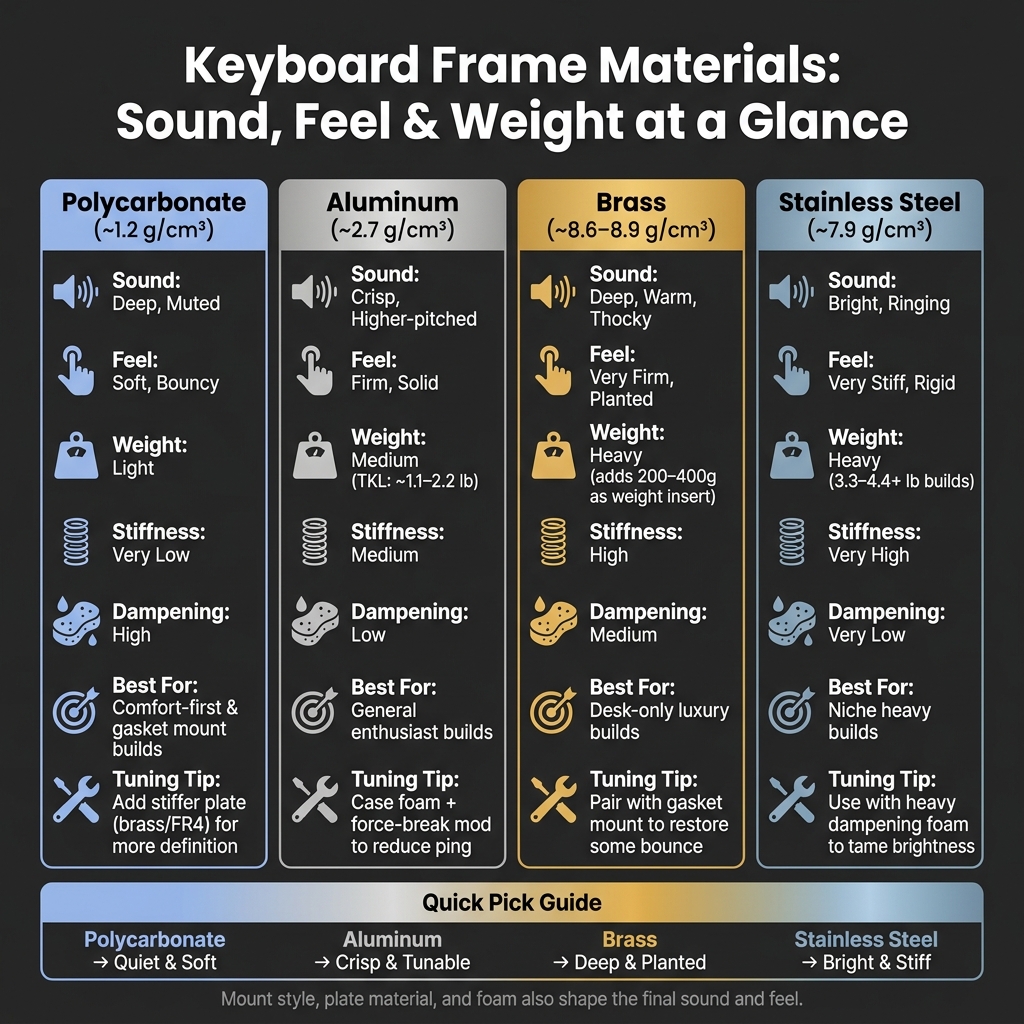
Keyboard Frame Materials Compared: Sound, Feel & Weight
Keyboard Cases Sound Comparison: Acrylic, Wooden, or Aluminum?
sbb-itb-3cb9615
Quick Comparison
| Material | Sound | Feel | Weight | Common Fit |
|---|---|---|---|---|
| Polycarbonate | Deep, muted | Soft, bouncy | Light | Comfort-first builds |
| Aluminum | Crisp, higher-pitched | Firm, solid | Medium | General custom builds |
| Brass | Deep, warm | Very firm, planted | Heavy | Desk-only, weight-first builds |
| Stainless Steel | Bright, ringing | Very stiff | Heavy | Niche heavy builds |
I’d treat frame material as the build’s baseline: it won’t decide everything, but it sets the sound and feel you tune around.
How the Frame Affects Acoustics and Typing Feel
Resonance, Dampening, and Internal Cavity
When you press a key, that vibration doesn't just stop at the switch. It moves through the plate, PCB, mounting hardware, and into the case. The frame then helps shape the sound you end up hearing.
In practice, aluminum and brass reflect more sound, which gives them a brighter edge. Polycarbonate absorbs more energy, so it tends to sound deeper. The space inside the case matters too. Thin-walled plastic cases can act a bit like a drum skin, boosting high-frequency pings.
Stiffness, Flex, and Bottom-Out Feedback
Sound and feel are tied together, but they aren't the same thing. Frame stiffness changes typing feel just as much as it changes sound.
Aluminum and steel usually give you a firmer bottom-out. Polycarbonate adds a little bounce and softness instead. It also absorbs some of that bottom-out energy, which makes the typing feel softer and a bit more elastic. Pair that with a gasket mount, and polycarbonate can feel even gentler over long sessions, which may help cut down on fatigue.
How Other Parts Work With the Frame
The frame never works alone. Plate material, mount style, and foam all affect the final result.
Mount style is one of the biggest factors. A tray mount connects the PCB straight to the bottom of the case, so vibration travels into the frame with almost no buffer. That tends to make the case material's natural resonance stand out more. A gasket mount suspends the plate and PCB with flexible silicone or rubber, which absorbs some vibration before it reaches the frame walls. That's why the same aluminum case can sound noticeably different in a tray or top mount compared with a gasket mount.
Foam matters too. Poron or EVA can cut cavity echo, while butyl rubber helps reduce structural vibration closer to the source. That's also why two cases made from the same material can still sound and feel different in use.
Here's a side-by-side look at the main frame materials:
| Material | Stiffness | Density (g/cm³) | Dampening | Typical Sound | Typical Feel | Best Use Case |
|---|---|---|---|---|---|---|
| Polycarbonate | Very Low | ~1.2 | High | Muted, deep | Bouncy, soft | Gasket mounts, RGB builds |
| Aluminum | Medium | ~2.7 | Low | Crisp, clacky | Rigid, solid | Enthusiast standard |
| Brass | High | ~8.6–8.9 | Medium | Deep, thocky, bassy | Very firm, stable | Luxury builds, maximum thock |
| Stainless Steel | Very High | ~7.9 | Very Low | Bright, ringing | Indestructible, stiff | Niche heavy builds |
Next, compare how aluminum and polycarbonate differ in real builds.
Aluminum vs. Polycarbonate Frames
Aluminum and polycarbonate are two of the most common case materials in custom keyboard builds. And they sit at opposite ends of the spectrum for the things people care about most: sound, feel, weight, and how much tuning a board needs.
Aluminum: Bright, Solid, and Tunable
Aluminum gives you a firm, planted typing feel. Bottom-out feels hard, and the sound is sharper and higher-pitched. Because aluminum reflects sound instead of soaking it up, it tends to make everything more obvious. The good and the bad both come through.
That means stabilizer rattle, switch scratch, and cavity echo are easier to hear in an aluminum case than in polycarbonate. If a build has flaws, aluminum usually doesn’t hide them. That’s part of why it works well as a baseline when you want to compare it with softer, more damped cases.
Polycarbonate: Deeper, Softer, and More Forgiving
Polycarbonate pulls down high frequencies and gives the board a deeper, more muted sound. It also has natural flex, so the typing feel is softer and a little bouncier than aluminum’s hard bottom-out.
That mix of dampening and flex can make long typing sessions easier on your hands. The trade-off is simple: polycarbonate scratches more easily.
Here’s the side-by-side view:
| Feature | Aluminum | Polycarbonate |
|---|---|---|
| Pitch | Higher, sharper, metallic | Lower, deeper, muted |
| Reverb | High; prone to ping | Low; vibrations are absorbed |
| Flex | Very rigid; virtually no flex | Flexible; springy and bouncy |
| Comfort | Can feel fatiguing over long sessions | Comfortable for extended typing |
| Ideal Use | Enthusiast builds, acoustic clarity | Comfort-focused builds, portability |
These differences stand out even more once you get into heavier metals.
How to Tune Each Material Without Swapping the Case
Neither material is stuck with just one sound. You can tune both, but the approach changes depending on the case.
For aluminum, the best moves are pretty straightforward:
- Add case foam to cut cavity echo
- Use the force-break mod to reduce metallic ping at contact points
- Swap to a softer plate material like FR4 or polycarbonate to add some flex
A gasket mount helps a lot here too. It separates the plate assembly from the case walls, which helps take the edge off aluminum’s natural brightness.
For polycarbonate, the logic flips. A stiffer plate like brass or stainless steel adds rigidity and shifts the sound toward a more defined, higher-frequency response. Using less internal foam lets more of the case’s natural resonance come through.
Case material sets the baseline. The trick is to tune around it, not try to wipe it out. That baseline gets even clearer when you move into brass, copper, and stainless steel.
Exotic Metal Frames and Heavy Structural Materials
Brass, copper, and stainless steel can push a keyboard’s sound and feel much farther than aluminum or polycarbonate. Put simply, these materials shift the baseline more.
Brass, Copper, and Stainless Steel Sound Profiles
Most of the sound change comes from density and stiffness. More mass tends to lower resonance and cut echo, which gives the board a deeper sound.
Brass produces a deep, warm tone. Copper damps the most and gives you the softest, deepest tone of the three. Stainless steel is the stiffest and brightest option here, so it often sounds sharper and louder.
You won’t see these metals used for full cases very often. Cost and machining make that a tough sell. Instead, brass and copper usually show up as internal weights or bottom plates, while stainless steel appears more often in niche builds, plates, or weights.
| Material | Density | Sound Profile | Typing Feel | Common Role |
|---|---|---|---|---|
| Stainless Steel | 7.9 g/cm³ | Bright, sharp, loud | Very stiff and rigid | Plates, niche cases |
| Brass | 8.6 g/cm³ | Deep, warm | Heavy, solid, planted | Internal weights, bottom plates |
| Copper | 8.9 g/cm³ | Deep, most dampening | Heavy, slightly softer than steel | Bottom cases, weights |
How Extra Mass Changes Typing Feedback
Sound is only part of the story. Extra mass also changes how the board feels under your hands. Brass or copper weight inserts usually add 200–400g to a build. That extra heft helps keep the keyboard planted on the desk and cuts down on unwanted movement during heavy typing or gaming sessions.
There’s a downside, though. Full brass or stainless steel cases aren’t great for travel, and a heavy tray-mounted metal build with no flex can wear on your hands during long sessions. Pairing a heavy, rigid frame with a gasket mount can bring back some bounce in the typing feel. Heavy metal frames can also feel cold in cool rooms.
If you like the idea of a deeper sound but don’t want to swap the whole case, a brass weight can soften sharp highs on its own.
That leaves you balancing two things: weight and comfort when choosing custom mechanical keyboards.
Choosing the Right Frame Material for Your Build
Match the Material to the Sound You Want
Use the tradeoffs above to pick the frame that lines up with the sound and typing feel you're after.
| Goal | Frame Material | Plate Pairing |
|---|---|---|
| Bright clack | Aluminum | Aluminum plate |
| Deep thock | Polycarbonate | Brass or FR4 plate |
| Soft flex | Polycarbonate (gasket-mount) | PC or FR4 plate |
| Heavy, planted | Aluminum with brass weight inserts | Brass plate |
That said, sound is only part of the call. Weight, portability, and how much noise hits your desk matter too.
Factor in Comfort, Weight, and Noise
Polycarbonate is lighter and easier to carry, so it makes sense if your keyboard moves between home, the office, or a bag. Aluminum sits in the middle and works well for day-to-day desk use. A typical aluminum TKL weighs about 1.1 to 2.2 lb, while brass-heavy builds can climb past 3.3 to 4.4 lb or more.
If you share a home office or work in a quiet room, a polycarbonate or dampened aluminum build will be less disruptive than an unmodded metal frame. Heavy metal builds fit stationary desk setups better, and aluminum can feel cold in cool rooms.
Key Takeaways
Frame material has a direct effect on pitch, resonance, stiffness, and how bottom-out feels under your fingers. Aluminum gives you a rigid, durable starting point that's easy to tune. Polycarbonate feels softer and deeper, with a natural bounce. Brass is the heaviest option, with the deepest sound, and it fits best in stationary setups. Mount style, plate material, foam, and switches all shape the end result too - the case sets the baseline, but it doesn't decide everything on its own.
FAQs
Does frame material matter more than switches?
It depends, but a lot of keyboard fans treat the case as the base of a board’s sound and feel. Switches matter too. But the frame material, plate, and internal damping do a lot to shape the end result.
Even a great switch can sound worse or feel off in a poorly tuned or overly rigid case. The best typing experience usually comes from how the frame, switches, plate, and mods all work together.
Can I make an aluminum case sound deeper?
Yes. You can make an aluminum case sound deeper by adding mass and damping. That helps cut resonance and the hollow echo aluminum cases sometimes have.
A few common fixes:
- Brass or steel weights to add mass
- Foam or silicone damping to soften resonance
- The tape mod on the underside of the PCB
- A softer plate material like POM or FR4 to reduce metallic ping and bring out lower frequencies
The main idea is simple: less case resonance, less sharp ping, and a more low-pitched sound profile.
Which frame material is best for long typing sessions?
For long typing sessions, softer materials like polycarbonate or POM are often the better pick. They have a bit more flex, which gives each keystroke a more cushioned feel and can help cut down on finger fatigue.
By contrast, stiffer materials like aluminum tend to feel stable and responsive. That said, some people find them harsher during extended use. Polycarbonate also helps absorb vibration, which can make typing feel smoother and easier on your hands.