
Keycap Profiles Explained: Cherry, SA, OEM, DSA
[ Back to Mechanical Keyboards 101 ]Keycap profiles influence how your keyboard feels, sounds, and performs. Here's a quick breakdown of the four most popular profiles:
- Cherry: Medium-low height (9.4mm), sculpted, ergonomic, and quiet. Great for typing and gaming.
- SA: Tallest profile (16.5mm) with a vintage look, deep "thock" sound, and deliberate typing feel.
- OEM: Medium height (11.9mm), familiar sculpted design, commonly found on stock keyboards.
- DSA: Uniform, flat, low profile (7.6mm), ideal for custom layouts and minimalist setups.
Choosing the right profile depends on your typing habits, gaming style, and aesthetic preferences. Cherry and OEM are ergonomic and versatile, while SA offers retro vibes, and DSA is perfect for layout flexibility.
Quick Comparison
| Profile | Height | Sculpting | Top Shape | Sound | Best Use |
|---|---|---|---|---|---|
| Cherry | Medium-Low | Sculpted | Cylindrical | Quiet, bassy | Typing & Gaming |
| SA | Tall | Sculpted | Spherical | Deep "thock" | Retro Aesthetics |
| OEM | Medium | Sculpted | Cylindrical | Higher-pitched | General Use |
| DSA | Low | Uniform | Spherical | Quiet | Custom Layouts |
The right keycap profile can transform your typing experience. Let’s explore each in detail as part of our Mechanical Keyboards 101 series.
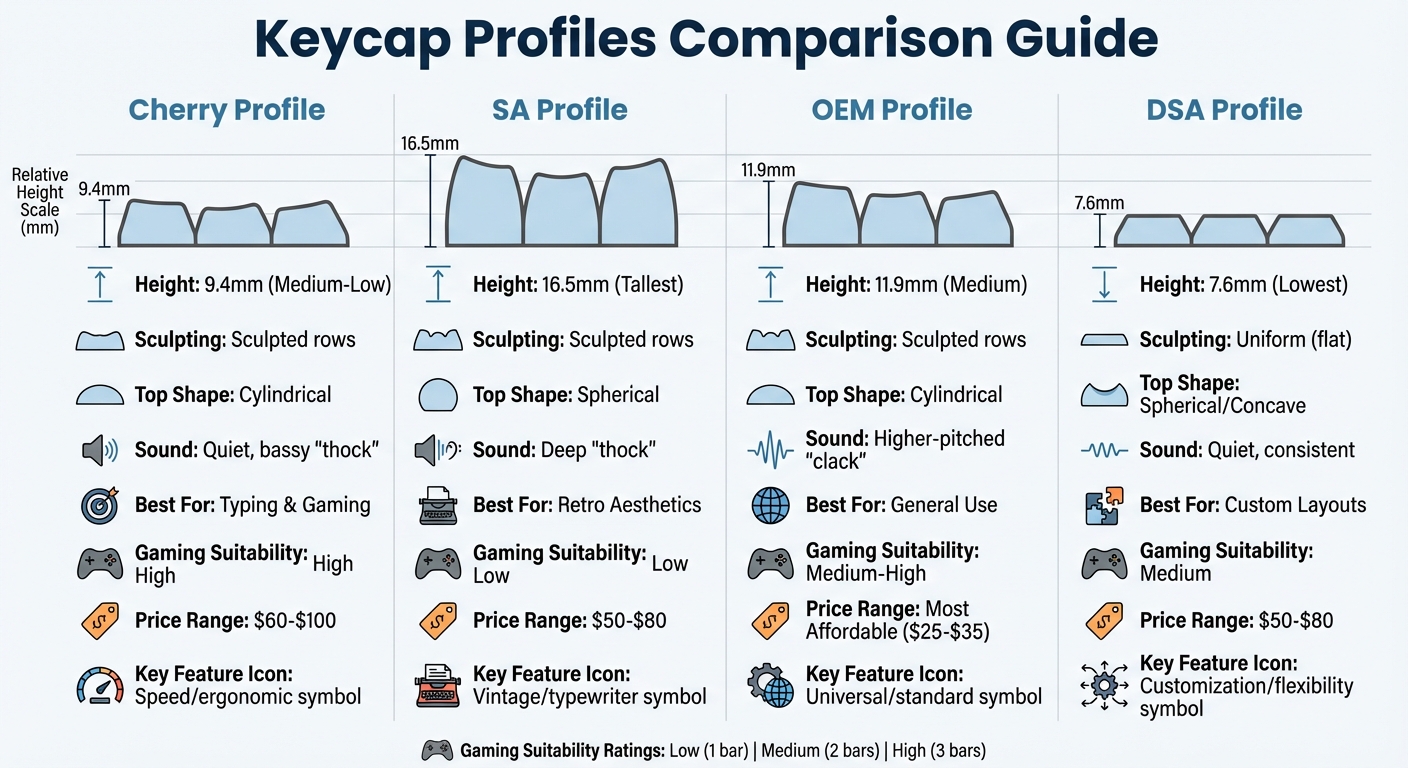
Keycap Profile Comparison Chart: Cherry vs SA vs OEM vs DSA
Cherry Profile
Physical Features of Cherry Profile
Cherry profile keycaps measure around 9.4mm in height, making them shorter than the OEM profile, which stands at approximately 11.9mm. This medium-low height is a defining trait of the Cherry profile.
The sculpted design features varying row heights and angles. Row 1 is the shortest, while Row 4 is the tallest and angled backward, creating a cascading effect that naturally aligns with finger movement. This thoughtful design contributes to a more intuitive typing experience.
The keycaps themselves have cylindrical, slightly curved tops, providing a gentle tactile guide for your fingertips. This curvature helps your fingers find their "home" position with ease. Originally developed in the 1980s by Cherry Corp, this profile has gained a reputation for balancing aesthetics and functionality.
However, Cherry keycaps can sometimes encounter interference on keyboards with north-facing LEDs. In such cases, the keycap may come into contact with the switch housing, which could slightly alter the typing sound.
These design elements not only shape the Cherry profile's appearance but also play a crucial role in its performance.
Typing Experience with Cherry Profile
The physical characteristics of the Cherry profile directly impact its typing performance. With a height that is about 1mm shorter than OEM, Cherry keycaps reduce the distance your fingers need to travel between keys. This shorter travel distance allows for quicker actuation, making it a favorite for those who type at high speeds.
The sculpted rows are designed to keep your hands in a more natural position, reducing strain on your wrists and fingers during long typing sessions. This ergonomic layout also guides your fingers to the correct keys, improving accuracy and minimizing typing errors.
In terms of sound, Cherry profile keycaps are known for their deeper, bassier "thock" when keys bottom out. The reduced internal air space within these shorter keycaps creates a muted, resonant tone that many enthusiasts find pleasing. This quieter sound profile is also ideal for shared work environments where loud typing might be distracting.
Cherry Profile: Pros and Cons
Here’s a breakdown of the main advantages and drawbacks of the Cherry profile:
| Advantages | Disadvantages |
|---|---|
| Ergonomic Design: Helps reduce wrist and finger fatigue during extended typing. | Interference: May occasionally clash with north-facing LEDs on certain keyboards. |
| Faster Typing: Shorter height allows for quicker movement and response times. | Cost: Typically priced higher than OEM sets, ranging from $60 to $100. |
| Stylish Look: Offers a sleek and professional aesthetic. | Limited Budget Options: Fewer affordable choices compared to OEM profiles. |
| Quieter Sound: Produces a deep, pleasing acoustic profile. | Low Profile Feel: May not appeal to users who prefer taller, chunkier keycaps. |
Most Cherry profile keycap sets are made from PBT plastic, which is highly durable and resistant to the shine that can develop from finger oils. This makes them a long-lasting option compared to standard ABS plastic.
sbb-itb-3cb9615
SA Profile
Physical Features of SA Profile
SA (Spherical All) keycaps stand out as the tallest keycap profile, measuring about 16.5mm in height. To put that in perspective, they’re nearly twice the height of Cherry keycaps. This towering design, paired with their deep, concave tops, creates a vintage aesthetic reminiscent of high-end electric typewriters from the 1980s. The scooped design cradles your fingertips, offering a classic feel that appeals to enthusiasts.
The SA profile is heavily sculpted, with each row varying in height and angle. Row 4, the top row, is the tallest, while Row 1, at the bottom, is the shortest. This sculpted design not only adds to their visual appeal but also contributes to the resonant, hollow sound they produce when typing.
These physical characteristics set the stage for a typing experience that’s unlike any other.
Typing Experience with SA Profile
Thanks to their unique design, SA keycaps offer a typing experience that feels both tactile and immersive. The higher finger travel required by their tall profile delivers satisfying feedback and a distinct "thock" sound with every keystroke. However, this increased travel can take some getting used to. It may also slow down typing speed and cause discomfort during extended use. For gamers or those who rely on rapid typing, the height of SA keycaps might not be the best fit, and you might prefer a hybrid like KBDFans OSA Profile keycaps.
SA Profile: Pros and Cons
| Advantages | Disadvantages |
|---|---|
| Classic vintage look inspired by 1980s typewriters | May cause wrist fatigue during long typing sessions |
| Produces a deep, resonant "thock" sound | Slower typing due to increased finger travel |
| Deep concave tops provide comfortable finger placement | Requires an adjustment period |
| Offers satisfying tactile feedback | Generally more expensive, costing around $50–$80 per set |
OEM Profile
Physical Features of OEM Profile
The OEM profile strikes a balance between the extremes of Cherry and SA keycap profiles. It’s a common choice for stock mechanical keyboards from brands like Filco, Leopold, Ducky, and Corsair. Sitting in the medium-height range, OEM keycaps are typically 1–2mm taller than Cherry keycaps.
One of its standout features is the sculpted staircase design, which naturally guides your fingers and aligns well with their reach. The tops of these keycaps are cylindrical, curving in a north-south direction to comfortably cradle your fingertips. For example, Row 4 measures 10.5mm in height, while Row 2 comes in at 6.9mm.
Another unique aspect of OEM keycaps is their taller internal cavity. This design creates extra resonance space, resulting in a higher-pitched, "clacky" sound. In contrast, lower-profile keycaps tend to produce a deeper "thock" sound.
Typing Experience with OEM Profile
"OEM Profile is the Toyota Camry of keycap profiles. It's not going to turn heads... But you know what the Camry is also known for? Being reliable, comfortable, affordable, and doing its job extremely well." - Keysfusion
The OEM profile offers a typing experience that feels familiar and dependable. For many users, it’s the profile they first encountered on a mechanical keyboard, making it an easy choice with no adjustment period. The sculpted rows provide excellent tactile feedback, ensuring your fingers naturally find their way to the correct keys.
The sound and feel of typing on OEM keycaps depend heavily on the material used. PBT keycaps deliver a more resonant, textured sound and are incredibly durable, lasting 5–10+ years with minimal shine. On the other hand, ABS keycaps are smoother and quieter but tend to wear out within 6–12 months of heavy use.
These qualities make the OEM profile a reliable option for most users, though it has its own set of pros and cons.
OEM Profile: Pros and Cons
| Advantages | Disadvantages |
|---|---|
| Compatible with 99% of standard keyboards | Often dismissed as "generic" by enthusiasts |
| Budget-friendly, with sets starting at $25–$35 | Taller height can cause wrist fatigue for some users |
| Widely used, requiring no learning curve | Quality can vary significantly between manufacturers |
| Ergonomic sculpting helps differentiate rows | Higher-pitched "clacky" sound isn’t for everyone |
| Available in a vast range of colors and themes | Offers less finger support compared to SA profile keycaps |
DSA Profile
Physical Features of DSA Profile
DSA keycaps are known for their uniform design. Originally referred to as DIN Standard America, this profile maintains a consistent height of 7.6mm across all rows - each keycap is identical in size and shape. This results in a flat typing surface with a sleek, minimalist look that appeals to fans of modern design.
The tops of these keycaps feature a spherical, slightly concave shape. This design cradles your fingertips evenly from all directions, setting it apart from the cylindrical curvature found in profiles like Cherry or OEM. The compact design also minimizes the space for sound to resonate, creating a quieter, lower-pitched typing sound. This makes DSA keycaps a great choice for shared workspaces or environments where noise reduction is important.
Typing Experience with DSA Profile
The uniformity of DSA keycaps plays a big role in how they feel during use. Since all rows are the same height, the typing experience remains consistent across the keyboard. However, without the sculpted contours found in profiles like Cherry or OEM, you'll rely more on muscle memory to navigate the keys. This can take some getting used to, especially for touch typists accustomed to sculpted layouts.
The 7.6mm height reduces finger travel, allowing for quicker keystrokes and potentially less fatigue during extended sessions. That said, the lack of a sculpted shape means your hands won't naturally follow the ergonomic contours provided by other profiles, which some users might find less comfortable over time.
One standout feature of DSA keycaps is their layout flexibility. Because every keycap is identical, they can be rearranged easily for alternative layouts like Dvorak, Colemak, or ortholinear configurations. This makes them a favorite among enthusiasts who enjoy experimenting with custom setups. For those new to the hobby, our mechanical keyboard guide covers the basics of customization.
DSA Profile: Pros and Cons
| Advantages | Disadvantages |
|---|---|
| Perfect for custom and alternative keyboard layouts | Lack of sculpting offers less tactile guidance for finger placement |
| Modern, minimalist design with uniform aesthetics | May take time to adjust for users of sculpted profiles |
| Low-profile height reduces finger travel and fatigue | Less ergonomic for prolonged use due to flat layout |
| Quieter, low-pitched typing sound ideal for shared spaces | Harder to distinguish keys by feel during fast-paced typing or gaming |
| Spherical tops provide comfortable fingertip support | Uniform shape can affect typing accuracy initially |
| Typically priced between $50 and $80 for full sets | Limited availability due to smaller production runs |
Comparing Keycap Profiles
Profile Comparison Table
Here’s a quick breakdown of the keycap profiles and how they differ:
| Profile | Height | Sculpting | Top Shape | Sound | Best Use Case | Gaming Suitability | Typical Price Range |
|---|---|---|---|---|---|---|---|
| Cherry | Medium-Low (~9.4mm) | Sculpted | Cylindrical | Balanced/Quiet | Professional Typing & Gaming | High | $60–$100 |
| SA | Tall (~16.5mm) | Sculpted | Spherical | Deep "Thock" | Retro Aesthetics & Deliberate Typing | Low | $50–$80 |
| OEM | Medium (~11.9mm) | Sculpted | Cylindrical | Standard | General Office & Beginners | Medium-High | Most Affordable |
| DSA | Low (~7.6mm) | Uniform | Spherical/Concave | Consistent | Custom Layouts & Minimalist Setups | Medium | $50–$80 |
This table highlights the key differences to help you zero in on the profile that fits your needs best.
How to Choose the Right Profile
Choosing the right keycap profile depends on your typing habits, gaming needs, and aesthetic preferences. If you're into competitive gaming, Cherry and DSA profiles are excellent due to their lower height, which helps with faster key actuation. On the other hand, if you're a programmer or spend long hours typing, sculpted profiles like Cherry or OEM offer better ergonomics by matching the natural curve of your hands.
"Cherry is the most ergonomic for most users, thanks to its low height and sculpted shape." - Keycapmart
For those who love a retro vibe and the satisfying "thock" sound, SA profiles are a solid choice, though they require a more deliberate typing style. Meanwhile, DSA profiles are a favorite for custom layouts, as their uniform height ensures easy key rearrangement without mismatched profiles.
If you’re ready to dive into the world of keycaps, KeebsForAll is a great place to start. Their Freebird series keyboards (available in 60%, 75%, and TKL layouts) are universally compatible with all four profiles, thanks to their hot-swap PCB design. They also offer exclusive kfaPBT keycap sets, which often come in the Cherry profile for better ergonomics. When shopping, make sure the keycap set includes all the keys needed for your specific layout.
Conclusion
Summary of Keycap Profiles
Keycap profiles play a big role in your keyboard’s comfort and performance. The Cherry profile is known for its sculpted, cylindrical design that strikes a balance between comfort and speed, making it a favorite for gamers and those who type for long hours. On the other hand, the SA profile stands out with its spherical key tops, giving off a vintage typewriter vibe and producing a deep "thock" sound, although it requires more deliberate finger movements. The OEM profile, found on about 80% of mainstream keyboards, offers a familiar feel that suits most users well. Lastly, the DSA profile is unique with its flat, uniform height across all keys, making it perfect for custom layouts or those who prefer a consistent typing surface.
Each profile brings something different to the table. Sculpted designs like Cherry and OEM are great for reducing finger strain by naturally aligning with your hands, while flat profiles like DSA allow for complete customization without worrying about height differences. Even the sound varies - SA keys are more resonant, creating a satisfying "thock", while Cherry keys are quieter and bassier.
Final Thoughts
Choosing the right keycap profile can make a noticeable difference in how you type or game. Cherry's low profile and quick actuation are ideal for competitive gaming and extended typing sessions, while OEM’s sculpted rows offer a comfortable and familiar experience. If you’re drawn to retro looks and enjoy the satisfying acoustics of a deep "thock", the SA profile is a solid pick. Meanwhile, the DSA profile stands out for its flexibility, allowing for custom layouts and a uniform typing feel.
Finding the perfect keycap profile is a personal journey, and experimenting is the best way to discover what works for you. At KeebsForAll, you’ll find a wide selection of high-quality keycap sets and mechanical keyboard components to match your preferences. Their Freebird series keyboards are designed to support all four profiles, thanks to hot-swap PCBs, making it easy to switch and explore. Plus, their exclusive kfaPBT keycap sets, often in the Cherry profile, are crafted with comfort and ergonomics in mind. Whether you’re diving into your first custom keyboard build or upgrading your current setup, the right profile can transform your experience. Check out KeebsForAll to find the keycap profile that takes your typing or gaming to the next level.
Keycap profiles - why do they matter? Which one is best for you?
FAQs
How do different keycap profiles impact typing comfort and speed?
Keycap profiles play a big role in shaping your typing experience by defining the shape, height, and angle of your keyboard's keycaps. Sculpted profiles - like Cherry, OEM, and SA - are designed with varying heights and angles across rows. This layout follows the natural curve of your fingers, making typing feel more comfortable and reducing strain. It’s a great choice for long typing sessions, as it minimizes finger movement and provides an ergonomic touch. On the other hand, uniform profiles - such as DSA and XDA - maintain the same height and angle across all rows, creating a flat and consistent layout that’s often easier for beginners to adapt to.
For many experienced typists, sculpted profiles offer better comfort and allow for faster, smoother typing thanks to their finger-friendly design. Uniform profiles, while slightly trickier for seasoned users to master at high speeds, are loved for their simplicity and adaptability. Ultimately, the best keycap profile comes down to your personal preferences and typing habits. Thankfully, KeebsForAll has a wide selection of keycap profiles to help you find the perfect match for your keyboard setup.
What is the best keycap profile for a minimalist keyboard setup?
For those aiming for a sleek and simple keyboard setup, DSA keycaps are a popular pick. Their uniform, low-profile design gives keyboards a clean and polished look, perfect for anyone who values a subtle and minimalist style.
Beyond aesthetics, the consistent height of DSA keycaps can make typing more comfortable for some, all while keeping your desk setup effortlessly modern and uncluttered.
Can certain keycap profiles cause compatibility issues with specific keyboards?
Keycap profiles typically don’t lead to compatibility problems on their own. However, issues can occur if the keycaps aren’t suited to the switch stems - like Cherry MX stems versus other types - or if the keyboard layout is different, such as ANSI versus ISO.
To avoid any fitting problems, make sure the keycaps you choose are designed for both your keyboard’s layout and its switch type. For instance, keyboards with custom layouts or non-standard bottom rows might need specially made keycap sets.