
Switch actuation force is the amount of pressure needed to press a keyboard key enough for it to register. Measured in grams (g) or grams-force (gf), this force depends on the resistance of the spring inside the switch. It directly impacts typing comfort and accuracy:
- Light switches (35g–50g): Easier to press, suitable for gaming or fast typing, but may lead to accidental presses.
- Medium switches (45g–68g): Balanced for general use and typing.
- Heavy switches (70g+): Prevent accidental presses but can cause fatigue during long sessions.
Choosing the right actuation force depends on your typing style, gaming needs, and preference for lighter or heavier resistance. Testing different switches with a tester kit is a good way to find your ideal match, or you can learn more in our Mechanical Keyboards 101 guide.
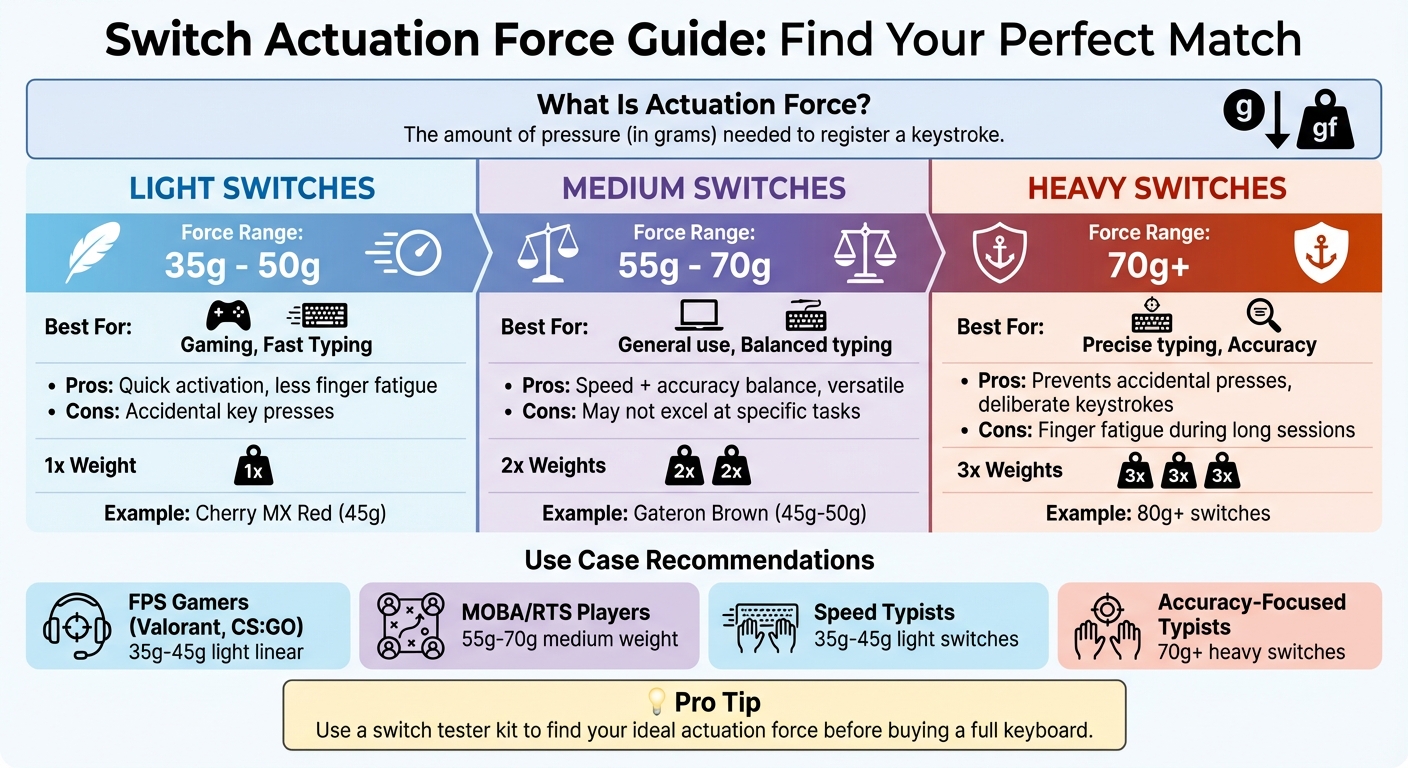
Keyboard Switch Actuation Force Comparison Guide
What Is Actuation Force For Mechanical Keyboards? - The Hardware Hub
sbb-itb-3cb9615
What Is Switch Actuation Force?
Actuation force refers to the minimum amount of pressure needed to activate a switch and register a keystroke. This force is influenced by the resistance of the switch's internal spring.
Measurement Units and Basics
Actuation force is measured in grams-force (gf) or simply grams (g). This measurement tells you how much pressure is required to activate the switch. For instance, a switch with a 45g rating needs 45 grams of pressure to register a keystroke. Some light linear switches require even less force for an effortless feel.
The actuation point varies depending on the type of switch. For linear switches, actuation typically occurs halfway through the total travel distance - often around 2mm within a 4mm travel. On the other hand, tactile switches actuate just after overcoming a tactile bump, where the required force momentarily decreases. This difference is why linear switches feel smooth and consistent, while tactile switches provide noticeable feedback when pressed. With these basics in mind, let’s explore how actuation force is measured in detail.
Actuation Force vs. Other Forces
Actuation force is not the only force to consider when evaluating switches. Bottom-out force refers to the pressure required to fully press a key until it hits the bottom of the switch housing. While actuation force determines when a keypress is registered, bottom-out force matters more for users who press keys all the way down.
Another term often used in this context is operating force, which is essentially interchangeable with actuation force. As LumeKeebs explains:
"Operating force is most closely interchangeable with the actuation force".
For those who type lightly and stop pressing as soon as the key registers, actuation force is the key metric to focus on. However, if you tend to press keys all the way down, bottom-out force might be a more relevant consideration. Understanding these distinctions helps ensure you choose a switch that aligns with your typing or gaming preferences. Up next, we’ll break down how actuation force is measured.
How Is Actuation Force Measured?
To measure actuation force, manufacturers rely on force gauges. These tools apply pressure gradually until the switch registers a keystroke. The force required is then recorded in grams (g) or gram-force (gf). However, since switches vary in design, the method of measurement is adjusted accordingly.
For linear switches, the force is typically measured at the midpoint of the switch's standard 4mm travel distance - around the 2mm mark. Tactile switches, on the other hand, are measured right after the tactile bump, at the point where the force drops noticeably.
Another key measurement is the pre-travel distance, which is the distance (in millimeters) the switch stem moves before it activates. Fast-acting switches usually have a pre-travel distance of less than 2mm. These precise techniques ensure consistent actuation force ranges across various switch types.
Common Actuation Force Ranges
Knowing the actuation force can help you pick a switch that aligns with your typing or gaming needs. Most mechanical switches fall into well-defined categories.
- Light switches: These require 35g to 50g of actuation force. They’re easy to press and are especially popular with gamers who need quick key activations.
- Heavy switches: These need 60g or more, offering greater resistance to minimize accidental presses, which is ideal for typing.
Some popular examples highlight these ranges. The Cherry MX Red, a linear switch preferred by gamers, actuates at 45g. Similarly, the Gateron Brown, a tactile switch often chosen for typing, operates within the 45g to 50g range. Other modern options, like the Gateron Magnetic Jade and Akko V3 Creamy Yellow Pro, offer similar force levels but with unique tactile feedback. By understanding these ranges, you can better decide which switch fits your style before committing to a purchase.
How Actuation Force Affects Typing and Gaming
The actuation force of your mechanical keyboard switches plays a big role in how your keyboard feels and performs. Whether you're typing up a report or immersed in a competitive game, the resistance of each keypress can impact your speed, accuracy, and comfort. To better understand this, let's dive into the differences between lighter and heavier switches.
Lighter vs. Heavier Switches
Light switches (35g–50g) require very little effort to press, making them great for quick, effortless keystrokes. This reduced resistance can help your fingers move faster across the keyboard, which is especially helpful during long sessions. However, the downside is that lighter switches can sometimes lead to accidental key presses.
Heavy switches (70g and above) demand more force, which makes accidental presses far less likely. This can improve accuracy, as every keystroke feels more deliberate. On the flip side, the extra resistance can lead to finger fatigue, especially during extended use. According to Cornell University's Human Factors and Ergonomics Laboratory, excessive typing force can increase the risk of Musculoskeletal Disorders (MSDs). Medium switches (55g–70g) offer a middle ground - enough resistance to reduce errors while still maintaining a good balance of speed and comfort.
Different Use Cases
The best switch weight often depends on how you use your keyboard. Different activities call for different levels of resistance.
- Gamers playing fast-paced titles like Valorant or CS:GO often lean toward light linear switches (35g–45g). These switches allow for quick reactions and minimal input delay.
- MOBA and RTS players, on the other hand, may prefer medium-weight switches. These provide the precision needed to ensure every command is intentional during chaotic moments.
For typists, preferences can vary. If you're typing for hours, light switches (35g–45g) can help reduce fatigue and keep your speed consistent. However, if accuracy is your top priority, heavier switches (70g and above) can offer better control. Additionally, if you tend to "bottom out" your keys - pressing them all the way down - you should consider the bottom-out force. The impact of each keystroke can influence your overall comfort more than the initial actuation force.
Before investing in a full keyboard, it's worth trying out a switch tester kit to explore different weights. As NPK Club puts it:
"The choice between heavy vs light switches isn't just about technical specs; it's about matching the actuation force to your personal 'finger physics'".
Ultimately, the "perfect" switch weight is highly subjective. What feels just right for one person might feel too light or too stiff for someone else. By testing and understanding your preferences, you can find the switch that suits your needs best.
Choosing the Right Actuation Force
Picking the right actuation force depends on your typing habits and the mechanics of the switch itself. Knowing how these factors interact can help you customize your keyboard for the best experience.
Factors to Consider
Actuation force is primarily dictated by the internal spring of a switch. Lighter springs are ideal for quick key presses, while heavier or multi-stage springs provide more resistance, which can feel smoother or more controlled. Spring length also matters - longer springs tend to feel "snappier" during the upstroke, giving a stronger bounce-back sensation. Additionally, the type of spring makes a difference. Basic springs offer a consistent resistance, while multi-stage and conical springs create a progressive feel, making the keypress noticeably heavier as you press further.
Your typing style plays a big role in choosing the right force. As P K from LumeKeebs puts it:
"If you are a light typer then the actuation force would be a more relevant piece of data since you only press until the key registers. If you are a heavy typer then the bottom out force would be the relevant information because you would be bottoming out during typing".
In other words, if you press keys lightly, focus on actuation force. But if you tend to press keys all the way down, consider both actuation and bottom-out force.
Testing Switches Before Buying
Once you understand the type of force that suits your style, it's a good idea to test switches before committing to a purchase. A switch tester kit is a great way to try out different weights and types side by side without investing in a full keyboard. You can also check force curve graphs, which show how a switch feels at every stage of a press, from the initial actuation to the release. If you already own switches but want to tweak their feel, swapping out the internal springs is another option to consider.
Finding Switches on KeebsForAll

KeebsForAll provides detailed specifications for actuation force, making it easier to find switches that match your preferences. Whether you're looking for a light 35g switch for gaming or something more balanced for typing, their wide selection ensures you can find the perfect match. With these options, you can fine-tune your keyboard to improve both your typing and gaming experience.
Conclusion
Understanding actuation force plays a huge role in finding a keyboard that suits your needs. Whether you're dealing with a light 35g switch or a heavier 80g option, the right choice can make a noticeable difference in your typing experience. As Glacier PC Gaming explains:
"The actuation force is an important factor because it directly affects how comfortable the keyboard feels to type on."
In short, choosing the right actuation force can help reduce typing fatigue, avoid unintentional key presses, and ensure your keyboard aligns with how you work or play. You can even take customization further by experimenting with spring swaps, trying out different switch types, or exploring a variety of options.
KeebsForAll simplifies this process by offering a wide selection of switches tailored to different preferences. With over 176 switch options, they provide choices ranging from affordable picks like the KTT Mint Linear at about $0.27 per switch to high-end selections such as the Búri Diamond at around $0.86 each. Plus, detailed product listings make it easy to understand the actuation force and other specs before making a purchase. Whether you're building a 65% keyboard with 70 switches or a full-size board requiring 120, they’ve got you covered.
If you're unsure where to start, grab a switch tester to compare actuation forces and narrow down your favorites. And with free shipping on orders over $70 within the USA, you can try different options without overspending. By learning how actuation force works and why it matters, you’ll be ready to pick the perfect switches for your typing or gaming needs. Explore your options and find your ideal keyboard today.
FAQs
Is actuation force the same as bottom-out force?
No, actuation force and bottom-out force aren't the same.
Actuation force refers to the minimum amount of pressure needed for a keystroke to register. This happens early in the keypress. On the other hand, bottom-out force is the maximum pressure required to press the key all the way down until it physically bottoms out.
While actuation force determines when the keypress is detected, bottom-out force influences how it feels when the key is pressed completely.
Why do manufacturers list grams (g) vs grams-force (gf)?
Manufacturers prefer using grams (g) instead of grams-force (gf) because grams measure mass, a concept that’s more commonly understood and standardized. While grams-force technically measures force, using grams makes things simpler for everyday understanding. Since mass and force are connected through gravity, this approach aligns with familiar measurement practices.
How do I choose the right actuation force for my typing style?
Choosing the right actuation force comes down to how much pressure feels right for you when pressing a key. If you’re into fast, light typing - like for gaming - switches with an actuation force under 50g are a great choice. On the other hand, switches over 60g are better if you want more control and fewer accidental presses.
Not sure what you prefer? Consider using switch testers or trying out hot-swappable keyboards to experiment. Lighter switches let you type quickly, while heavier ones give a more deliberate and controlled feel. It’s all about finding what matches your style.