
Keyboard layouts are more than just a matter of design - they're shaped by history, language, and typing efficiency. While QWERTY dominates globally, it wasn't designed with all languages in mind. Variants like AZERTY (French) and QWERTZ (German) evolved to meet specific linguistic needs, while alternatives like Dvorak and Colemak focus on improving typing speed and ergonomics. Here's a quick breakdown:
- QWERTY: Created in the 1870s to prevent typewriter jams. Widely adopted but not ergonomically efficient.
- AZERTY: Tailored for French, with easy access to accented characters but criticized for programming inefficiencies.
- QWERTZ: Used in German-speaking regions, featuring keys for umlauts and a swapped "Z" and "Y."
- Dvorak: Designed for efficiency, reducing finger movement, but requires significant retraining.
- Colemak: Balances improved ergonomics with familiarity, altering fewer keys than Dvorak.
Each layout reflects a trade-off between language-specific functionality, typing efficiency, and user familiarity. Modern keyboards now allow software-based remapping, offering flexibility for diverse needs.
1. QWERTY
Historical Development
The QWERTY layout was designed in the early 1870s by Christopher Latham Sholes. Its purpose? To prevent typebar jams on mechanical typewriters by spacing out frequently used letter pairs. Sholes even drew on input from Morse code operators, who needed distinct key placements for better clarity .
The first typewriter featuring QWERTY, the Sholes & Glidden, was released on July 1, 1874. By 1886, a major convention in Toronto brought leading manufacturers together to standardize QWERTY across the industry. Later, in 1893, the Union Typewriter Company trust solidified its dominance by fixing the price of standard typewriters at $100 and setting up international agencies to promote QWERTY worldwide. This move effectively sidelined rival layouts.
Language-Specific Features
The QWERTY layout was built around the frequency of English letter combinations. For instance, commonly paired letters like "E" and "R" were placed deliberately. Interestingly, the left hand does most of the work, as thousands of English words can be typed using only its keys, while far fewer rely solely on the right hand. Even the three most common English letters - E, T, and A - are all handled by the left hand .
"The inventors were focused on perfecting the mechanism, while the principal business partner was pushing for a payoff on his investment. A human-factored letter sequence was neither conceived nor developed."
- Ronald Earl Walker, Mechanical Typewriter Historian
Since English rarely uses accents or diacritical marks, the original QWERTY layout didn’t include these characters, unlike modern ANSI-EN/US keycap sets. However, European versions adapted to include such features. Today, software-based "International" or "Extended" QWERTY layouts allow users to add accents without altering the physical keyboard design . These tweaks have helped QWERTY remain versatile and widely used.
Adoption Trends
QWERTY's dominance was driven by a mix of business strategy and educational practices. Typing schools taught only QWERTY, creating generations of typists familiar with the layout. The cost of retraining made switching to alternative layouts impractical. During World War I, governments awarded contracts solely to QWERTY-based manufacturers, forcing competitors with alternative designs to pivot to war production. This effectively wiped out non-standard layouts.
The transition to computers only strengthened QWERTY's position. This evolution is a core part of mechanical keyboard history. In 1981, IBM, which controlled 62% of the mainframe computer market, adopted QWERTY for the IBM PC, capitalizing on existing typist skills. The release of the IBM Model M keyboard in 1984 further entrenched the layout, and major operating systems like Windows and macOS followed suit. Even smartphones embraced QWERTY - BlackBerry made it popular in the late 2000s, and Apple adopted it for the iPhone in 2007 .
sbb-itb-3cb9615
2. AZERTY
Historical Development
The AZERTY keyboard layout was created in France during the 1890s as a modified version of the American QWERTY setup. While the exact reasons behind its specific letter swaps are not well-documented, the layout made key changes like switching A/Q and Z/W and moving M to the right of L, where the semicolon key is located on a US QWERTY keyboard.
Between 1900 and 1914, AZERTY became the standard in French offices and schools, often used on custom mechanical keyboards, largely because its resemblance to QWERTY made it more accessible than alternatives like the ZHJAY layout introduced in 1907. It wasn’t formally standardized until April 2, 2019, when AFNOR established the NF Z71-300 standard. Unlike QWERTY, which was shaped by mechanical limitations, AZERTY was tailored to the linguistic needs of French speakers.
Language-Specific Features
AZERTY was designed to address the unique typographic requirements of the French language. For instance, accented characters like é, è, à, ç, and ù are placed on the number row, requiring users to hold the Shift key to type digits 0 through 9. This prioritization reflects the importance of diacritics in French writing.
The letter Z occupies a prominent position on the top row because it is used about three times more often in French than in English. Interestingly, the letter ù has its own dedicated key, even though it appears in just one common French word, "où" (meaning "where"). Dead keys are also a key feature of AZERTY, allowing users to add diacritics. For those using different operating systems, specialized compatibility keycaps can help bridge the gap between layouts. For example, pressing ^ followed by a vowel creates a circumflex (e.g., â), while Shift + ^ produces a diaeresis (e.g., ä).
The 2019 standard introduced around 60 additional characters, including ligatures like œ and æ, accented uppercase letters such as À and É, and French quotation marks (« »). Windows 11 version 24H2 further enhanced accessibility by adding native support for this updated layout.
Adoption Trends
AZERTY’s design has influenced keyboard layouts in other French-speaking regions. It is the primary layout in Belgium, Switzerland, and many African countries like Algeria, Morocco, Tunisia, and Senegal. Regional variations exist; for example, Belgian AZERTY assigns the euro symbol (€) to AltGr + 5 instead of AltGr + E and includes extra dead keys for Dutch and German characters.
Despite its widespread use, AZERTY has faced criticism, particularly from programmers. Typing symbols like {} [] and | requires complex AltGr combinations, which has led some French developers to opt for the US-International QWERTY layout instead. Nevertheless, AZERTY remains the dominant choice in French-speaking regions, with the 2019 update marking a major step forward after more than a century of minimal changes.
3. QWERTZ
Historical Development
The QWERTZ keyboard layout, much like its QWERTY and AZERTY counterparts, was developed to address both mechanical keyboard limitations and linguistic needs specific to its region. It originated in the late 19th century when German typewriter manufacturers adapted Christopher Latham Sholes' 1878 QWERTY patent to better suit Central European languages. The key modification was swapping the "Y" and "Z" keys, reflecting the higher frequency of "Z" in German compared to "Y".
This adjustment also helped improve the efficiency of early typewriters. Frequently paired letters like "T" and "Z" were positioned for alternate-hand typing, reducing the risk of typebar jams. Additionally, placing "Z" and "U" close together made typing common German words and prefixes, such as "zu", more convenient. In 1904, Wanderer-Werke, a German company, introduced the "Continental Standard" typewriter with the QWERTZ layout. Protected by over 60 patents, this design became a staple in German and Austrian bureaucratic offices. It wasn't until October 1988 that the layout received formal standardization with the publication of DIN 2137-2 by the German Industrial Standards Committee. This "T1" layout remains the foundation for German keyboards today.
Language-Specific Features
QWERTZ keyboards are tailored to include keys for German-specific characters absent on QWERTY layouts. These include the umlauts (ä, ö, ü) and the sharp S (ß), with the ß typically located next to the "0" key. These additions reflect how the design accommodates linguistic needs. However, this customization comes at a cost - common programming symbols are less accessible and often require the AltGr key. For instance, typing the "@" symbol involves using AltGr + Q instead of the QWERTY-standard Shift + 2.
Regional adaptations extend to key labels as well. For example, "Strg" replaces "Ctrl" for the Control key, while "Entf" and "Einfg" correspond to Delete and Insert, respectively. Most QWERTZ keyboards follow the ISO physical standard, featuring 105 keys and an L-shaped Enter key, unlike the 104-key ANSI standard used in the US. The Swiss version of QWERTZ takes a multilingual approach, accommodating German, French, and Italian. To make room for French accented characters like "é", "à", and "è", it excludes the ß character. More recently, the 2023 update introduced extended layouts like "E1", which support additional international characters and programming symbols while retaining the core QWERTZ structure.
Adoption Trends
QWERTZ remains the primary keyboard layout in German-speaking countries such as Germany, Austria, Switzerland, and Liechtenstein, where it's the default for nearly all hardware. However, its influence has waned in some Central and Eastern European nations due to the growing dominance of English-centric computing. For example, Poland historically used QWERTZ but transitioned to QWERTY as the standard in the early 1990s. A similar shift occurred in the Czech Republic. While a 2013 survey showed 56% of users favored QWERTZ, by 2020, that number had dropped to 43%, with 57% now preferring QWERTY. Romania also formalized QWERTY as its national standard in 2012 through SR 13392:2004, rebranding the older QWERTZ-based layout as "Romanian (Legacy)" in Windows systems.
The rise of mobile devices has further accelerated this trend. In 2020, Samsung began prioritizing QWERTY keyboards for Czech users to align with shifting preferences.
4. Dvorak
Historical Development
The Dvorak keyboard layout was created with ergonomics as its primary focus. In the 1930s, August Dvorak and William Dealey developed this layout to address QWERTY's shortcomings, aiming to reduce typing errors, improve speed, and minimize fatigue.
A large-scale study in Tacoma involving 2,700 students demonstrated that Dvorak could be learned in just one-third of the time it takes to master QWERTY. Despite these encouraging findings, Dvorak faced an uphill battle against QWERTY's 60-year advantage in training and manufacturing. However, in 1982, the American National Standards Institute (ANSI) officially recognized Dvorak as an alternative keyboard standard.
Efficiency and Ergonomics
Dvorak's design centers around hand alternation, with vowels placed on the left side of the home row and the most frequently used consonants on the right. This thoughtful arrangement promotes balanced hand movement. Impressively, 70% of keystrokes occur on the home row in Dvorak, compared to just 32% on QWERTY, reducing finger travel by roughly 63%.
The layout also redistributes the workload more evenly: 56% of keystrokes fall to the right hand, which is often the dominant hand. In contrast, QWERTY places more strain on the left hand. Additionally, only 8% of keystrokes on Dvorak take place on the bottom row - the hardest to reach - compared to 16% on QWERTY. Notably, Barbara Blackburn, a renowned typist, achieved her record-breaking speeds using a Dvorak-configured Apple IIc.
Adoption Trends
Despite its ergonomic advantages, Dvorak's adoption has been hindered by the 100-hour retraining period required to switch from QWERTY. Familiar keyboard shortcuts like Ctrl+C and Ctrl+V, optimized for QWERTY, can feel awkward on Dvorak. Additionally, many public computers and standardized testing systems lack support for this layout.
That said, software support for Dvorak has significantly improved. Today, all major operating systems - including Windows, macOS, Linux, Android, and iOS (starting with iOS 16 in 2022) - offer built-in Dvorak options. Specialized versions, such as Programmer Dvorak, have also been developed to better accommodate coding tasks by rearranging numbers and symbols. While Dvorak has not replaced QWERTY as the default hardware standard, it remains a compelling option for those willing to invest the time to learn it.
Next, the Colemak layout takes ergonomic design even further.
5. Colemak
Historical Development
Colemak, introduced on January 1, 2006, was the result of Shai Coleman's efforts to refine and build upon the Dvorak layout. Before finalizing Colemak, Coleman experimented with earlier versions called ASERTH (July 2005) and Asetion (August 2005). His goal was to create a layout that improved typing efficiency without demanding a steep learning curve for QWERTY users. Unlike Dvorak, which changes 33 keys, Colemak alters only 17, making it easier for typists to adapt. As Coleman put it, "Dvorak is hard for QWERTY typists to learn due to it being so different... Colemak attempts to find a layout that is better than Dvorak on all important metrics, while making it reasonably easy to switch from QWERTY". This balance between familiarity and improvement has made Colemak a practical choice for those seeking better ergonomics without a complete overhaul.
Efficiency and Ergonomics
Colemak stands out for its thoughtful key placement, leading to noticeable gains in typing efficiency. About 74% of typing happens on the home row - higher than Dvorak's 70% and far beyond QWERTY's 32%. This design reduces finger travel by roughly 44% and lowers same-finger usage to just 1.3%, a dramatic improvement from QWERTY's 6.6%. Hand alternation reaches 84%, making typing smoother and less tiring. Another ergonomic tweak is replacing the Caps Lock key with an extra Backspace, which minimizes pinky strain. Additionally, Colemak retains the familiar QWERTY shortcut keys (Z, X, C, and V), making it especially appealing to programmers and heavy keyboard users. These features demonstrate how Colemak addresses both comfort and efficiency for modern typists.
Adoption Trends
Today, Colemak ranks as the third most popular keyboard layout for English touch typing. A key achievement came when Microsoft added native Colemak support to Windows 11 (version 24H2), joining other platforms like macOS, Linux, Android, and ChromeOS.
The layout has also inspired variations like Colemak-DH, developed by Steven Pugh in 2014, which optimizes the design for different keyboard types. Another adaptation, Tarmak, offers a gradual transition for users moving from QWERTY. While learning Colemak takes time - typically 3–6 months - most users experience the steepest learning curve in the first 1–2 weeks, often seeing their typing speed drop to 10–15 words per minute initially. These developments underscore Colemak's growing influence in the world of keyboard layouts, catering to a wide range of linguistic and ergonomic needs.
Why QWERTY? Keyboard Layouts Investigated
Advantages and Disadvantages
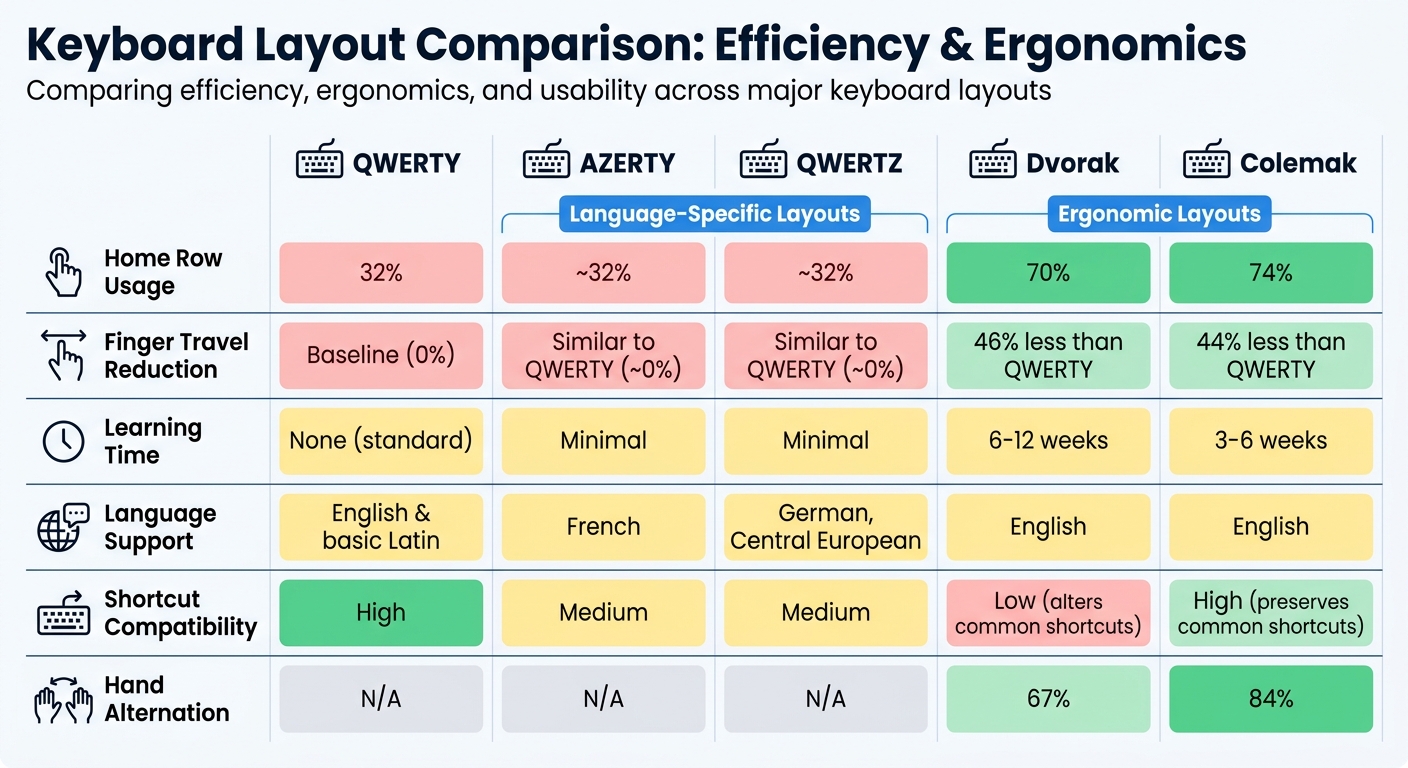
Keyboard Layout Comparison: QWERTY vs AZERTY vs QWERTZ vs Dvorak vs Colemak
Each keyboard layout comes with its own strengths and weaknesses, often balancing usability, efficiency, and ease of learning. Here's a breakdown of the major layouts:
QWERTY stands as the global standard, compatible with virtually every device. However, its design isn't the most ergonomic. With only 32% of keystrokes on the home row, it requires significant finger movement. Additionally, it places a heavy workload on the left hand, as letters like E, T, and A - some of the most frequently used in English - are positioned there. Interestingly, thousands of English words can be typed using just the left hand, while only a few hundred rely solely on the right hand.
AZERTY and QWERTZ cater to specific language needs. AZERTY simplifies typing accented characters for French speakers, while QWERTZ is tailored for German speakers, making letters like ä, ö, ü, and Z more accessible. Despite these regional adjustments, both layouts inherit QWERTY's ergonomic limitations, focusing more on language-specific tweaks than on overall typing efficiency.
Dvorak was created to improve typing efficiency by reducing finger movement. With 70% of keystrokes on the home row and a 46% reduction in finger travel compared to QWERTY, it also achieves a 67% rate of hand alternation. However, transitioning to Dvorak requires remapping 28 keys and can take 6–12 weeks to master. Don Norman, a cognitive scientist, once remarked:
"We are committed to it [QWERTY], even though it was designed to satisfy constraints that no longer apply, was based on a style of typing no longer used, and is difficult to learn."
Colemak offers a middle ground, combining ergonomic improvements with a smoother learning curve. By altering only 17 keys, it achieves 74% home row usage and reduces finger travel by 44% compared to QWERTY. It also maintains common shortcuts like Z, X, C, and V, achieving 84% hand alternation while minimizing same-finger usage to just 1.3%. This design makes it easier to learn - typically within 3–6 weeks - though it may require software remapping on some devices.
Here's a quick comparison of the layouts:
| Layout | Home Row Usage | Finger Travel Reduction | Learning Time | Language Support | Shortcut Compatibility |
|---|---|---|---|---|---|
| QWERTY | 32% | Baseline | None (standard) | English & basic Latin | High |
| AZERTY | ~32% | Similar to QWERTY | Minimal | French | Medium |
| QWERTZ | ~32% | Similar to QWERTY | Minimal | German, Central European | Medium |
| Dvorak | 70% | 46% less than QWERTY | 6–12 weeks | English | Low (alters common shortcuts) |
| Colemak | 74% | 44% less than QWERTY | 3–6 weeks | English | High (preserves common shortcuts) |
This comparison highlights how different layouts are shaped by the need to balance language-specific requirements with ergonomic considerations. Each layout reflects the priorities of its design, whether it's universal compatibility, language accessibility, or typing efficiency.
Conclusion
Keyboard layouts have always been shaped by the interplay of language requirements, efficiency goals, and regional preferences. From the mechanical constraints that birthed the QWERTY design in 1873 to today’s software-driven customizations, each layout tells a story about the needs of its users. For instance, AZERTY accommodates accented characters, while QWERTZ caters to German umlauts, showcasing how linguistic demands influence design. Meanwhile, layouts like Dvorak and Colemak aimed to enhance typing efficiency but faced an uphill battle against QWERTY's widespread adoption.
Modern keyboards, however, have moved beyond fixed layouts. Thanks to scancode-based systems, users can fully remap their keyboards, adding dead keys and AltGr modifiers to handle a variety of diacritics and symbols. This software evolution has opened the door to hardware innovations that make layout customization more accessible than ever.
Today’s mechanical keyboards merge these historical advancements with unparalleled flexibility. Models like the Freebird series from KeebsForAll support multiple configurations, spanning ANSI and ISO standards. This adaptability lets users tailor their keyboards for various languages, alternative layouts favored by programmers, or ergonomic setups for comfort - all within a single device.
As Antonio G. Di Benedetto aptly remarked, "We're living in a golden age of affordable mechanical keyboards". Features once exclusive to high-end, $300+ boutique models - such as aluminum frames, gasket mounts, and hot-swap sockets - are now available in the $100–$200 range, making customization accessible to a broader audience.
The evolution of keyboard layouts is far from over. The challenge ahead lies in balancing universal compatibility with the need for efficiency and the preservation of cultural identity. Modern mechanical keyboards are rising to meet this challenge, offering tools that cater to diverse typing needs with remarkable flexibility.
FAQs
Which keyboard layout is best for typing in multiple languages?
The ideal keyboard layout for typing in multiple languages largely depends on the specific languages you use and your personal preferences. Multilingual QWERTY variants are a popular choice since they often include additional symbols to accommodate various languages. For languages like French or German, AZERTY and QWERTZ layouts are effective, though they might lack the flexibility needed for broader multilingual use.
If you need more customization, consider QWERTY layouts with added keymaps or even ergonomic options like Dvorak, provided your operating system supports them. These options can make switching between languages smoother and more comfortable.
Can I switch layouts without changing my physical keyboard?
Yes, you can switch keyboard layouts directly through your device's software settings without needing to replace the physical keyboard. This feature lets you type in different languages or layouts using the same hardware. Simply navigate to your operating system's settings to enable and toggle between the layouts as required.
What’s the easiest ergonomic layout to learn after QWERTY?
The Colemak layout is often considered the simplest ergonomic alternative to QWERTY. Why? It changes just 17 keys, making it easier to adjust while still focusing on comfort and efficient typing. With its design aimed at reducing finger movement, it strikes a nice balance between being familiar and offering ergonomic advantages.