
5 Factors to Consider When Picking Keyboard Switches
[ Back to Mechanical Keyboards 101 ]Mechanical keyboard switches significantly impact how your keyboard feels, sounds, and performs. Choosing the right one depends on your typing habits, noise tolerance, and usage needs. Here are the five key factors to consider:
- Actuation Force: The pressure needed to register a keypress. Lighter switches (under 50g) are ideal for fast typing or gaming, while heavier ones (above 60g) help avoid accidental presses.
- Switch Feel: Choose between linear (smooth), tactile (bump feedback), or clicky (bump + audible click) switches based on your preference for feedback and sound.
- Sound Profile: From silent to loud, switch sound levels vary. Quiet switches suit shared spaces, while clicky ones are best for private use.
- Travel Distance: Shorter travel distances enable faster typing, while longer ones provide more feedback, catering to different needs like gaming or typing.
- Durability: Mechanical switches last 50–100 million keystrokes. Regular maintenance and hot-swappable keyboards can extend their lifespan.
Quick Tip: Test switches before committing to find the perfect match for your typing style and environment.
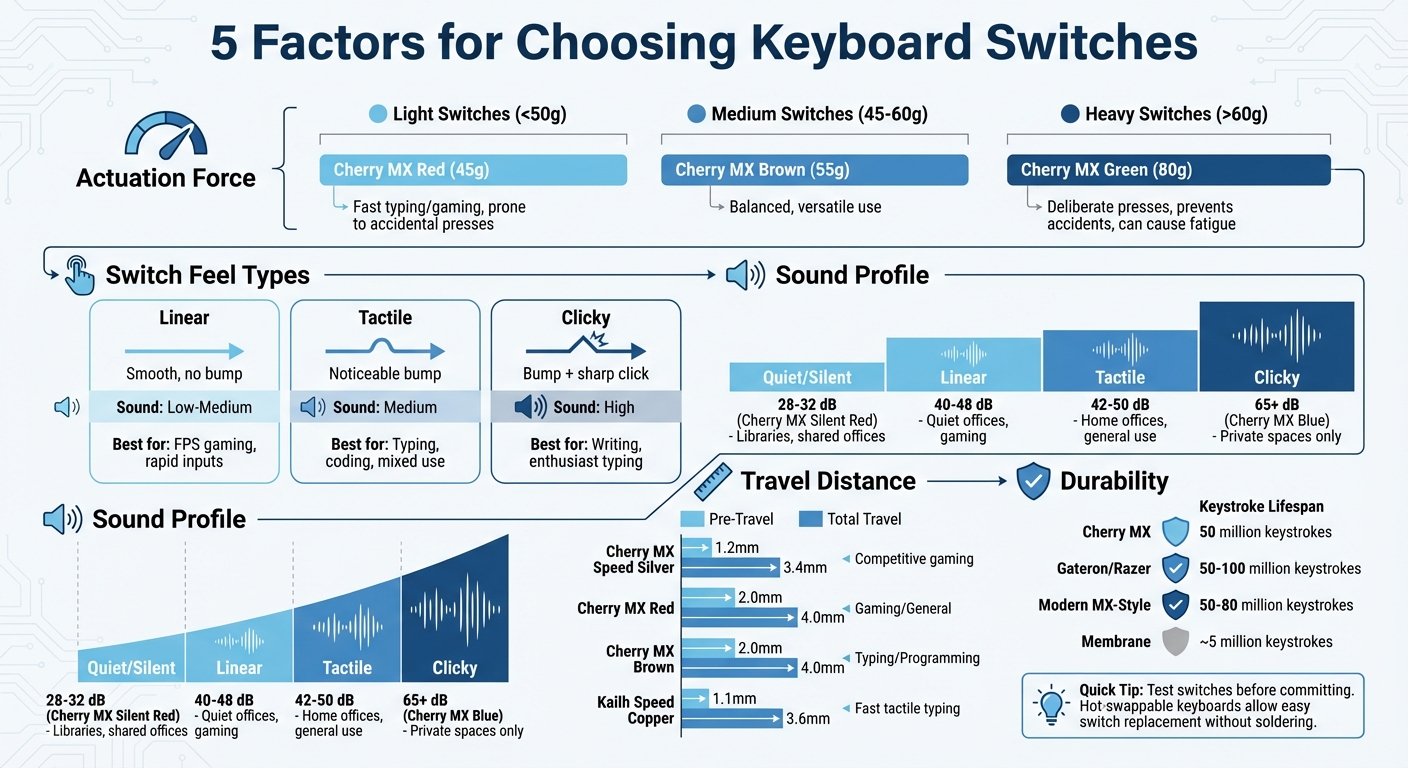
Mechanical Keyboard Switch Comparison Guide: Actuation Force, Feel, Sound & Travel Distance
A Beginner's Guide to Keyboard Switches
Once you understand the basics, you can explore our full collection of keyboard switches to find the perfect match for your build.
sbb-itb-3cb9615
1. Actuation Force
Actuation force refers to the pressure needed to press a key and register a keystroke. Measured in grams (g) or centinewtons (cN), it plays a big role in how a keyboard feels when you use it. Most mechanical switches require anywhere from 40g to 80g of force, and the ideal level depends on your typing habits and specific needs.
The force level you choose can affect your comfort, typing speed, and accuracy. Lighter switches are easier on your fingers during long sessions, while heavier ones provide better control, reducing accidental presses when your fingers rest on the keys. For gamers, especially in competitive settings, a lower actuation force often means quicker, more responsive inputs. On the other hand, typists looking to avoid accidental keystrokes might lean toward switches with higher resistance.
"Keys that are too easy to press can be sensitive to accidental triggering, while keys that are too stiff can be particularly exhausting after long typing sessions."
- Newark
Let’s break down how actuation force defines light, medium, and heavy switches.
Light, Medium, and Heavy Switches
Light switches (under 50g) are designed for minimal resistance and quick response times. They’re a favorite for fast-paced gaming - especially in first-person shooters - and for those who type quickly. For example, the Cherry MX Red switch, which actuates at 45g, offers smooth and effortless keystrokes. However, it’s worth noting that resting your fingers too heavily might lead to accidental presses.
Medium switches (45g–60g) strike a balance that works for most people. They provide enough resistance to avoid unintended keystrokes while staying comfortable for extended typing or gaming sessions. The Cherry MX Brown, requiring 55g of force, is a popular option for its subtle tactile feedback, making it versatile for both gaming and typing.
Heavy switches (above 60g) require more deliberate pressure for each keystroke. These are ideal for users who prefer a firmer feel and want to minimize accidental presses. A good example is the Cherry MX Green, which needs 80g of force - almost double that of a Cherry MX Red. While the strong tactile and audible feedback can be satisfying, the added force might cause finger fatigue during long sessions.
Actuation Force Comparison Table
| Switch Model | Actuation Force | Type | Advantages | Disadvantages |
|---|---|---|---|---|
| Cherry MX Red | 45g | Linear | Smooth, fast, low fatigue | Prone to accidental presses |
| Cherry MX Brown | 55g | Tactile | Balanced feedback, versatile | Might feel "scratchy" to some |
| Cherry MX Green | 80g | Clicky | Deliberate, satisfying click | High fatigue, very loud |
2. Switch Feel (Linear, Tactile, Clicky)
Switch feel plays a key role in shaping your typing and gaming experience, going beyond just actuation force. It defines the subtle sensations and sounds you encounter with each keystroke. Mechanical switches generally fall into three categories: linear, tactile, and clicky. Each type delivers a unique feedback and sound profile, catering to different preferences and uses.
Linear Switches
Linear switches offer a smooth keystroke with no tactile bump or audible click. This uninterrupted motion makes them a favorite for competitive gaming, especially in fast-paced genres like first-person shooters or rhythm games. Notable examples include the Gateron Red, which is known for its light 45g actuation and smooth feel, and the Cherry MX Speed Silver, designed with a shorter actuation distance to enhance response time.
"Reds are typically recommended as the 'best for gaming' due to the speed and smoothness of the keypress."
- Randall Jue, Writer, Switch and Click
If you're chasing speed and fluidity, linear switches are hard to beat. However, tactile and clicky switches bring their own benefits, particularly for typing and precision tasks.
Tactile and Clicky Switches
Tactile switches provide a distinct bump at the actuation point, signaling when a keypress is registered. This feedback helps reduce accidental bottoming out, making tactile switches ideal for typing, coding, and versatile use cases. Popular tactile options include the Cherry MX Brown and the Boba U4T, which offers a stronger tactile response.
Clicky switches take tactile feedback a step further by adding a sharp, audible click to the bump. This combination delivers both physical and auditory confirmation with every keystroke. The Cherry MX Blue is a classic choice for clicky switches, known for its crisp, high-pitched sound. For a deeper, richer click, the Kailh Box Jade uses a "clickbar" design to amplify both tactility and sound. However, their loudness makes clicky switches better suited for private spaces or enthusiast setups.
"There is no single 'best' switch for everyone. The right choice depends on how you use your keyboard, your acoustic tolerance and whether you prioritize speed or feedback."
- Dashan Yuan, UniKeys
Switch Feel Comparison Table
Here’s a quick breakdown of the key differences and ideal scenarios for each switch type:
| Switch Type | Feel | Sound Level | Best Use Case |
|---|---|---|---|
| Linear | Smooth, no bump | Low to Medium | FPS gaming, rapid inputs |
| Tactile | Noticeable bump | Medium | Typing, coding, mixed use |
| Clicky | Bump + sharp click | High | Writing, enthusiast typing |
3. Sound Profile
The sound your keyboard makes isn't just about how loud it is - it has a big impact on your overall typing experience. While the type of switch plays the biggest role, other factors like the materials used, lubrication, and the way the keyboard is mounted also shape its final sound.
Sound Levels and Use Cases
The sound profile of a keyboard is just as important as how it feels to use. Different switches create distinct acoustic experiences:
- Linear switches are the quietest, producing a smooth and consistent sound that falls between 40–48 decibels. These are perfect for fast gaming sessions or quiet office settings where you don’t want to disturb others.
- Tactile switches offer a moderate sound level, around 42–50 decibels. They feature a noticeable bump and a satisfying "clack" or "thock", making them ideal for typing and multi-purpose use.
- Clicky switches are the noisiest, often exceeding 65 decibels. That’s about as loud as a regular conversation. Their sharp, audible click is loved by many typists but can be disruptive in shared spaces, so they’re better suited for private offices or personal setups.
- Silent switches are designed to minimize noise, using dampeners made of rubber or silicone. Models like the Cherry MX Silent Red or HMX Sakura Silent V2 keep sound levels as low as 28–32 decibels when measured from 20 inches away - similar to a soft whisper. For comparison, most mechanical keyboards produce 60–70 decibels, while quieter models register around 45–50 decibels. These are great for libraries, shared workspaces, or late-night use.
Factors That Affect Sound
Several elements influence how a keyboard sounds, beyond just the switches:
- Housing materials: Nylon housings create a deeper tone, while polycarbonate results in a higher-pitched sound.
- Lubrication: Proper lubrication can significantly reduce friction noise and eliminate annoying metallic "spring ping" or scratchy sounds. Popular options include Krytox 205g0 for linear switches and Tribosys 3203 for tactile ones. However, if you're working with silent switches, avoid lubricating the rubber dampeners, as it could affect their performance.
- Mounting and plates: The way a keyboard is mounted also shapes its acoustics. Gasket-mounted keyboards, for example, provide a cushioned feel that improves sound quality, while integrated plates can make the sound harsher. Plate materials like aluminum, brass, or FR4 each contribute their own unique resonance.
- Switch films: Adding films between the switch housing halves reduces wobble and gaps, leading to a cleaner and more consistent sound profile.
All these elements come together to create unique sound profiles, which are summarized in the table below.
Sound Profile Comparison Table
| Sound Profile | Description | Switch Examples | Recommended Environment |
|---|---|---|---|
| Quiet/Silent | Dampened travel, minimal noise | Cherry MX Silent Red, HMX Sakura Silent V2, Durock Dolphins | Shared offices, libraries, bedrooms |
| Thocky | Deep, low-frequency, solid sound | Gateron Yellow, Boba U4T, HMX Lunar Stone | Home offices, enthusiast setups, streaming |
| Clicky | Sharp, high-pitched audible click | Kailh Box White, Cherry MX Blue, Kailh Box Jade | Private spaces, solo typing |
| Clacky/Tap | Higher-frequency, crisp impact | Polycarbonate-housed linears, HMX Xinhai | Gaming, fast-paced typing |
4. Travel Distance
Travel distance plays a big role in shaping your keyboard experience, just like actuation force and feedback. It measures how far a key moves when pressed and is divided into two parts: pre-travel and total travel. Pre-travel, also known as actuation distance, is how far the key moves before the keystroke is registered electronically. Total travel, on the other hand, is the complete distance a key moves from its starting position to when it bottoms out. For most standard mechanical switches, the total travel is around 4.0mm.
These measurements directly affect how a keyboard feels and performs. Short pre-travel distances allow for faster key registration, which is especially important for competitive gaming. On the other hand, longer travel distances provide more tactile feedback, making them ideal for deliberate typing. However, while longer travel can enhance feedback, it may lead to finger fatigue over time. In contrast, very short travel distances might feel abrupt and require some getting used to.
"The travel distance of a keyboard key directly influences the typing experience and responsiveness. Short travel keys are favored in ultra-thin laptops for speed, but mechanical keyboards with longer travel often provide superior feedback and durability, catering to typists and gamers who prioritize precision."
- Marcus Villanueva, Mechanical Keyboard Designer, KeyCraft Innovations
Different switches balance pre-travel and total travel to cater to a variety of needs. Let’s take a closer look.
Short vs. Long Travel Switches
Short travel switches, like the Cherry MX Speed Silver (1.2mm pre-travel, 3.4mm total travel), are designed for speed, making them perfect for competitive gaming. On the other hand, switches with longer travel, such as the Cherry MX Brown, offer 2.0mm of pre-travel and 4.0mm total travel. This provides a more balanced experience, making them a favorite for both typing and general use. Tactile switches use the travel distance to create a "bump" that provides feedback before bottoming out, while linear switches stay smooth throughout the entire motion.
Travel Distance Comparison Table
| Switch Model | Pre-Travel (Actuation) | Total Travel | Best Use Case |
|---|---|---|---|
| Cherry MX Red | 2.0mm | 4.0mm | Gaming / General |
| Cherry MX Speed Silver | 1.2mm | 3.4mm | Competitive Gaming |
| Cherry MX Brown | 2.0mm | 4.0mm | Typing / Programming |
| Kailh Speed Copper | 1.1mm | 3.6mm | Fast Tactile Typing |
| Hako True | 1.9mm | 3.6mm | Heavy Typing |
5. Durability and Longevity
When you’re investing in a mechanical keyboard, the lifespan of its switches is just as important as their feel or sound. Most modern MX-style switches are built to last between 50 million and 100 million keystrokes. To put that in perspective, a 50 million keystroke lifespan means about 86 days of non-stop typing at 80 words per minute. With proper care, many mechanical keyboards can stick around for 10 to 15 years.
Switch Lifespan and Maintenance
Manufacturers test switch durability using automated machines that repeatedly press the switches - usually 2 to 3 times per second - until they no longer meet specifications. A switch is considered to have reached its "end of life" when its contact resistance exceeds 1Ω, its tactile feel becomes mushy, or it starts experiencing issues like double-clicking due to contact bounce. However, how long your keyboard lasts in the real world depends a lot on how well you take care of it.
Routine maintenance can go a long way. Applying lubricants like Krytox 205g0 helps reduce friction, which extends the life of the switches. Regular cleaning - using compressed air and a soft brush - prevents dust and debris buildup. Using a keyboard cover when it’s not in use can also protect against accidental spills. Even adjusting your typing habits, like adopting a lighter touch, can reduce wear on the internal components.
KeebsForAll Hot-Swappable Keyboards

If longevity is your priority, hot-swappable keyboards might be a game-changer. These designs let you replace individual switches without the need for soldering, which means you don’t have to replace the entire keyboard if a single switch wears out. For example, KeebsForAll’s Freebird series - including the Freebird60, Freebird75, and Freebird TKL - features hot-swappable sockets, making it easy to swap out worn switches and extend the life of your keyboard.
Durability Comparison Table
| Switch Type | Lifespan Rating | Maintenance Requirements | Best For |
|---|---|---|---|
| Cherry MX | 50 Million | Cleaning & lubrication | General use, reliability |
| Gateron / Razer | 50–100 Million | Cleaning & lubrication | Gaming, enthusiast builds |
| Modern MX-Style | 50–80 Million | Cleaning & lubrication | Custom keyboards |
| Membrane | ~5 Million | Surface cleaning only | Budget applications |
The materials used in your keyboard also play a major role in how long it lasts.
Material Considerations
High-quality materials are essential for durability. For example, gold-plated contacts resist corrosion better than silver-plated ones, and the type of plastic used in the switch housing can impact wear resistance. When it comes to keycaps, PBT (Polybutylene Terephthalate) is a standout choice - it resists shine and wear much better than ABS keycaps, which tend to smooth out and fade over time. By choosing the right materials and keeping up with regular maintenance, you can ensure your keyboard stays reliable for years to come.
Conclusion
This checklist equips you to align keyboard switches with your typing style. Finding the right switches involves weighing factors like actuation force, switch feel, sound profile, travel distance, and durability. Each detail shapes your typing experience, whether you're aiming for lightning-fast gaming or precise, comfortable typing.
To truly understand these differences, hands-on testing is invaluable. A switch tester can give you a feel for various options before you commit to a full set. For example, KeebsForAll offers switch testers starting at just $4.00, along with over 176 switch choices. Options range from budget-friendly Cherry MX Hyperglide switches to exclusive KFA-branded ones. They also stock hot-swappable keyboards like the Freebird60, Freebird75, and Freebird TKL, making it easy to swap switches as your preferences change over time.
While technical specs like actuation force and travel distance offer helpful guidelines, the perfect switch ultimately comes down to what feels right for you. By using this checklist, you can confidently choose switches that balance performance and durability, creating a keyboard that not only sounds and feels great but also stands up to long-term use.
FAQs
How do I know if my switches are too light or too heavy?
To figure out whether your keyboard switches are too light or too heavy, pay attention to the actuation force - the amount of pressure needed to register a keypress. Lighter switches need less pressure, while heavier ones require more.
If you find yourself accidentally pressing keys or feeling strain over time, the switches might be too light for you. On the other hand, if pressing the keys feels like a chore or causes discomfort, they could be too heavy. Ultimately, it comes down to your personal preference and how you use your keyboard, whether for gaming, typing, or both.
What’s the easiest way to test switches before buying a full set?
The simplest way to figure out which switches suit you best is to test them yourself. A switch tester or a hot-swap keyboard lets you experience the sound and feel of various switches firsthand. This hands-on approach helps you decide what fits your preferences before making a bigger investment.
Do hot-swappable keyboards change which switches I should choose?
Hot-swappable keyboards let you replace switches without needing to solder, making it super easy to try out different types. This gives you the freedom to experiment and figure out which switches feel best for your typing or gaming style.