
Negative vs Positive Tilt: Which Is Better?
[ Back to Mechanical Keyboards 101 ]If you’re wondering whether a negative tilt or positive tilt is better for your keyboard setup, here’s the answer: negative tilt is generally better for wrist health and long-term comfort. While positive tilt is common, it forces your wrists into an upward bend that can lead to strain and injuries over time. Negative tilt, on the other hand, aligns your wrists and forearms naturally, reducing stress on joints and tendons.
Key takeaways:
- Positive tilt (back of keyboard raised): Familiar design but increases wrist extension, carpal tunnel pressure, and strain. Better for short typing sessions or users who look at the keys while typing.
- Negative tilt (front of keyboard raised): Promotes a neutral wrist position, reduces strain by up to 52%, and is ideal for prolonged typing or gaming.
Quick Comparison:
| Feature | Positive Tilt | Negative Tilt |
|---|---|---|
| Wrist Position | Extended (bent upward) | Neutral (straight) |
| Strain Risk | Higher | Lower |
| Best For | Short typing sessions | Long typing sessions |
| Carpal Tunnel Pressure | High | Reduced by 15–20% |
The right choice depends on your typing habits, but if you type for long hours, switching to a negative tilt keyboard can make a big difference in comfort and health.
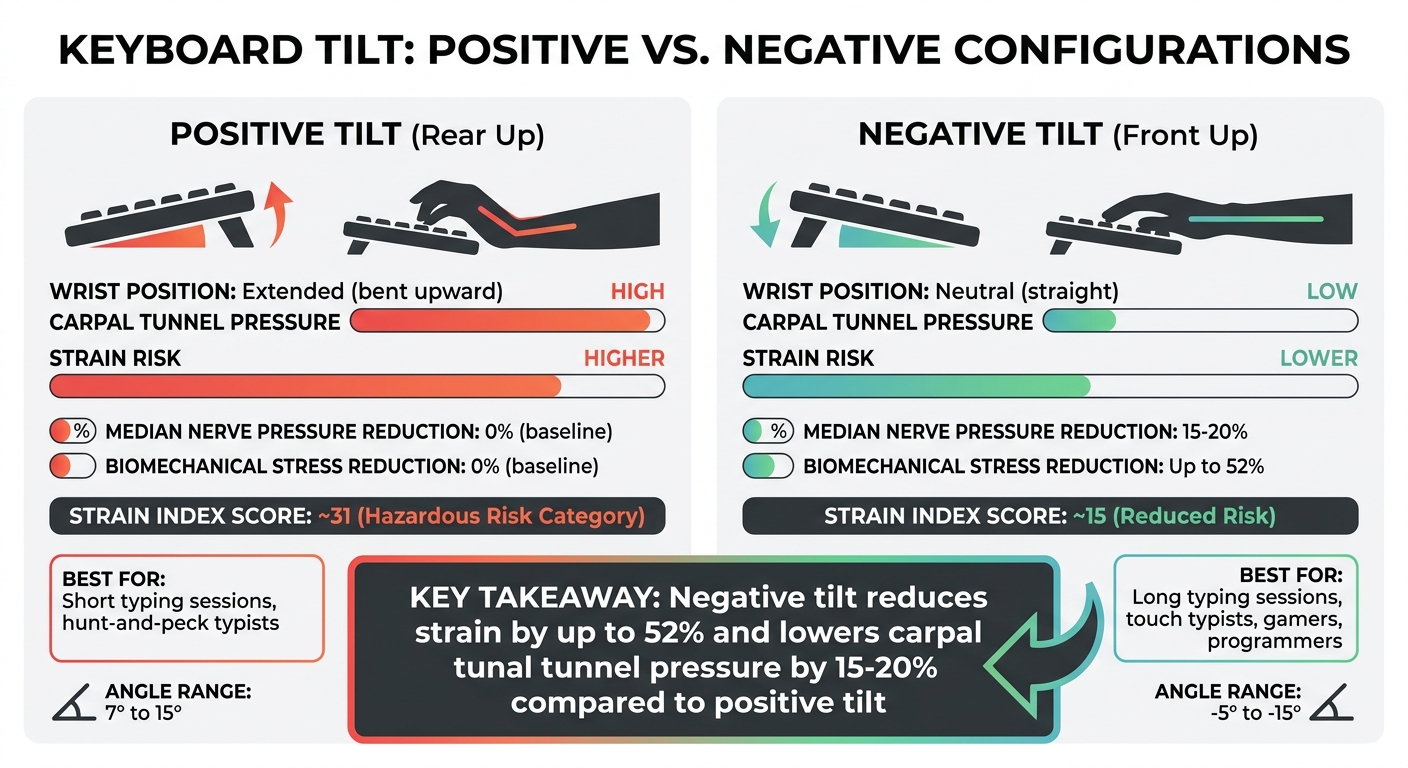
Positive vs Negative Keyboard Tilt Comparison Chart
What Is The Ideal Keyboard Angle For Typing?
sbb-itb-3cb9615
What Is Positive Keyboard Tilt?
Positive keyboard tilt refers to a setup where the back of the keyboard is elevated higher than the front, creating an upward slope toward the user. Most modern keyboards come with a tilt angle between 7° and 15°. This incline is usually achieved with flip-out feet or built-in legs designed for ergonomic purposes.
Interestingly, this design isn't based on recent ergonomic research. It actually originates from the days of mechanical typewriters, which required a steep angle for their tiered key rows to function. Despite its historical roots, modern studies suggest this default setup may not be ideal for wrist health. As ATTACKSHARK points out:
The standard design of the modern mechanical keyboard often prioritizes visual aesthetics and 'out-of-the-box' familiarity over long-term biomechanical health.
This tilt is more than just a design choice - it has a direct impact on wrist posture and overall comfort.
How Positive Tilt Works
To understand its effects, it’s helpful to look at how positive tilt influences wrist positioning. When a keyboard tilts upward, it forces your wrists into extension, also known as dorsiflexion. This means your wrists bend backward, which narrows the carpal tunnel and compresses the median nerve and surrounding tendons. As Eureka Ergonomic explains:
Most standard keyboards, when placed on a flat desk, force your wrists into a state of extension - an upward bend that strains tendons and compresses nerves in the carpal tunnel.
For those who type or game for extended periods - 4 to 6 hours daily - this setup can lead to significant strain. The Moore-Garg Strain Index estimates this configuration scores around 31, placing it in the Hazardous Risk Category. Over time, the constant tension on the flexor tendons can result in inflammation, pain, and repetitive strain injuries.
Where Positive Tilt Is Used
Despite its drawbacks, positive tilt remains common in many work settings. It’s widely used in standard office environments and is the default configuration for most keyboards. One reason for its popularity is that it feels familiar. The upward angle makes key legends easier to see, which many users find convenient. Additionally, some people believe this angle helps their fingers "drop" more naturally into the keys during short typing sessions.
However, low desk heights can make the situation worse. When a desk is positioned too low relative to your elbows, your wrists must bend upward even further to reach the keys, increasing strain. Ironically, the flip-out legs marketed as "ergonomic" only worsen the angle, amplifying the risk of wrist extension.
What Is Negative Keyboard Tilt?
Negative keyboard tilt raises the front edge of a keyboard, creating a downward slope that angles away from your body. This design aligns with the natural position of your forearms when resting on a desk, helping to avoid wrist extension. This alignment allows your wrists to stay in a neutral position - essentially a straight line from your elbows to your fingertips. As Vvenace explains:
"A negative tilt angles the key plane down and away, lining the keys with your forearm so tendons glide with less compression."
Studies suggest that using a negative tilt can reduce pressure on the median nerve by 15–20% compared to the traditional upward tilt of most keyboards.
How Negative Tilt Works
By sloping the keyboard downward, negative tilt minimizes wrist extension, which helps prevent compression on the median nerve and tendons. For competitive gamers, this setup is particularly effective, reducing biomechanical stress by approximately 52% compared to positive tilt configurations.
The optimal range for negative tilt generally falls between –5° and –15°. Achieving this angle is simple: retract the rear feet of your keyboard entirely and use adhesive silicone bumpers (6–8 mm thick) to elevate the front edge. Pairing this setup with a low-profile, firm wrist rest ensures that your wrists remain supported without bearing too much weight. This combination is ideal for creating an ergonomic workstation adaptable to various needs.
Where Negative Tilt Is Used
Thanks to its ergonomic benefits, negative tilt is a popular choice in professional workstations, especially when paired with adjustable keyboard trays or standing desks. Cornell University Ergonomics Web highlights its importance:
"Using an external keyboard on a negative-tilt tray is a 'gold standard' recommendation for preventing computer-related strain."
Standing desks, in particular, benefit from this configuration since they naturally position your forearms at a downward slope toward the keyboard. Standard desk heights - typically 29–30 inches - often create ergonomic challenges, making negative tilt trays a practical solution.
This setup is not just for office work; it’s also ideal for activities like extended typing, coding, and competitive gaming. Ergonomists suggest combining adjustable negative tilt settings with the "20-8-2" routine: 20 minutes sitting, 8 minutes standing, and 2 minutes moving around. This rhythm helps distribute muscle load and reduces strain throughout the day.
For those transitioning from a positive tilt to a negative one, there is usually a brief adjustment period. Over 1–2 weeks, users may notice a temporary 10–15% drop in typing speed as their muscle memory adapts. However, the long-term reduction in wrist strain often makes this short adjustment period well worth it.
Positive vs Negative Tilt Comparison
Advantages and Disadvantages of Each Type
A positive tilt raises the back of the keyboard, causing your wrists to extend upward. This position can compress the carpal tunnel, increasing pressure on the median nerve and tendons, which may lead to discomfort or repetitive strain injuries (RSIs) like carpal tunnel syndrome. While the raised angle makes keys easier to see and feels familiar to many users, it comes with ergonomic drawbacks, particularly for prolonged use.
On the other hand, a negative tilt raises the front edge of the keyboard, aligning it with the natural downward angle of your forearms. This setup allows your wrists to remain in a neutral, straight position, which can lower pressure on the median nerve by 15–20% compared to a positive tilt. Over time, this configuration can reduce cumulative biomechanical stress by up to 52% in high-intensity typing scenarios.
| Feature | Positive Tilt (Rear Up) | Negative Tilt (Front Up) |
|---|---|---|
| Wrist Alignment | Extension (Bent Upward) | Neutral (Straight) |
| Carpal Tunnel Pressure | High | Low (15–20% reduction) |
| Muscle Load | High static load on extensors | Low; promotes relaxation |
| RSI Risk | Hazardous (SI Score ~31) | Reduced (SI Score ~15) |
| Recommended Use | Short bursts; visual key seeking | Prolonged typing; power users |
These comparisons highlight how the tilt angle of your keyboard can significantly impact comfort and long-term health. The right choice often depends on individual habits and needs, such as typing style or duration of use.
How Typing Style Affects Tilt Preference
Your typing style plays a big role in determining which tilt works best for you. Touch typists - those who rely on muscle memory to type without looking at the keys - often gain the most from a negative tilt. This position minimizes tension in the finger flexor tendons, allowing smoother movement through the carpal tunnel. For professionals like programmers, data entry specialists, or competitive gamers using a custom mechanical keyboard who spend hours typing, a negative tilt can support faster and more sustainable performance.
In contrast, hunt-and-peck typists, who look at the keyboard while typing, may prefer a positive tilt. The raised back makes keys easier to see, which can feel more intuitive for this style. However, adjusting to a negative tilt might feel awkward if you’re used to resting your palms on the desk or keyboard. Additionally, users with smaller hands might find that a negative tilt requires more effort to reach certain keys.
Ultimately, personal comfort and typing habits matter as much as ergonomic data. As Dygma Lab explains:
"It's ultimately about you, the user. Your hand size, working setup, typing style, wants, and needs all play a role in choosing the perfect ergonomic keyboard for you".
How to Choose the Right Tilt
What to Consider When Choosing
To create an ergonomic typing setup, start by adjusting your desk and chair so your feet are flat on the floor, your knees are bent at 90°, and your elbows rest comfortably at a 90–100° angle. This ensures your keyboard's home row aligns naturally with your hands.
If your desk is too high, it may cause your wrists to angle upward while typing. In this case, using a negative tilt can help. This adjustment aligns the keyboard with the natural downward slope of your forearms. A good starting point is a –5° tilt, which you can gradually increase to anywhere between –7° and –15°, depending on what feels most comfortable.
For those who type for long hours, adopting a negative tilt can significantly reduce strain on your tendons, potentially lowering biomechanical stress by as much as 52%. Here's a quick test: check the angle of your hands. If your knuckles sit noticeably higher than your forearm, either increase the negative tilt or lower your keyboard to achieve a better alignment.
Additionally, ensure your mouse is at the same level as your keyboard to avoid unnecessary shoulder strain. The Occupational Safety and Health Administration (OSHA) emphasizes:
A neutral posture is one where your joints are naturally aligned, reducing stress on muscles, tendons, and nerves.
Once these basic adjustments are in place, you can explore adjustable keyboards to further enhance your setup.
Adjustable Keyboards from KeebsForAll

Adjustable keyboard kits make it easier to fine-tune your ergonomic setup. KeebsForAll offers models like the Freebird60 (starting at $160.00) and Freebird75 (starting at $199.00). These keyboards feature durable CNC aluminum construction and come with a hot-swappable design, allowing you to adjust the tilt without compromising on quality. Whether you're switching from a positive tilt or refining your current setup, these keyboards provide the flexibility to adapt to your needs over time.
Conclusion
When it comes to keyboard tilt, the best choice boils down to finding the right balance between ergonomic design and your personal preferences.
Using the correct tilt can help protect your wrists and make typing more comfortable in the long run. Studies highlight that a negative tilt encourages a neutral wrist position, which helps reduce biomechanical stress.
As OSHA explains:
A neutral posture is one where your joints are naturally aligned, reducing stress on muscles, tendons, and nerves.
This underscores the importance of a properly adjusted keyboard, whether you're typing for work or leisure.
The "perfect" tilt varies depending on factors like your hand size, joint flexibility, and any existing physical conditions. However, the ultimate goal is to maintain a straight alignment between your forearm and the back of your hand - whether you're seated, standing, or alternating between both positions.
Start by tweaking your desk height and elbow angle to create that alignment. If you're transitioning to a negative tilt, expect a brief adjustment period of about 1–2 weeks as your muscle memory adapts. While it might take some getting used to, the long-term benefits of reduced strain and greater comfort make it well worth the effort.
FAQs
How do I know if my keyboard tilt is hurting my wrists?
When typing, it's important to notice any discomfort, pain, or strain during or after your sessions. Using a keyboard with a negative tilt - where the front is lower than the back - helps maintain a neutral wrist position and eases strain. On the other hand, a positive tilt can put extra pressure on your wrists, potentially leading to more discomfort.
To minimize strain, adjust your keyboard to either a neutral or negative angle, and aim to keep your wrists relaxed and straight while typing. If you still experience pain after making these changes, it might be worth consulting ergonomic guidelines or seeking advice from a professional.
What’s the easiest way to set up a negative tilt on a normal desk?
To create a negative tilt for your keyboard, use an adjustable stand or riser to lift the back of the keyboard. Adjust it so the front edge sits lower than the back, forming a downward slope. Make sure your wrists remain in a neutral position by keeping your forearms and hands aligned. This setup helps minimize wrist strain during extended typing sessions.
Do I need a wrist rest with a negative tilt keyboard?
You don't absolutely need a wrist rest when using a negative tilt keyboard, but it can make typing more comfortable depending on your ergonomic preferences. Negative tilt keyboards are designed to encourage a more natural wrist angle, which helps minimize strain. That said, some people still find a wrist rest helpful for extra support, especially during extended typing sessions. In the end, it's all about what feels right for your typing habits and overall workspace setup.