
Mechanical Keyboard Kits vs. Prebuilt Keyboards
[ Back to Mechanical Keyboards 101 ]Mechanical keyboards are popular for their durability, tactile feedback, and customization. When choosing one, you’ll encounter two main options: prebuilt keyboards and mechanical keyboard kits. Here’s the difference:
- Prebuilt keyboards come ready to use, including all components like switches and keycaps. They’re ideal for beginners or those who want a simple, plug-and-play experience. Prices range from $50 to $150, and many now feature premium elements like hot-swappable PCBs and pre-lubed switches.
- Mechanical keyboard kits (barebones kits) let you build your own keyboard by selecting and installing switches and keycaps. These offer full control over design and typing feel but require time, effort, and a higher budget, typically starting at $250.
Quick Comparison:
| Feature | Prebuilt Keyboards | Mechanical Keyboard Kits |
|---|---|---|
| Ease of Use | Plug-and-play | DIY assembly required |
| Customization | Limited (switches/keycaps) | Full control over components |
| Cost | $50–$150 | $250–$500+ |
| Assembly Time | None | 2–8+ hours |
| Warranty | Manufacturer warranty | No unified warranty |
If you want convenience, go for a prebuilt. If you enjoy hands-on projects and personalization, a custom mechanical keyboard kit is the better choice. For a middle ground, consider hot-swappable prebuilt keyboards - they offer some customization without full assembly.
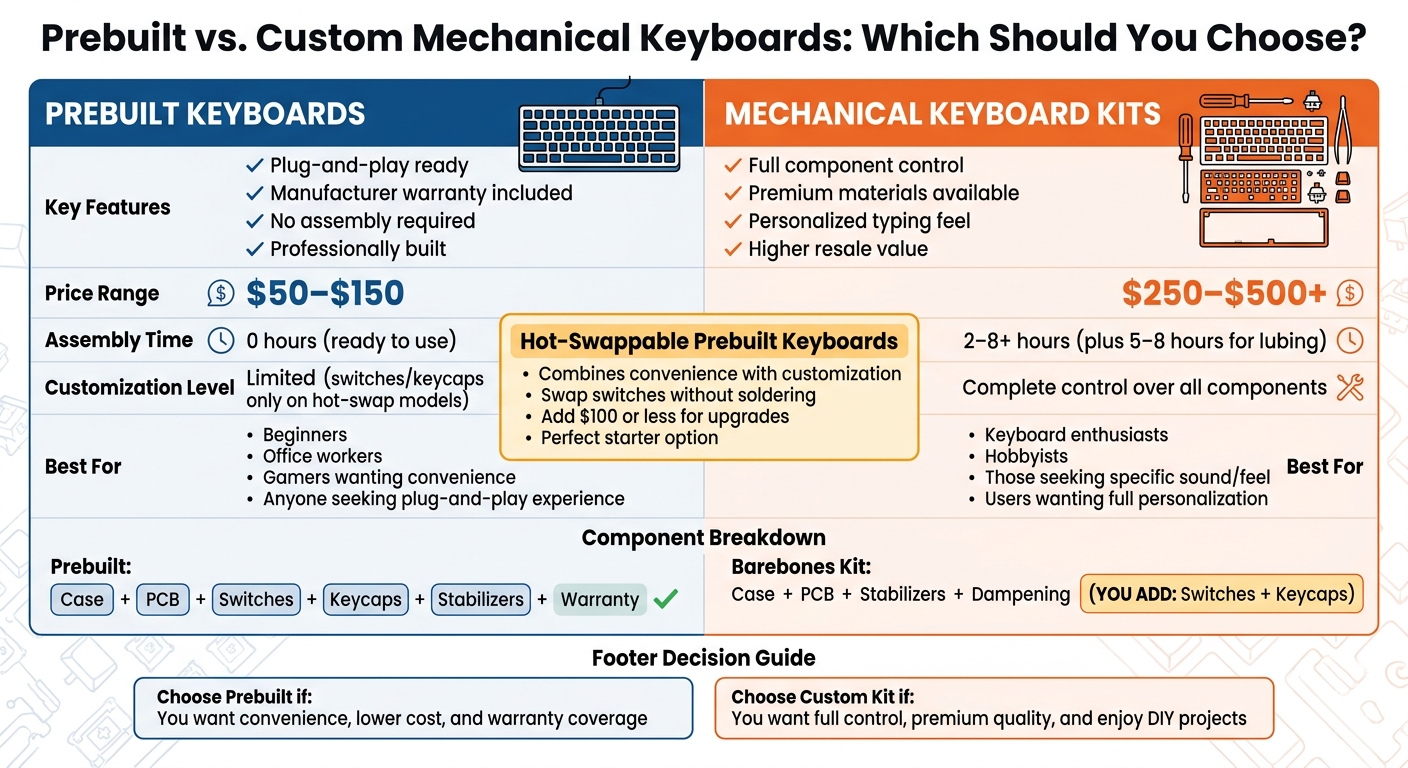
Prebuilt vs Custom Mechanical Keyboards Comparison Guide
BUILD vs BUY Custom Mechanical Keyboard!
sbb-itb-3cb9615
What Are Prebuilt Keyboards?
A prebuilt mechanical keyboard is a ready-to-use option that comes fully assembled right out of the box. Unlike keyboard kits that require assembly, prebuilt models include all the essential components - case, PCB (printed circuit board), switches, keycaps, stabilizers, and firmware - already in place. This plug-and-play setup makes them perfect for beginners or anyone who wants to skip the technical steps and dive straight into using a mechanical keyboard. As Tanveer Singh from XDA-Developers explains:
Pre-built keyboards offer excellent build quality and typing experience at great prices.
One of the perks of prebuilt keyboards is the manufacturer's warranty, which typically lasts at least a year, providing peace of mind and easy access to support if needed.
Today's prebuilt keyboards, even those priced as low as $60, often include features that were once exclusive to custom builds. Think gasket mounts, pre-lubed switches, wireless connectivity, and PBT keycaps. Many models also come with hot-swappable PCBs, allowing users to swap out switches without the need for soldering. This feature bridges the gap between convenience and customization, giving users a small taste of personalization.
Interestingly, the price difference between a barebones kit and a fully assembled prebuilt version is often minimal. Take the Keychron Q5 as an example: the barebones kit costs $185, while the prebuilt version is only $20 more at $205. For many, this small price increase makes prebuilts an appealing, cost-effective option for enjoying a high-quality keyboard without the extra effort.
While prebuilt keyboards excel in ease and practicality, custom keyboard kits cater to those seeking a more personalized and hands-on experience. Up next, we’ll dive into how custom kits unlock a whole new world of creativity and customization.
What Are Mechanical Keyboard Kits?
A mechanical keyboard kit, often called a "barebones kit", serves as the starting point for building your own custom keyboard. Unlike prebuilt keyboards that come fully assembled and ready to use, these kits include only the essential structural parts: the case, printed circuit board (PCB), stabilizers, and sound-dampening materials. You'll need to purchase and install the switches and keycaps yourself.
As Ismar Hrnjicevic, Senior Author at How-To Geek, puts it:
"Barebones kits typically come with all the essential components - the case, PCB, sound-damping materials, stabilizers, gaskets, etc. The only two components that are left out are the switches and keycaps, which you're supposed to buy and install yourself."
This setup eliminates the compatibility headaches often associated with fully custom builds, as the case and PCB are already matched for you.
Many modern kits feature hot-swappable PCBs, which make assembly much easier. Hot-swap sockets let you insert and replace switches without soldering, giving you the freedom to experiment with different switch types - linear, tactile, or clicky - until you find the one that suits your typing style. This flexibility means you can fine-tune your keyboard's feel and sound to your liking.
Customization doesn’t stop at switches. You can enhance your keyboard's sound and feel with options like PBT keycaps for a richer sound profile, foam dampening for quieter typing, and various mounting styles to adjust the overall typing experience. Additionally, open-source firmware like VIA or QMK allows you to remap keys and create custom macros, giving you full control over functionality. As Hrnjicevic points out, "while barebones kits can be pricey, you're essentially investing in better parts instead of paying for pre-assembly."
Next, we’ll dive into how these kits compare to prebuilt keyboards in terms of cost and customization potential.
Key Differences Between Prebuilt and Custom Kits
The main distinction between prebuilt keyboards and custom kits boils down to convenience versus control. Prebuilt keyboards are ready to go straight out of the box - just plug them in and start typing. In contrast, custom kits allow you to fine-tune nearly every aspect of your keyboard, from its aesthetics to its performance. Let’s take a closer look at the differences, starting with assembly and how it affects your overall typing experience.
Assembly requirements are where the two options diverge the most. Prebuilt keyboards are designed for ease - no technical skills or setup time required. Custom kits, however, demand a time investment ranging from 30 minutes to as much as 24 hours, depending on the complexity of the build and your familiarity with the process.
When it comes to typing feel, prebuilt keyboards offer a consistent, factory-set experience that suits most users. On the other hand, custom kits let you tweak every tactile aspect. For example, you can choose different plate materials: aluminum for a stiffer feel, FR4 for a balanced experience, or polycarbonate for a softer, more flexible typing experience. This level of customization allows you to fine-tune travel distance, feedback, and weight to perfectly suit your preferences. As Tanveer Singh, a PC building expert, explains:
The degree of control you have when building your own keyboard is unmatched, but I can customize most things on my hot-swappable pre-built board anyway.
Component quality is another area where custom kits often stand out. These kits typically feature high-end materials like precision-machined aluminum cases and premium switches, which can range in price from $0.26 to $1.12 each. Stabilizers in custom builds can also be hand-tuned, clipped, and lubed for a smoother feel, whereas prebuilt keyboards often come with stabilizers that feel inconsistent or rattly. These differences in quality can significantly influence your decision.
Comparison Table
| Factor | Prebuilt Keyboards | Mechanical Keyboard Kits |
|---|---|---|
| Customization Level | Limited (switches/keycaps only on hot-swap models) | Full control over all components |
| Typing Feel | Standardized factory feel | Fully customizable (flex, weight, travel, etc.) |
| Assembly Required | None (plug-and-play) | DIY assembly required |
| Switch Options | Pre-selected or hot-swap compatible | Any MX-style or specialized switch |
| Keycap Variety | Stock sets (often ABS or basic PBT) | Unlimited (boutique, artisan, various profiles) |
| Stabilizers | Pre-lubed (variable quality) | Hand-tuned, clipped, premium lubed |
| PCB Type | Fixed or hot-swap | Hot-swap, solderable, VIA/QMK compatible |
| Case Materials | Plastic or thin aluminum | CNC aluminum, resin, brass, polycarbonate |
Cost Analysis: Prebuilt vs. Kits
Now that we've gone over the components, let's break down the costs of prebuilt keyboards versus custom kits.
Prebuilt keyboards are generally more budget-friendly upfront. They typically range from $50 to $150 and come fully assembled - no extra purchases required. On the other hand, custom builds start with a barebones kit, which only includes essentials like the case, PCB, stabilizers, and dampening materials. You'll need to buy switches and keycaps separately.
The Extra Costs of Custom Builds
Custom keyboards come with added expenses. For starters, a kit generally requires 70 to 110 switches, which can cost anywhere from $0.30 per switch for budget options to $1.12 or more for premium ones. Keycaps are another major expense, with budget PBT sets priced at $40–$60 and premium GMK sets going for $120–$180. As Ismar Hrnjicevic from How-To Geek points out:
Custom mechanical keyboards are expensive due to the use of premium materials and pricey components like switches and keycaps.
Beyond the components, there are other costs to consider. Shipping from multiple vendors can add $30 to $60, tools like switch openers or soldering irons range from $40 to $80, and lubricants for switches cost $15 to $25. Altogether, a quality custom keyboard typically costs $250 to $500, while high-end builds with exotic materials can go beyond $700. These higher costs reflect the use of top-tier materials, such as CNC-machined aluminum cases and upgraded stabilizers, which are rarely found in prebuilt models.
For a middle ground, you might consider a hot-swappable prebuilt keyboard. By upgrading its switches and keycaps, you can achieve a "semi-custom" feel for under $100 extra.
Pricing Comparison Table
| Keyboard Type | Base Price | Additional Components Needed | Total Beginner Cost (Est.) |
|---|---|---|---|
| Prebuilt Keyboard | $50.00 – $150.00 | None (Ready to use) | $50.00 – $150.00 |
| Freebird60 Kit | $160.00 | Switches, Keycaps, Tools, Lube | ~$270.00+ |
| Freebird75 Kit | $199.00 | Switches, Keycaps, Tools, Lube | ~$310.00+ |
| High-End Custom | $250.00 – $300.00 | Premium Switches, GMK Keycaps, Tools | $500.00 – $700.00+ |
Pros and Cons of Prebuilt Keyboards vs. Kits
Once you've looked at the differences in components and pricing, it's time to weigh the practical pros and cons of prebuilt keyboards and custom kits. Each option has its own advantages and drawbacks, and understanding these tradeoffs can help you decide which one works best for your needs.
Prebuilt keyboards are all about convenience. They're ready to use straight out of the box, cost less, and don't require any technical know-how. Plus, most come with a one-year manufacturer's warranty for peace of mind. On the downside, customization options are limited - usually just switch and keycap changes on hot-swappable models. Their standardized design can also lead to issues like rattling stabilizers.
Custom keyboard kits, on the other hand, are all about control. You can choose every component, from the mounting style to the sound-dampening materials and firmware. As MKB Guide puts it:
Custom builds are hobby projects as much as functional tools. If you enjoy the process and customization for its own sake, they're deeply satisfying.
However, custom builds require a significant time investment. Assembly alone can take 2–3 hours, and lubing switches might add another 5–8 hours. Cost is another factor - while prebuilt keyboards typically range from $50 to $150, custom builds, such as the KBDfans KBD75 kit, usually start at $250 and can go up to $500.
Interestingly, modern prebuilt keyboards have started to close the quality gap. Many now include features like gasket mounts, pre-lubed switches, and sound-dampening foam - features that used to be exclusive to custom builds. Hot-swappable prebuilt models even offer a "semi-custom" experience. For an additional $100 or less, you can upgrade switches and keycaps while still enjoying warranty coverage.
To make things easier, here's a quick comparison of the pros and cons:
Pros and Cons Comparison Table
| Option | Pros | Cons |
|---|---|---|
| Prebuilt Keyboards | • Ready to use • Affordable ($50–$150) • Includes warranty • Professionally assembled |
• Limited customization • Lower resale value • Standardized design • Stabilizers may rattle |
| Mechanical Keyboard Kits | • Fully customizable • Higher build quality • Good resale value • Great for hobbyists |
• Expensive ($250–$500+) • Time-consuming assembly (5–11 hours) • No unified warranty • Possible compatibility issues |
Who Should Choose Prebuilt vs. Custom Kits?
Deciding between a prebuilt or custom keyboard kit comes down to your budget, technical skills, and how much you care about personalization.
Prebuilt keyboards are a great option for beginners, office workers, and gamers who want something functional right out of the box. As Tanveer Singh, a tech writer and PC builder, puts it:
Until you develop a deeper feel for what you prefer in a mechanical keyboard and can't resist building your own, a pre-built keyboard can easily last you for years without feeling like a compromise.
For $50–$150, prebuilt keyboards offer solid performance, manufacturer warranties, and no assembly hassles. Gamers, in particular, can enjoy features like low-latency performance and built-in RGB lighting. If you’re someone who values convenience over customization, a prebuilt keyboard might be the perfect fit. However, if you want total control over every detail, custom kits are worth exploring.
Custom kits cater to enthusiasts who love personalization. Whether you’re after a specific typing feel - like the deeper "thocky" sound or the sharper "clacky" feedback - or you want to experiment with materials like FR4 or polycarbonate plates, custom builds let you create the exact experience you’re looking for. That said, they require a bigger commitment of time and money, with costs ranging from $150 to over $500, plus hours of assembly.
If you're not ready to dive into a full custom build, hot-swappable prebuilt keyboards offer a flexible middle ground. These allow you to swap out switches and keycaps without dealing with more complex components like PCBs and cases. As Singh explains:
The degree of control you have when building your own keyboard is unmatched, but I can customize most things on my hot-swappable pre-built board anyway.
Many enthusiasts start with a hot-swappable prebuilt and gradually move to custom builds as they refine their preferences. Ultimately, there’s no wrong choice - just the one that matches your current needs and interests.
Building Your First Custom Keyboard with KeebsForAll
If you're ready to dive into the world of custom keyboards, KeebsForAll has made the process simple and approachable. Their Freebird series offers affordable, well-crafted options, ranging from compact 60% layouts to full tenkeyless (TKL) designs. Each Full Kit includes everything you need: a CNC-machined aluminum case, hotswappable PCB, switch plate, Durock V2 stabilizers, silicone dampeners, and all the necessary mounting hardware. No need to piece together parts from multiple sources - everything is bundled for convenience.
The Freebird75 Full Kit ($199.00) is a great choice for beginners. Its 75% layout strikes a balance between compactness and functionality, preserving essential keys like the function row. You can tailor your build by selecting plate materials - aluminum for a firmer feel or POM/PC for a softer, more flexible typing experience. Additionally, you can choose your preferred mounting style, such as Top Burger or Gummy O-Ring, to fine-tune the keyboard's performance. The hotswappable PCB, compatible with QMK/VIA software, eliminates the need for soldering. Simply snap in your switches and customize key mappings effortlessly.
Assembly Made Easy
Putting your keyboard together is a straightforward process:
- Start by installing the stabilizers on the PCB.
- Place the silicone dampener into the case to minimize hollow sounds.
- Connect the daughterboard using the JST cable.
- Choose your mounting style and insert the switches into the hotswap sockets.
- Add your keycaps and use VIA software to configure the layout.
The whole process typically takes just a few hours. Plus, if you run into any questions, the KeebsForAll Discord community is there to help.
Options for Every Budget
If you're looking for a more budget-friendly option, the Freebird60 Full Kit starts at $160.00 and offers a minimalist 60% layout. For those who prefer a larger keyboard, the Freebird TKL Full Kit ($249.99) delivers a classic tenkeyless design. KeebsForAll also provides free shipping on orders over $70 within the U.S., making it even easier to get started. Whether you opt for in-stock items or participate in group buys for the best deals, KeebsForAll offers flexibility. And if you miss a group buy, their KFA Marketplace allows you to purchase verified, warehouse-checked products from other enthusiasts.
"Continuing our mission to make the keyboard hobby more accessible, we are excited to introduce the FreeBird75... designed to provide a customizable and flexible typing experience." – KeebsForAll
With a range of kits and strong community support, KeebsForAll ensures your first custom keyboard build is an enjoyable and rewarding experience.
Conclusion: Making the Right Choice
Your decision between a prebuilt keyboard and a custom kit comes down to your priorities. Prebuilt keyboards are all about convenience - just plug them in, and you're good to go. They typically include manufacturer warranties and fall within a price range of $50 to $150, making them a great option for beginners or anyone who wants a dependable keyboard without the fuss of assembly.
On the other hand, custom kits offer complete control over every detail, from switches to mounting styles. While they require more time and a higher initial investment, they deliver a personalized typing experience that’s hard to beat.
If you’re chasing a specific sound profile or want to fine-tune the feel of every keystroke, a custom kit is the way to go. As hardware reviewer Abdul Hannan puts it:
A custom keyboard designed by an enthusiast will almost always sound better than a pre-built one by any major brand.
However, Tanveer Singh offers a different perspective:
Until you develop a deeper feel for what you prefer in a mechanical keyboard and can't resist building your own, a pre-built keyboard can easily last you for years without feeling like a compromise.
There’s also a middle ground: hot-swappable prebuilt keyboards. These allow you to switch out keycaps and switches without diving into a full custom build.
Ultimately, your choice depends on whether you value simplicity or customization more. The balance between cost and personalization will guide you to the perfect keyboard for your needs.
If you’re ready to dive in, KeebsForAll has you covered. They offer everything from affordable Freebird kits starting at $160.00 to individual components like switches, stabilizers, and keycaps. The perfect keyboard is one that matches your workflow, budget, and personal style.
FAQs
What parts do I still need for a barebones kit?
To finish building a basic mechanical keyboard kit, you'll need to buy a few extra components: switches, keycaps, and stabilizers. Stabilizers are crucial for larger keys like the spacebar, Enter, and Shift to ensure smooth and stable operation. Depending on the kit, you might also need a plate if it's not already included. Typically, the kit will come with the case and PCB, so those are covered.
Do I need soldering to build a custom keyboard?
You don’t always need to break out the soldering iron to build a custom keyboard. It all comes down to the components you pick. Many kits now come with hot-swappable PCBs, making it easy to assemble your keyboard without any soldering - a perfect option for beginners. On the other hand, if you go with a traditional PCB that isn’t hot-swappable, you’ll need to solder the switches and other parts to get everything working.
Is a hot-swappable prebuilt enough for customization?
A hot-swappable prebuilt keyboard is a great choice if you’re looking for easy customization without the hassle of soldering. These keyboards let you swap out switches effortlessly, giving you the freedom to tweak the typing feel and sound to your liking. While they don't offer the same level of customization as a DIY build, they’re perfect for users who want straightforward upgrades and a touch of personalization.