
Soldered vs Hot-Swappable: Key Differences
[ Back to Mechanical Keyboards 101 ]When choosing a mechanical keyboard, the decision between soldered and hot-swappable switches is crucial. Here’s a quick summary:
- Hot-swappable switches: Easy to install or replace without tools or technical skills. Ideal for experimenting with different switch types. However, they are slightly more expensive and have limited layout options.
- Soldered switches: Offer strong, permanent connections, supporting a wider range of layouts. They are more affordable but require soldering skills for installation or repairs, making them less beginner-friendly.
Quick Comparison:
| Feature | Hot-Swappable | Soldered |
|---|---|---|
| Installation | Simple, no tools required | Requires soldering iron |
| Customization | Switches can be swapped easily | Fixed once soldered |
| Durability | Limited socket lifespan | Permanent connection |
| Layout Flexibility | Fixed layouts | Supports advanced layouts |
| Price Range | $50–$300+ | $30–$150 |
Choose hot-swappable if you want flexibility and ease of use. Go for soldered if you prefer stability, advanced layouts, and lower costs. Your choice depends on how much customization and effort you’re willing to invest.
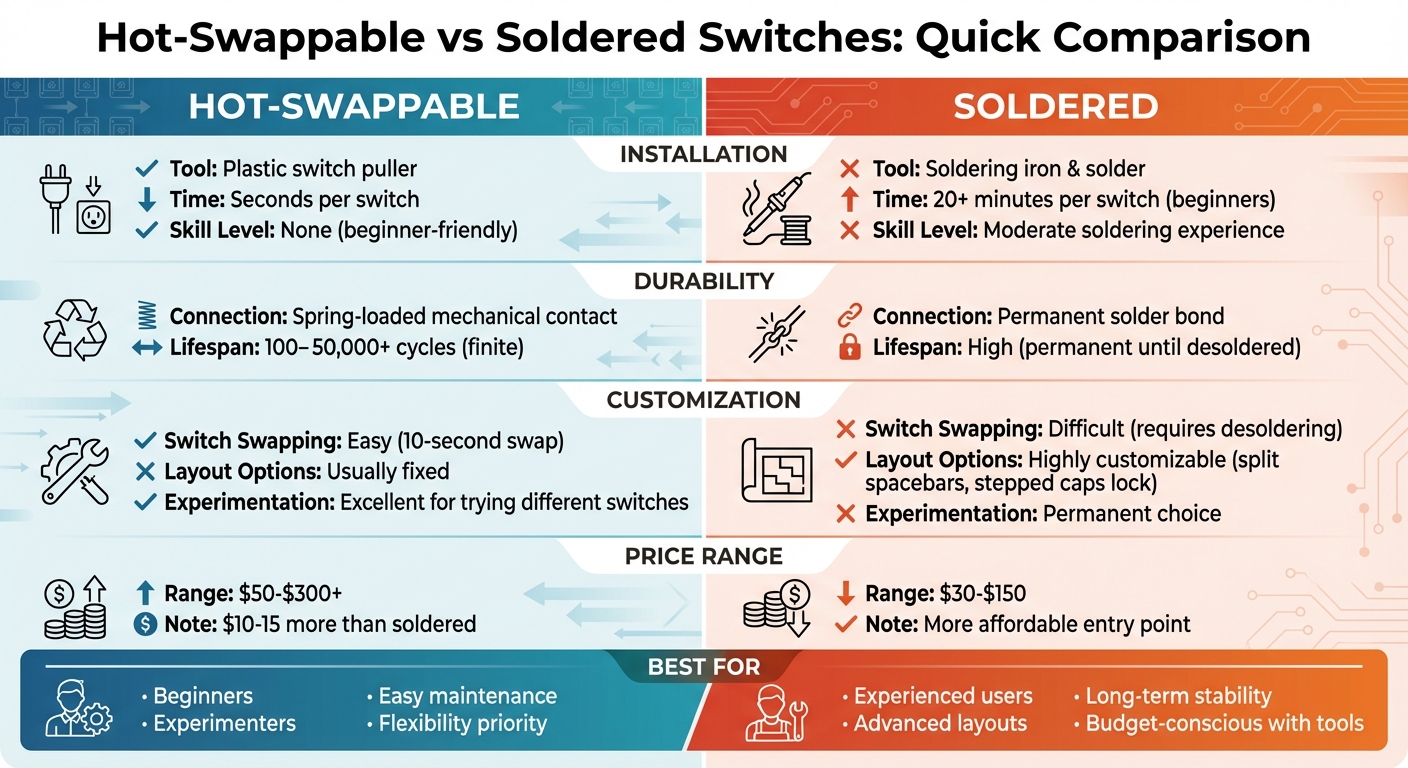
Hot-Swappable vs Soldered Keyboard Switches Comparison Chart
Hotswap PCB vs Soldered PCB | Pros & Cons
sbb-itb-3cb9615
What Are Hot-Swappable Switches?
Hot-swappable switches bring a whole new level of convenience to mechanical keyboards by allowing instant customization without the need for soldering.
These switches are designed to clip into special sockets on the keyboard's PCB (printed circuit board) instead of being permanently soldered. Think of them like plug-and-play components - you can pop them in or out without needing technical skills or tools like a soldering iron.
The PCB is equipped with metal sockets, often Kailh or Gateron, which use spring-loaded clips (sometimes called "jaws") to hold the switch's metal pins securely in place. This ensures a reliable electrical connection without requiring soldering.
How Hot-Swappable Switches Work
Each socket has a plastic housing and metal contacts. When you insert a switch, its pins slide into the socket and are gripped by the clips, completing the circuit - no heat or solder needed.
Removing a switch is just as easy. Using a simple plastic switch puller, you grip the top and bottom of the switch and lift it straight out. The spring clips release the pins, and the switch comes free in seconds. It's important to pull vertically to avoid bending the pins or damaging the socket's clips.
Benefits of Hot-Swappable Switches
The standout benefit is how accessible they make custom keyboards. You don’t need to learn soldering - just follow basic instructions, and you’re good to go. This has opened the keyboard hobby to a much wider audience, transforming what used to be a technical skill into something anyone can try.
For enthusiasts, hot-swappable boards allow you to experiment with different switch types - linear, tactile, or clicky - on the same keyboard. This process, often called "switch rolling", helps you discover what feels best for you. You can even mix and match switches, using heavier ones for modifier keys and lighter ones for the main typing keys.
Maintenance is another major plus. If a switch becomes faulty or starts acting up, you can replace it in seconds. Compare that with the time-consuming process of desoldering switches on a traditional board, and the convenience is clear.
Downsides of Hot-Swappable Switches
One drawback is the lack of layout flexibility. Most hot-swap PCBs are designed for specific layouts, so if you’re looking for advanced options like split spacebars or stepped caps lock, you’ll likely need a soldered board.
Socket durability is another factor. Kailh sockets are rated for over 100 swap cycles, while Gateron v2 sockets can handle more than 50,000 cycles. For most users, this is plenty, but frequent swapping can eventually wear out or loosen the sockets.
"The downside to this is that you are locked to only certain layouts as most hot-swap PCBs do not support more than the layout provided to you originally." - Preston S., Kinetic Labs
Careful handling is essential during installation. Always support the back of the PCB with your hand when pushing a switch into place to avoid damaging the sockets. Also, make sure the switch pins are straight before inserting them - bent pins can harm the socket permanently.
Next, let’s dive into soldered switches and see how they stack up.
What Are Soldered Switches?
Soldered switches are mechanical keyboard switches that are permanently attached to the PCB (printed circuit board). Unlike hot-swappable boards, where switches clip into sockets, soldered switches are fixed in place by melting metal to create a secure bond between the switch and the PCB. Before hot-swap technology became popular around 2018, soldered switches were the standard for mechanical keyboards. This method is known for its stability and reliability since the connection is rigid and less prone to issues over time.
How Soldering Works
Soldering involves using a soldering iron to melt solder wire - a metal alloy made of tin and lead (or lead-free alternatives) - to create both an electrical and physical connection between the switch leads and the PCB's through-holes. Here's a simplified breakdown of the process:
- Switches are aligned and snapped into the plate or PCB to ensure proper positioning.
- A soldering iron heats both the copper pad on the PCB and the switch lead at the same time.
- Once the joint reaches the right temperature - about 422.6°F (217°C) for lead-free solder or 361°F (183°C) for leaded solder - the solder wire is fed into the heated area.
- The solder melts and flows into the through-hole, forming a small, cone-like bond around the lead without any gaps.
- After cooling, residual flux is cleaned off to protect the PCB from corrosion.
This process requires precision and care to avoid damaging the keyboard's components.
Benefits of Soldered Switches
One of the main advantages of soldered switches is their durability. Since the connection is a solid metal bond, it doesn’t wear out over time like spring-loaded clips in hot-swap sockets. The switches stay firmly in place, making them more resistant to loosening or popping out during heavy use or transport. Enthusiasts often praise soldered keyboards for their consistent typing feel and better sound transmission.
Soldered PCBs also support a broader range of layouts, including advanced configurations like split spacebars and stepped caps lock, which are not typically available with hot-swap boards.
"The benefit of using a soldered keyboard is basically that you have a wide variety of layout options to choose from" - Preston S., Kinetic Labs
Another plus is cost. Soldered keyboards tend to be more affordable, with prices ranging from $30 to $150. In comparison, hot-swap boards often come at a premium, starting around $50 and going well over $300.
Downsides of Soldered Switches
The main downside of soldered switches is the technical skill required for installation and repairs. Soldering can be daunting for beginners, as it requires precise heat control, careful technique, and safety precautions. Soldering irons can reach temperatures of up to 842°F (450°C), posing a risk of damaging components if mishandled. Working in a well-ventilated area and wearing safety gear is essential.
Replacing a single switch on a soldered board can also be a challenge. The process of desoldering an old switch and soldering a new one can take over 20 minutes and comes with the risk of damaging the PCB by lifting a pad during the repair. For those new to mechanical keyboards or without access to soldering tools, soldered boards might not be the best choice.
Next, we’ll look at how these features compare to hot-swappable switches to give you a clearer picture.
Comparing Soldered and Hot-Swappable Switches
This section takes a closer look at how soldered and hot-swappable switches stack up against each other in key performance areas that influence your day-to-day experience.
Ease of Use and Installation
The complexity of installation is a major consideration when choosing between these two options.
Hot-swappable switches are incredibly straightforward to install. You simply align the pins and press the switch into place, a process that takes just seconds. All you need is a plastic switch puller, and swapping switches later is just as easy - no tools or extra effort required.
In contrast, soldered switches demand a lot more effort and skill. Soldering each switch can take even experienced users over 20 minutes. There's also the risk of damaging the PCB if the soldering iron is too hot or applied for too long. Fixing such damage often involves desoldering the affected switch, which requires specialized tools and a lot of patience - or, in some cases, replacing the entire keyboard.
Durability and Stability
The way switches connect to the PCB plays a big role in their reliability over time.
Soldered switches create a permanent bond with the PCB, ensuring a stable and consistent typing experience. This solid connection makes them highly reliable, even under heavy use or frequent transportation.
Hot-swappable switches, on the other hand, rely on spring-loaded metal contacts to grip the pins. While these sockets have improved a lot - some are rated for thousands or even tens of thousands of cycles - they do have a limited lifespan. The most common failure point is the solder joint that attaches the socket to the PCB, which can develop hairline cracks after repeated switch changes. For gamers who rely on ultra-responsive setups, such as 8000Hz polling rates, even minor issues like loose sockets or oxidation can lead to problems like signal jitter or dropped inputs.
Customization Flexibility
The ability to customize your keyboard varies significantly between these two options.
Hot-swappable keyboards are perfect for experimenting. They let you try different types of switches - linear, tactile, or clicky - without committing to a permanent setup. You can even mix and match switches on the same board, such as using linears for gaming keys and tactiles for typing, to find your ideal combination.
Soldered boards, however, often allow for more advanced layouts. They can support configurations like split spacebars or stepped caps lock keys, which are typically not possible with hot-swap PCBs. Most hot-swap boards are limited to the layouts they were originally designed for.
Cost Differences
Price is another critical factor to weigh when deciding.
Soldered keyboards are generally more affordable, with prices ranging from $30 to $150. Hot-swappable boards tend to be pricier, starting around $50–$80 for budget models and going up to $200–$300 or more for premium builds. The extra cost comes from the added complexity of including hot-swap sockets and their precise installation. That said, the price difference has narrowed in recent years, often amounting to just $10–$15 more for hot-swap versions.
Here’s a side-by-side comparison to make things clearer:
| Feature | Hot-Swappable Switches | Soldered Switches |
|---|---|---|
| Installation Tool | Plastic switch puller | Soldering iron & solder |
| Time per Switch | Seconds | 20+ minutes (for beginners) |
| Technical Skill | None (beginner-friendly) | Moderate (soldering experience) |
| Connection Type | Spring-loaded mechanical contact | Permanent solder bond |
| Durability | Finite (100–50,000+ cycles) | High (permanent until desoldered) |
| Layout Options | Usually fixed | Highly customizable |
| Repairability | Easy (10-second swap) | Difficult (requires desoldering) |
| Typical Price Range | $50–$300+ | $30–$150 |
If you prioritize ease of use and enjoy the flexibility to experiment with switches, a hot-swappable keyboard might be ideal. On the other hand, if you're after specific layouts or long-term durability at a lower cost, a soldered keyboard could be the better choice.
Which Option Is Right for You?
Deciding between hot-swappable and soldered switches comes down to your experience level with mechanical keyboards and what features matter most to you.
When to Choose Hot-Swappable
Hot-swappable keyboards are a great starting point for beginners. They allow you to try out different switch types - linear, tactile, or clicky - without committing to a specific setup. This flexibility makes it easier to discover your preferences without investing in multiple keyboards.
"Hot-swap capability is what lets you actually figure out what you like without buying three different keyboards to get there." - mkbguide.com
From a budget perspective, hot-swap boards can save money in the long run. While they might cost $10–$15 more upfront than soldered boards, you won’t need to buy soldering tools, which can range from $30–$50 for a decent setup. Options like the Royal Kludge RK84 ($50–$80) or the mid-range Keychron V-series ($100–$180) offer excellent value. For secondhand deals, platforms like KFA Marketplace are worth exploring.
When shopping for hot-swap boards, look for models with Kailh or Gateron sockets rather than generic friction-fit designs. Also, ensure the board supports 5-pin switches for greater compatibility. However, if you have specific advanced needs, a soldered board might be a better fit.
When to Choose Soldered
Soldered keyboards are ideal for experienced users who know exactly what they want. If you’ve already settled on a favorite switch type and value a stable, polished typing experience, soldered boards are worth considering. They also support advanced layouts, like split spacebars or stepped caps lock keys, which are often unavailable on hot-swap boards.
For those who already own soldering equipment, soldered boards can be a more affordable entry point. However, this cost-saving comes at the expense of long-term flexibility and the convenience of swapping switches without tools. If maintenance and adaptability are priorities, hot-swap designs might still be the better option.
Conclusion
When weighing the differences between soldered and hot-swappable switches, it really boils down to flexibility versus permanence. Hot-swappable keyboards offer the freedom to swap switches without tools, while soldered boards demand more time, effort, and technical skill for any changes.
For most people in 2026, hot-swappable keyboards strike the right balance between convenience and versatility. With the price difference now down to just $10–$15, these boards make it easier to experiment with various switches and stay updated with new advancements, making them a solid long-term choice.
On the other hand, soldered keyboards are better suited for seasoned users who have already settled on their preferred switches and are looking for a more direct connection. That said, the traditional edge soldered boards had in terms of sound and feel has largely diminished, as modern hot-swap designs often surpass them in performance.
There’s no one-size-fits-all answer here - the best choice depends entirely on your needs and where you are in your mechanical keyboard journey. If you’re still figuring out which switches you like, a hot-swap board offers the flexibility to explore. But if you’re confident in your preferences and working with a tight budget, a soldered board might work just fine. Keep in mind, though, that tastes can change, and hot-swap boards are designed to adapt as you do. Consider your habits and technical comfort level to make the most practical decision.
FAQs
Will hot-swap sockets wear out if I change switches a lot?
Hot-swap sockets are designed to endure repeated switch insertions and removals, with an average lifespan of about 100 cycles. Although they are sturdy, over time, frequent swapping can cause wear. To maintain their durability, it’s a good idea to limit unnecessary switch changes.
Can a hot-swappable PCB use both 3-pin and 5-pin switches?
Most hot-swappable PCBs are built to handle both 3-pin and 5-pin switches. Their hot-swap sockets are generally designed to accommodate either type, giving you the flexibility to personalize your keyboard with a variety of switches.
What tools do I need to replace a switch on a soldered keyboard?
To swap out a switch on a soldered keyboard, you'll need a few specific tools: a temperature-controlled soldering iron set between 390–410°F, a desoldering pump or solder wick to remove solder, precision tweezers for handling components, and isopropyl alcohol (90% or higher) to clean the PCB. A heat-resistant mat is also a good idea to protect your workspace. Taking your time and using the proper tools will help ensure you don't accidentally damage the PCB during the process.