
How Case Material Changes Keyboard Sound
[ Back to Mechanical Keyboards 101 ]When you type on a mechanical keyboard, the material of the case affects both the sound and feel of your keystrokes. Heavier materials like brass or steel create deeper, richer tones, while lighter plastics, such as ABS, often result in higher-pitched, hollow sounds. The case also impacts typing comfort, stability, and vibration management. For example:
- Aluminum: Crisp sound, rigid feel, durable but may "ping."
- Polycarbonate: Warm, muted sound with a softer typing experience.
- POM: Deep, quiet "thock" with excellent vibration absorption.
- Brass/Steel: Heavy, stable, with deep, resonant tones.
Factors like density, rigidity, and damping define how a keyboard sounds and feels. Modifications like adding foams can further fine-tune acoustics. Whether you prefer a bright "clack" or a deep "thock", the case material plays a central role in shaping your typing experience.
Keyboard Cases Sound Comparison: Acrylic, Wooden, or Aluminum?
sbb-itb-3cb9615
Key Factors That Affect Sound and Feel
The materials used in a keyboard play a huge role in shaping its acoustics and feel. Three key properties - density, rigidity, and damping - determine whether your keyboard produces a hollow sound or a deep, satisfying tone. By understanding these factors, you can get a good sense of how a keyboard case will perform before you even touch it. These technical details connect the science of materials with the experience of typing.
Density and Weight
Heavier materials lead to deeper, richer sounds. Dense options like brass (8.6 g/cm³) or steel (7.9 g/cm³) lower the vibration frequency, creating a deep "thock" with minimal echo. On the flip side, lighter materials such as polypropylene (0.9 g/cm³) or standard aluminum (2.7 g/cm³) often result in higher-pitched or hollow tones.
Weight also contributes to stability. A heavier keyboard won’t slide around during intense typing or gaming sessions, keeping things steady. For this reason, enthusiasts sometimes add brass or steel weights to aluminum cases to improve both sound and stability.
Take 7075 aluminum alloy as an example. It’s about 5% denser than the more common 6061 or 6063 alloys, giving it a noticeably fuller sound and stronger structural characteristics. That slight density difference can make a big impact on the overall typing experience.
Rigidity and Flex
Stiffer materials create sharper tones, while more flexible ones produce muted, cushioned sounds. This is measured by Young’s modulus: the higher the value, the stiffer the material. For example, stainless steel (195 GPa) delivers sharp, "clacky" keystrokes, whereas polycarbonate (2.3 GPa) provides a softer, bouncier feel with a warm "thock".
"Stiffer plate materials like brass and aluminum create a more rigid typing experience with a higher pitched sound, while more flexible plate materials like polycarbonate (PC) or polyoxymethylene (POM) create a softer typing feel with a deeper and dampened sound." - P K, LumeKeebs
Your choice of material can depend on how you use your keyboard. Gamers often prefer rigid materials like aluminum or carbon fiber because they offer a stable, responsive platform for fast keystrokes. On the other hand, office workers might lean toward softer materials like polycarbonate or POM, which reduce finger fatigue during long sessions. Flex-cut plates, which are thinner (1.2mm compared to the standard 1.6mm), increase flexibility but can produce a "thinner" sound unless paired with dampening foams. Rigidity not only impacts the sound but also ensures a responsive typing experience.
Damping Properties
Damping adds another layer of refinement to sound quality. It determines how quickly vibrations fade after each keystroke. Materials with high damping, like polycarbonate and POM, absorb vibrations rather than reflecting them, resulting in a controlled, muted sound. In contrast, metals like aluminum can produce noticeable resonance or "pinging" unless additional mass or damping materials are used to adjust the sound profile.
The internal design of a keyboard also plays a role. Smooth surfaces inside the case can cause sound waves to bounce around, creating echoes. High-end cases often include features like "acoustic ribs" - textured surfaces that scatter sound waves and prevent certain frequencies from building up. This explains why two keyboards made from the same material can sound entirely different depending on their internal design.
Even environmental factors like humidity and temperature can affect damping. For instance, high humidity can increase the mass of internal foams, softening the impact of each keystroke and slightly extending the sound’s decay. It’s a subtle difference, but one that keyboard enthusiasts often notice when comparing their setups across different seasons.
Common Case Materials and Their Characteristics
Let’s dive into the various materials used for keyboard cases and how they influence both sound and feel. Whether it’s the crisp tone of aluminum or the natural warmth of wood cases, each material adds a distinct character to your typing experience. Knowing these details can help you pick the perfect match for your preferences.
Aluminum Cases
Aluminum is the go-to material for many custom keyboard enthusiasts. It offers a metallic, crisp sound profile paired with a firm and stable typing experience - qualities that have set the standard for premium builds. Its rigidity contributes to a bright, controlled tone, but without proper internal damping, it may create a "pingy" resonance. Models like the Womier SK75 TMR highlight its popularity. Aluminum cases are typically finished with anodization or electrocoating, enhancing their appearance and texture.
However, there are some drawbacks. Aluminum can interfere with 2.4 GHz wireless signals if the receiver is located behind the case. Additionally, it tends to feel cold to the touch in winter, which might be uncomfortable for some users.
Polycarbonate Cases
Polycarbonate is known for its vibration-dampening qualities, resulting in a warm and muted sound profile. Its flexibility provides a softer, cushioned typing feel, which is easier on the fingers during extended use.
"Polycarbonate is favored by users who prefer a 'smooth, less clicky' experience." - Glacier PC Gaming
This material is also a favorite for RGB builds, as its light-diffusion properties allow backlighting to shine through beautifully.
POM Cases
POM (Polyoxymethylene) is a dense plastic that excels at sound dampening and offers a smooth typing experience. It absorbs vibrations to create a deep, quiet, and consistent keystroke sound that many enthusiasts describe as "buttery". If you’re chasing that deep "thock" sound but don’t want the weight of metal cases, POM provides a lightweight alternative with similar acoustic benefits. Its damping properties ensure keystroke vibrations fade quickly, delivering a controlled sound signature.
Acrylic Cases
Acrylic is prized for its transparency, making it a standout choice for RGB-focused builds. It produces a brighter, more "poppy" or hollow sound compared to materials like aluminum or POM. This lightweight plastic offers a soft typing feel similar to polycarbonate, though it’s more brittle and prone to cracking under stress. Its lower density and thinner construction contribute to a resonant tone that appeals to those who enjoy a livelier sound.
Brass and Steel Cases
Brass cases emphasize low frequencies, creating a deep "thock" with sustained resonance. Steel, being even stiffer, produces a lower, muted tone with minimal vibration.
"A brass keyboard sound is usually lower-pitched and weighty, with long sustain. Steel offers similar heft but can sound even brighter if not tuned carefully." - Ray Mamba, Head of Gaming Experience, MambaSnake
Both materials are exceptionally heavy, providing unmatched desk stability during intense typing or gaming sessions. However, their weight can make repositioning the keyboard a hassle. To strike a balance, many use brass or steel as internal weights instead of full-case materials.
Other Materials: Carbon Fiber and Wood
Carbon fiber offers a mix of stiffness and lightness, resulting in a neutral sound that bridges the gap between aluminum’s brightness and polycarbonate’s warmth. It provides a rigid, responsive typing platform, making it a favorite among gamers seeking precision.
Wood cases bring a natural aesthetic and warm tone to keyboards. Bamboo is valued for its low thermal conductivity and comfortable touch, while black walnut is appreciated for its durability and resistance to cracking. The Womier WD75 V2, rated 4.56/5 from 25 reviews, showcases the appeal of wooden cases. However, wood is sensitive to humidity and temperature changes, requiring extra care to avoid warping or cracking.
Next, consider comparing these materials side by side to find the perfect fit for your needs.
Comparing Case Materials
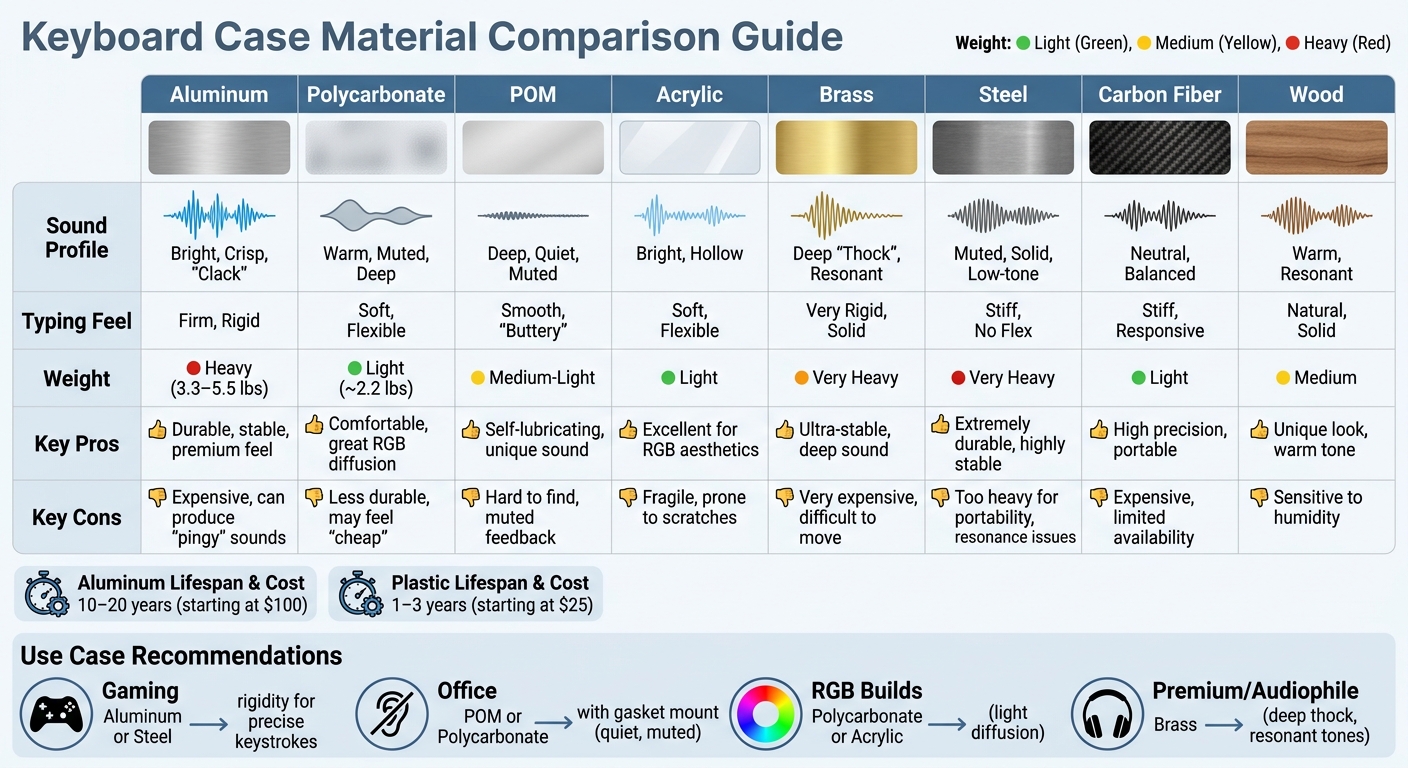
Keyboard Case Materials Comparison: Sound, Feel, Weight & Durability
Choosing the right material for your keyboard case can significantly affect its sound, typing feel, and practicality. Each material has its own set of characteristics, and understanding these differences can help you select the best option for your needs.
Metal cases, such as those made from aluminum, brass, or steel, typically weigh between 3.3 lbs and 5.5 lbs, offering exceptional stability during intense use. However, their weight makes them less portable. On the other hand, plastic cases, like polycarbonate, are much lighter - around 2.2 lbs - and are better suited for users who need a more mobile setup.
When it comes to durability, aluminum keyboards can last an impressive 10–20 years, while plastic models may only last 1–3 years before requiring replacement. This longevity comes at a cost, though - aluminum kits start at about $100, whereas plastic kits can be found for as little as $25.
Material Comparison Table
Here's a breakdown of how different materials compare in terms of sound, feel, weight, and practicality:
| Material | Sound Profile | Typing Feel | Weight | Pros | Cons |
|---|---|---|---|---|---|
| Aluminum | Bright, Crisp, "Clack" | Firm, Rigid | Heavy (3.3–5.5 lbs) | Durable, stable, premium feel | Expensive, can produce "pingy" sounds |
| Polycarbonate | Warm, Muted, Deep | Soft, Flexible | Light (~2.2 lbs) | Comfortable, great RGB diffusion | Less durable, may feel "cheap" |
| POM | Deep, Quiet, Muted | Smooth, "Buttery" | Medium-Light | Self-lubricating, unique sound | Hard to find, muted feedback |
| Acrylic | Bright, Hollow | Soft, Flexible | Light | Excellent for RGB aesthetics | Fragile, prone to scratches |
| Brass | Deep "Thock", Resonant | Very Rigid, Solid | Very Heavy | Ultra-stable, deep sound | Very expensive, difficult to move |
| Steel | Muted, Solid, Low-tone | Stiff, No Flex | Very Heavy | Extremely durable, highly stable | Too heavy for portability, resonance issues |
| Carbon Fiber | Neutral, Balanced | Stiff, Responsive | Light | High precision, portable | Expensive, limited availability |
| Wood | Warm, Resonant | Natural, Solid | Medium | Unique look, warm tone | Sensitive to humidity |
Recommendations Based on Use
For competitive gaming, materials like aluminum or steel provide the rigidity needed for precise and consistent keystrokes. These materials ensure stability even under intense use. Meanwhile, for office environments, quieter options like POM or polycarbonate paired with a gasket mount offer a muted typing experience that’s less likely to disturb colleagues.
Ultimately, the material you choose will directly influence your keyboard’s performance and how it feels to use, making it a crucial decision for customizing your setup with mechanical keyboard basics.
Modifying Sound with Case Materials and KeebsForAll Products

After exploring how different case materials influence the sound and feel of a keyboard, the next step is fine-tuning its acoustics with dampening modifications.
Adding Foams and Sound Dampeners
Once you've chosen your case material, foams and dampeners become essential for adjusting your keyboard's sound. These additions help address the hollow sound often associated with plastic cases and the sharp metallic tones common in metal cases.
Case and plate foams are designed to fill the space between the PCB and the bottom case, reducing unwanted reverb and creating a richer sound. For aluminum cases prone to metallic "ping", the force-break method is a simple yet effective fix. By placing small pieces of dampening material at key contact points, you can eliminate metal-on-metal resonance. Silicone dampeners are another excellent option for cutting resonance. For instance, KeebsForAll offers custom-fitted silicone dampeners for their Freebird TKL model at $10.50, showcasing how small tweaks can significantly enhance sound clarity.
Poron foam, typically 2mm to 3mm thick, has gained popularity for metal keyboards due to its effectiveness in deepening sound and reducing reverb. It costs around $9.99 and can be trimmed to fit most keyboard cases, provided there's adequate clearance at the bottom. For those who prefer a more "poppy" sound, the tape mod - applying tape to the back of the PCB - can raise the pitch and enhance the overall acoustic response.
Freebird Keyboard Kits
The Freebird series offers a great example of built-in sound customization. These kits feature CNC-machined aluminum cases, delivering the bright, controlled sound typical of metal while allowing for extensive customization. Pricing starts at $160.00 for the Freebird60, $199.00 for the Freebird75, and $249.99 for the TKL.
"Welcome to the board that started it all, the Freebird60 is sitting on the precedent of what we've always wanted, something that's easily affordable, accessible, and ready to go for anyone new to this hobby." - KeebsForAll
Each kit uses an O-ring tray mount system with rubber O-rings and 2M screws, providing a cushioned typing experience and an adjustable sound profile. The hot-swappable PCBs (compatible with QMK and VIA) make it easy to experiment with different switches without soldering, while the choice of plate materials - White POM, Black FR4, Aluminum, or Brass - gives you control over vibration and pitch. For example, POM and polycarbonate plates are especially effective for reducing sharp high-frequency sounds, resulting in a deeper "thocky" tone.
Other Accessories for Sound Optimization
Additional accessories can help you refine your keyboard's acoustics even further. Switch lubricants like Krytox 205 g0 ($7.95) reduce friction noise and smooth out mechanical action. For easier modification, the KFA Switch Opener ($19.00) streamlines the process. KeebsForAll also offers 60% Universal POM & FR4 Plates at $19.00, while brass plates - ideal for a higher-pitched and more rigid tone - are priced at $45.00.
The combination of mounting style and dampening materials can create the most noticeable acoustic changes. For instance, gasket mounts paired with soft foams or silicone deliver a cushioned, quiet typing experience. On the other hand, top mounts with minimal foam preserve a bright and clear sound. For polycarbonate cases, combining a gasket mount with thick case foams can deepen the tone and minimize vibrations. By using these targeted modifications and accessories, you can fine-tune your keyboard's sound to match your personal typing preferences.
Conclusion
When it comes to keyboards, the case material plays a huge role in defining its sound and feel. It influences everything from the acoustic profile to the tactile feedback of each keystroke. Denser materials like brass and steel produce rich, resonant tones, while lighter materials such as polycarbonate and POM soften vibrations for a gentler, muted sound. Aluminum, often the go-to for custom keyboards, strikes a middle ground, offering durability along with consistent sound performance.
Your choice should reflect the sound and feel you’re aiming for. Want that deep, satisfying "thock"? Pair heavier materials with dampening mods to accentuate lower frequencies. Prefer a "clacky" and bright tone? Aluminum or acrylic cases with a top mount will deliver the stiffness and sound reflection to achieve it. If portability is key, polycarbonate or magnesium alloys are excellent lightweight options that still feel high-quality.
Keep in mind, though, that the case material doesn’t work in isolation. The mounting style, plate material, and internal dampening all interact to shape the final sound profile. For instance, the mounting method and foam inserts can dramatically change how a case performs acoustically. By considering all these elements together, you can fine-tune your keyboard to match your personal preferences.
Whether you're assembling a new build with a Freebird kit or tweaking an existing setup, understanding how density, rigidity, and damping work together gives you the tools to craft a typing experience that’s uniquely yours.
FAQs
What case material is best for a deep “thock” sound?
Stiffer materials such as brass or aluminum are perfect for achieving that deep, satisfying “thock” sound. These materials amplify resonance, delivering a sharper and more defined tone. If you're aiming to fine-tune the sound profile of your mechanical keyboard, the choice of case material is a key factor in influencing both the acoustics and overall typing experience.
How can I reduce metal “ping” without changing the case?
To cut down on the metal "ping" sound without modifying the keyboard case, you can use dampening materials like foam or silicone. For instance, placing foam between the PCB and the case or adding silicone sheets can help absorb vibrations and reduce resonance. These materials are simple to install and can make a noticeable difference in reducing unwanted noise while letting you fine-tune the keyboard's sound to your liking.
Does case material affect wireless performance or portability?
Case material doesn’t play a direct role in wireless performance or portability, but it does shape the keyboard's sound and feel. For instance, aluminum, being a rigid material, tends to create sharper, higher-pitched sounds. On the other hand, plastic, which is softer, absorbs vibrations and results in a quieter, more subdued tone. While these differences are subtle, they can affect the perceived durability and portability of the keyboard.