
QMK vs. ZMK: Wireless Firmware Comparison
[ Back to Mechanical Keyboards 101 ]When deciding between QMK and ZMK for your custom mechanical keyboard, the choice comes down to whether you need wired or wireless functionality. Here's the key takeaway:
- QMK is ideal for wired keyboards. It offers advanced customization features, supports AVR and ARM microcontrollers, and integrates well with tools like VIA and Vial for real-time key remapping. However, its wireless capabilities are limited due to licensing restrictions and higher power consumption in wireless setups.
- ZMK is built for wireless keyboards. It supports Bluetooth Low Energy (BLE), delivers excellent battery life (up to 660 hours), and simplifies wireless split keyboard setups. Its power management and MIT license make it a strong choice for modern wireless builds, though it lacks some of QMK's advanced customization features.
Quick Comparison
| Feature | QMK Firmware | ZMK Firmware |
|---|---|---|
| Primary Focus | Wired / USB | Wireless / BLE |
| Wireless Split | No | Yes (Native) |
| Battery Life | ~180 hours (dual MCU) | ~660 hours (single MCU) |
| Customization Tools | VIA / Vial (Mature) | ZMK Studio (In Progress) |
| License | GPL | MIT |
QMK excels in wired builds with a rich feature set and GUI tools, while ZMK dominates wireless setups with power efficiency and BLE support. Choose based on your keyboard's intended use.
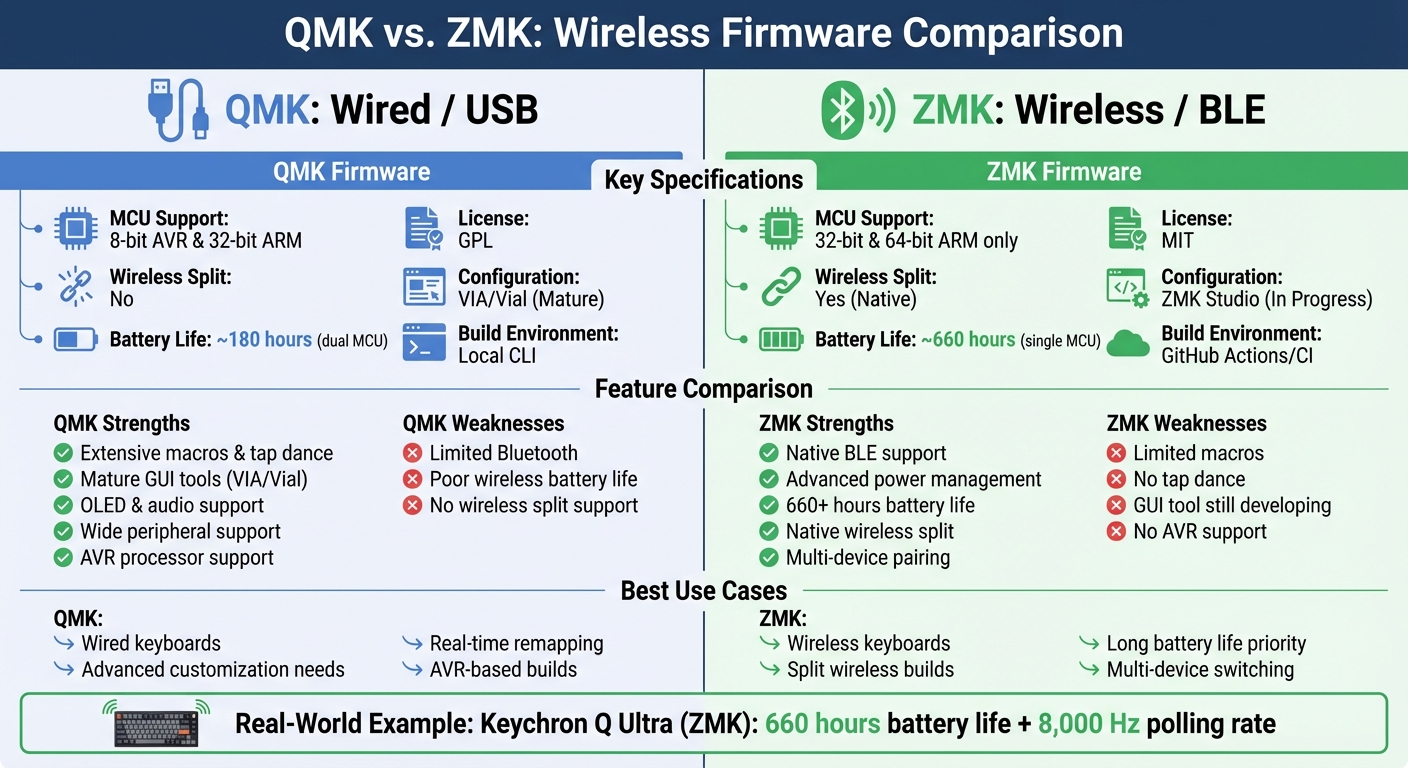
QMK vs ZMK Firmware Comparison: Features, Battery Life, and Use Cases
QMK Features and Capabilities
Feature Set
QMK stands out as the go-to firmware for wired custom keyboards, offering an impressive range of customization options that cater to even the most advanced keyboard enthusiasts.
One of QMK’s key strengths is its support for layered key functions, where the highest active layer takes precedence. It goes beyond simple key remapping with features like tap dance (assigning multiple functions to a key based on the number of taps), combos (triggering actions by pressing multiple keys together), and complex macro sequences. It also includes advanced input capabilities such as N-Key Rollover (NKRO), mousekeys for cursor control, leader keys for sequence-based actions, and an auto-shift feature.
From a hardware perspective, QMK integrates seamlessly with RGB lighting (both underglow and per-key backlighting), OLED displays, haptic feedback modules, audio output, and even MIDI devices. These features allow users to add visual and tactile elements, such as real-time data displays for WPM tracking, layer status, or custom animations. Additionally, QMK supports VIA and Vial, making configuration changes simple and eliminating the need for firmware reflashes.
QMK is compatible with both 8-bit AVR microcontrollers (like the ATmega32U4) and 32-bit ARM microcontrollers (such as the RP2040), giving builders the freedom to choose from a wide range of hardware. The firmware operates by continuously scanning the keyboard matrix - at least 10 times per second - using nearly 99% of the CPU’s processing power.
However, while QMK excels in wired setups, it faces challenges when it comes to wireless functionality.
Wireless Limitations
QMK’s architecture, though robust for wired keyboards, runs into hurdles with wireless builds. The firmware was originally designed for wired USB connections, and its wireless capabilities remain limited. The main issue stems from licensing conflicts, as Andrew Kannan from CannonKeys explains:
Most wireless chips that support BT wireless also use proprietary drivers. These drivers are incompatible with QMK's licensing - so they cannot be included in QMK's open-source code.
Since QMK operates under a GPL license, it cannot incorporate the proprietary drivers required by many Bluetooth Low Energy (BLE) chips. This forces builders to adopt a dual-microcontroller setup for wireless keyboards. In these setups, one microcontroller (like an Atmega or RP2040) runs QMK and handles key scanning, while a second microcontroller manages Bluetooth communication.
This dual-microcontroller approach has some notable downsides. First, it consumes more power, leading to significantly reduced battery life. Kannan highlights this issue:
Running two microcontrollers typically consumes more power than running just one - especially when one of the microcontrollers isn't that power-optimized. This is why many of the boards that offer QMK and wireless have poor battery life.
The numbers speak for themselves. A QMK-based wireless Keychron keyboard, equipped with a large 4,000 mAh battery, only manages around 180 hours of battery life. In contrast, a ZMK-based BakenekoGO achieves 800+ hours on a much smaller 200 mAh battery. The dual-microcontroller setup also introduces extra latency due to the additional communication step.
QMK's power management features further exacerbate these issues. The firmware lacks proper optimization for low-power sleep states, making it less efficient for battery-powered builds. On top of that, any keymap changes made via VIA or Vial still require a physical USB connection, which limits the convenience of wireless functionality.
ZMK Features and Capabilities
Built-In Wireless Support
ZMK stands apart from QMK by being designed specifically for wireless keyboards. Built on the Zephyr Real-Time Operating System, it prioritizes low-power performance from the ground up. Wireless connectivity isn’t just an add-on - it’s a core part of its design.
One of the standout differences is ZMK's use of the MIT license, which avoids the restrictions of QMK's GPL. This choice makes it easier to include proprietary Bluetooth Low Energy (BLE) drivers. As the ZMK documentation highlights:
"ZMK is designed for the future, and we believe the future is wireless. So power efficiency plays a critical role in every design decision."
ZMK supports modern 32-bit microcontrollers like the Nordic nRF52840 and Raspberry Pi RP2040, while dropping older 8-bit AVR chips to focus on energy-efficient hardware. It also offers built-in multi-device BLE connectivity, making it easy to pair with multiple devices and switch between them using profile slots. This seamless pairing improves both usability and responsiveness.
For split keyboards, ZMK simplifies wireless communication by assigning roles: one half acts as the "central" (connecting to the host), while the other functions as a "peripheral" (sending keystrokes). This setup streamlines split keyboard configurations. These features, combined with advanced power management, make ZMK a leader in wireless keyboard firmware.
Power Management
ZMK's focus on power efficiency is evident in real-world results. For instance, the Keychron Q Ultra keyboard, showcased at CES in January 2026, achieved an impressive 660 hours of battery life with ZMK firmware, even while maintaining an 8,000 Hz polling rate over a 2.4 GHz dongle.
The firmware incorporates three low-power modes to extend battery life:
- Idle State: Activates after 30 seconds of inactivity, turning off peripherals like displays and lighting while keeping Bluetooth connected for instant wake-up.
- Deep Sleep: Disconnects Bluetooth, clears RAM, and powers down peripherals. While it takes a few seconds to reconnect, this mode significantly conserves energy.
- Soft Off: Allows users to completely shut down the keyboard via a keybind or button, eliminating the need for a physical toggle switch.
ZMK also supports VCC shutoff for external peripherals, cutting power to components like RGB LEDs and OLEDs to prevent unnecessary battery drain. Users can manually activate this feature using the &ext_power EP_OFF command in their keymaps. These power-saving features are ideal for scenarios where long battery life is essential.
Development Workflow
ZMK streamlines development with a cloud-based workflow that eliminates the need for complicated local toolchains. Most users create a "ZMK Config" repository on GitHub, where GitHub Actions automatically compile firmware whenever updates are pushed.
The firmware uses Devicetree syntax for defining keymaps and hardware configurations, while Kconfig handles high-level settings like deep sleep or split keyboard functionality. Its modular structure separates the microcontroller (board) from the keyboard layout (shield), making it simple to swap controllers like the nice!nano between different builds.
A game-changing feature, ZMK Studio, enables real-time keymap updates over USB or BLE. This reduces the need for constant firmware flashing. For split keyboards, flashing the central half automatically updates the keymap for both sides. This streamlined approach makes ZMK accessible and efficient for both beginners and advanced users.
QMK vs. ZMK: Feature Comparison
Feature Comparison Table
QMK and ZMK each bring unique strengths to the table, catering to different needs in the keyboard community. While QMK excels in wired setups with its robust customization options, ZMK is built from the ground up for wireless functionality.
QMK has long been the go-to firmware for wired keyboards, offering a wealth of customization tools and support for both 8-bit AVR and 32-bit ARM processors. However, its Bluetooth capabilities are still in an experimental phase, and the GPL license it uses can complicate the integration of proprietary wireless drivers.
On the other hand, ZMK is designed with wireless performance as a priority. Built on the Zephyr RTOS, it supports modern 32-bit processors like the Nordic nRF52840 and the Raspberry Pi RP2040, ensuring efficient power management and seamless wireless operation. Additionally, its MIT license simplifies the use of proprietary Bluetooth stacks, making it a more accessible choice for wireless-focused projects.
Here’s a quick breakdown of their differences:
| Feature | QMK Firmware | ZMK Firmware |
|---|---|---|
| Primary Focus | Wired / USB | Wireless / BLE |
| MCU Architecture | 8-bit & 32-bit | 32-bit & 64-bit |
| Wireless Split | No | Yes (Native) |
| Power Management | Basic | Advanced |
| GUI Configuration | Mature (VIA / Vial) | Emerging (ZMK Studio) |
| License | GPL | MIT |
| Build Environment | Local CLI | GitHub Actions / CI |
| Macros/Tap Dance | Extensive | Limited |
These differences translate into distinct performance outcomes. For example, at CES in January 2026, Keychron's Q Ultra series - powered by ZMK - achieved an impressive 8,000 Hz polling rate over a 2.4 GHz dongle, paired with 660 hours of battery life. Such performance is out of reach for QMK, which relies on add-ons for wireless functionality.
Pros and Cons of QMK and ZMK
Strengths and Weaknesses Comparison
QMK shines with its broad feature set, offering support for OLED displays, audio features, tap dance, macros, and configuration through VIA or Vial - tools that make setup easier for users who prefer graphical interfaces over command-line options. However, its major shortcoming lies in wireless performance. Without advanced power management, battery life in wireless setups is notably poor, limiting its usability in such scenarios. This limitation sets the stage for a direct comparison with ZMK, which is designed with wireless functionality as a priority.
ZMK, built on Zephyr RTOS, is optimized for wireless efficiency, featuring native Bluetooth support, advanced power management, and sleep states. It also enables peripheral power-off and supports wireless split keyboards seamlessly. The permissive MIT license further simplifies integration with proprietary wireless stacks for manufacturers. However, ZMK has its own challenges. Its Kconfig-based configuration and reliance on GitHub Actions for builds present a steeper learning curve. Additionally, its GUI tool, ZMK Studio, is still in development, lagging behind the mature VIA/Vial tools available for QMK. Power-user features like dynamic macros and tap dance are also less developed.
| Feature | QMK Strengths | QMK Weaknesses | ZMK Strengths | ZMK Weaknesses |
|---|---|---|---|---|
| Wireless Performance | - | Limited/experimental Bluetooth; poor battery life | Native BLE; 660 hours battery life | - |
| Feature Richness | Extensive macros, tap dance, OLED support | - | - | Limited macros; no tap dance |
| Configuration | Mature VIA/Vial GUI | - | - | ZMK Studio still developing |
| Split Keyboards | Mature wired support | No wireless split support | Native wireless split | Wired split support is experimental |
| Learning Curve | Accessible local CLI | - | - | Steeper (Kconfig/GitHub Actions) |
| Hardware Support | AVR & ARM processors | - | - | 32-bit ARM only (no AVR) |
These comparisons underscore how each firmware's design influences its suitability for wireless keyboard builds.
"ZMK is designed for the future, and we believe the future is wireless. So power efficiency plays a critical role in every design decision." – ZMK Documentation
QMK struggles to replicate ZMK's wireless efficiency without resorting to complex workarounds, as demonstrated by ZMK-powered keyboards like the Keychron Q Ultra series.
sbb-itb-3cb9615
Keyboard Input Latency Compared: Wireless BLE ZMK, QMK, and Corsair
Use Cases for Wireless Keyboards
Choosing the right firmware largely depends on how you plan to use your keyboard. Let’s break down the strengths of each option based on specific scenarios.
QMK for Wired or Hybrid Builds
If you’re working with wired or hybrid keyboard setups, QMK is a standout choice. It supports real-time remapping through VIA or Vial GUIs, making it easy to tweak layouts without diving into code. Plus, it handles advanced features like Tap Dance sequences, dynamic macros, and complex combos - capabilities that are still catching up in ZMK.
For builds using 8-bit AVR controllers, QMK is your only option. It also supports a wider range of peripherals that ZMK doesn’t currently accommodate.
Developers appreciate QMK’s command-line interface (CLI) for its efficiency. Luckas Ranarison, a developer, shared his thoughts:
I still prefer QMK in that regard [flashing], since it provides everything needed to build and flash your keyboard with just a few commands, and you get faster build times with caching.
This local-first approach contrasts with ZMK, which prioritizes battery life and wireless efficiency. But when wireless performance is critical, QMK might not be the best fit.
ZMK for Fully Wireless Builds
For fully wireless setups, ZMK shines. Built on the Zephyr RTOS, it’s designed specifically for Bluetooth Low Energy (BLE) and power efficiency. A great example is Keychron's Q Ultra series, which boasts 660 hours of battery life and an 8,000 Hz polling rate over 2.4 GHz.
ZMK is the go-to choice for wireless split keyboards. It allows both halves to communicate via BLE, with one half acting as the "central" and the other as the "peripheral". While this BLE-based split protocol introduces an average latency of 3.75ms, it’s a small price to pay for the convenience of a cable-free experience. On the other hand, QMK relies on physical cables for split keyboards and lacks the power management features needed for long battery life.
Compatibility with KeebsForAll Products
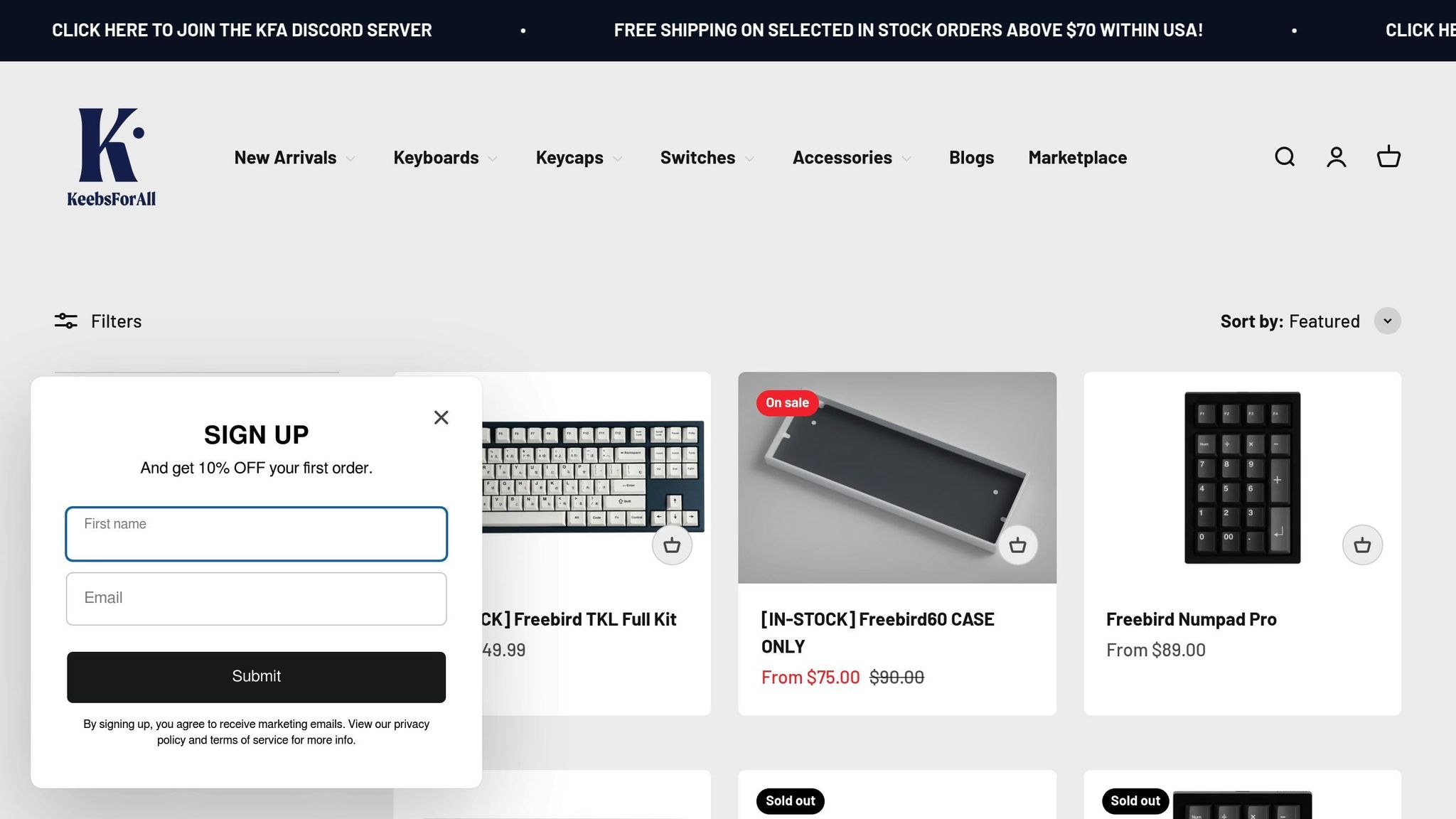
The Freebird series showcases how firmware selection - QMK for wired builds and ZMK for wireless setups - can align with the specific needs of different configurations. The Freebird lineup from KeebsForAll, including the Freebird60, Freebird75, and TKL kits, supports both QMK and ZMK firmware, depending on whether you prefer a wired or wireless build.
QMK for Freebird Wired Configurations
QMK is a perfect match for wired Freebird builds. With straightforward USB plug-and-play connectivity, there's no need for additional driver installations. The pricing for these kits is as follows: Freebird60 at $160.00, Freebird75 at $199.00, and TKL at $249.99.
One of QMK’s standout features is its support for VIA and Vial, allowing users to remap keys in real time through an easy-to-use graphical interface - no coding or compiling required. This makes QMK a favorite for enthusiasts who want features like macros, tap dance, combos, and multi-layer functionality. Plus, all Freebird kits come with hot-swappable PCBs, giving you the flexibility to switch out key switches without compromising QMK’s capabilities. For those seeking a wireless experience, the Freebird series also supports ZMK firmware.
ZMK for Freebird Wireless Configurations
When it comes to wireless builds, ZMK takes center stage with its focus on long battery life and smooth multi-device connectivity. Designed with BLE (Bluetooth Low Energy) in mind, ZMK ensures optimal battery performance for Freebird wireless setups. As highlighted in the ZMK documentation:
ZMK is designed for the future, and we believe the future is wireless. So power efficiency plays a critical role in every design decision.
ZMK’s low-power sleep modes and support for multiple Bluetooth profiles allow you to easily switch between devices like laptops, tablets, and smartphones. While ZMK Studio, its web-based tool for updating keymaps, may not yet rival VIA in terms of features, it still provides a user-friendly way to make adjustments. For split wireless builds, updating the firmware typically requires flashing only the central half (usually the left side), simplifying the process.
Conclusion
Deciding between QMK and ZMK ultimately comes down to whether you need a wired or wireless setup. QMK is the go-to option for wired keyboards, offering a mature interface for remapping keys and extensive customization options. If you're building a wired keyboard and want the flexibility to tweak settings without diving into code, QMK is an excellent choice.
On the other hand, ZMK is tailored for wireless keyboards. As the ZMK documentation states:
ZMK is designed for the future, and we believe the future is wireless. So power efficiency plays a critical role in every design decision.
With built-in Bluetooth Low Energy support, advanced power-saving modes, and impressive battery life, ZMK makes wireless keyboards practical for everyday use. Its permissive MIT license also enables manufacturers to incorporate proprietary wireless technology, something QMK’s GPL license doesn't allow.
For those using KeebsForAll's products, the distinction is clear. The Freebird series offers both wired and wireless options, with each configuration optimized for its specific firmware. Wired builds use QMK, featuring hot-swappable PCBs and full VIA support for real-time key remapping. Wireless builds rely on ZMK, taking advantage of Bluetooth connectivity and efficient power management, ensuring weeks or even months of use between charges.
Ultimately, each firmware shines in its intended domain. QMK is unmatched for wired performance and customization, while ZMK provides the efficiency and reliability needed for modern wireless setups. By determining whether you prioritize wired dependability or wireless convenience, you can choose the firmware that best suits your keyboard's purpose.
FAQs
Can I convert a QMK keyboard to wireless later?
Yes, making your keyboard wireless is possible, but it requires some hardware and firmware modifications. You'll need a Bluetooth-enabled controller like the nice!nano v2, a battery, and potentially a power switch. On the firmware side, you'll need to switch from QMK to ZMK, as ZMK is specifically built to support wireless functionality. While this process can be done with the right tools and components, it does involve assembling the hardware and reconfiguring your keymaps in ZMK to get everything working smoothly.
What hardware do I need to run ZMK?
To use ZMK firmware, you'll need hardware that aligns with its architecture. The essentials include a physical keyboard layout, a kscan driver (such as a GPIO matrix or direct wiring setup), a matrix transform, and a keymap. ZMK is designed to work with microcontrollers that are compatible with Zephyr RTOS. It supports both wired and wireless keyboards and can accommodate optional add-ons like encoders or lighting systems, depending on your keyboard's specific design.
Will I lose macros and tap-dance if I switch to ZMK?
Switching to ZMK doesn’t mean saying goodbye to your macros or tap-dance functions, but you will need to reconfigure them. ZMK fully supports these features, though its setup works differently compared to QMK. You’ll need to define these functions within ZMK’s keymap behaviors. While the capabilities are similar, making the switch involves reprogramming them to fit ZMK’s syntax and framework.