
Choosing the right keyboard layout comes down to size, functionality, and your daily needs. Here’s a quick breakdown:
- 60% keyboards: Compact (61 keys, ~11.5 inches wide), great for gaming and portability. No arrow keys or function row; relies heavily on shortcuts (Fn layers). Best for gamers or minimal setups.
- 65% keyboards: Adds arrow keys and a few navigation keys (67–68 keys, ~12 inches wide). Balances functionality and size, ideal for writers, coders, and casual users.
- 75% keyboards: Includes a function row and more navigation keys (82–84 keys, ~12.5 inches wide). Slightly larger but retains most essential keys. Perfect for programmers, office work, or productivity-focused users.
Quick Comparison:
| Feature | 60% Layout | 65% Layout | 75% Layout |
|---|---|---|---|
| Key Count | ~61 keys | 67–68 keys | 82–84 keys |
| Width | ~11.5 inches | ~12 inches | ~12.5 inches |
| Arrow Keys | No (Fn layer only) | Yes | Yes |
| Function Row (F1–F12) | No (Fn layer only) | No (Fn layer only) | Yes (Dedicated) |
| Navigation Cluster | None | Partial | Compressed |
| Learning Curve | 2–4 weeks | 1–2 weeks | 1–3 days |
Key takeaways:
- 60% is best for gamers and those who value desk space.
- 65% offers a middle ground, adding arrow keys while staying portable.
- 75% is ideal for productivity, with most keys available without shortcuts.
Choose based on your workflow and space needs.
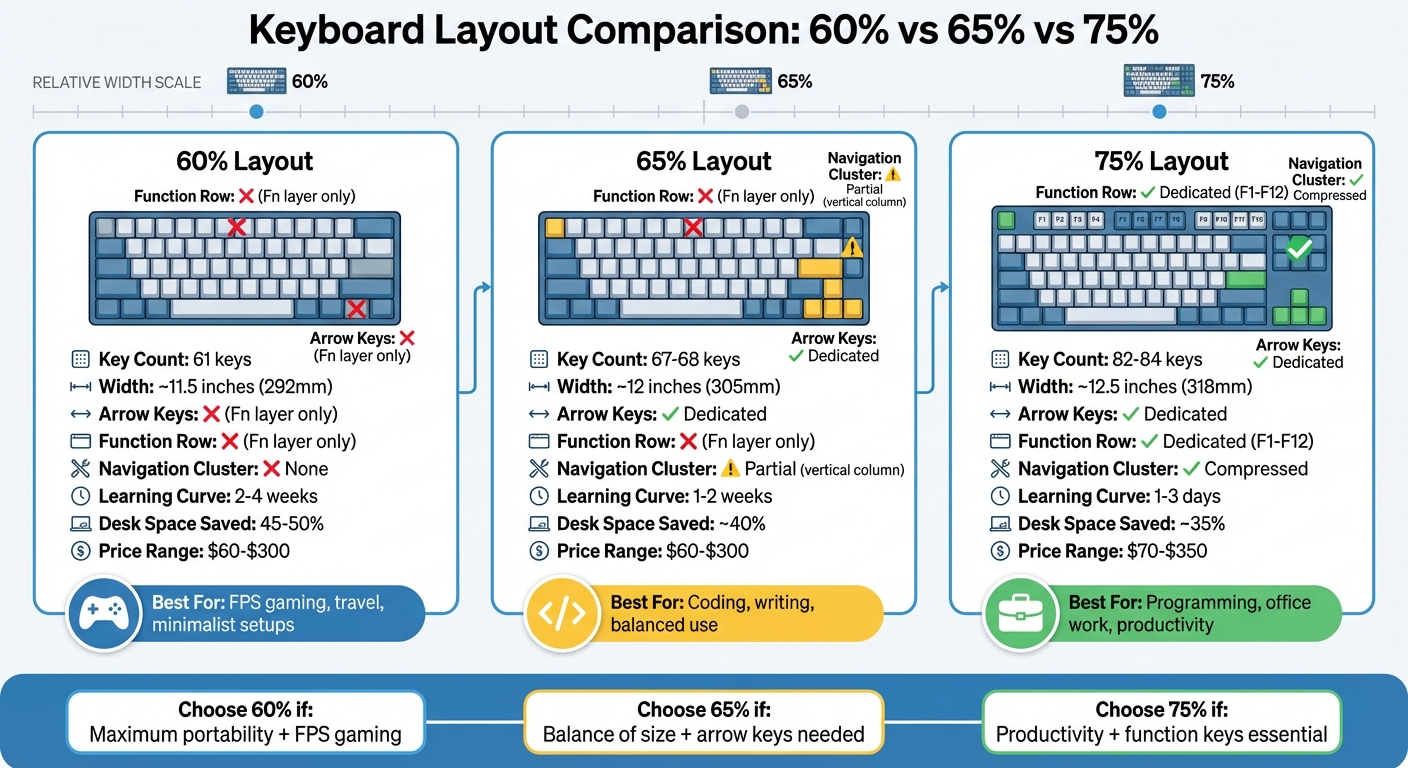
60% vs 65% vs 75% Keyboard Layout Comparison Chart
Keyboard Size Comparison: Don't Make The Wrong Choice.
sbb-itb-3cb9615
60% Keyboard Layout Explained
A 60% keyboard is one of the smallest standard layouts in the mechanical keyboard world. It strips things down to the basics: alphanumeric keys, modifiers, and the number row. What’s missing? Dedicated arrow keys, the function row (F1–F12), the navigation cluster (Home, End, Page Up, Page Down), and the numpad. With just 61 keys, it takes up a compact 11.5 x 4.25 inches of desk space.
To make up for the missing keys, these keyboards use programmable layers. By holding the Function (Fn) key, you can remap the number row to act as F-keys (e.g., Fn + 1 becomes F1) or turn keys like WASD or IJKL into arrow keys. Even the navigation cluster is tucked into the main layout through Fn combinations. While this system works well, it does come with a 2–4 week learning curve for most users. These layers are what give the 60% layout its unique functionality.
For FPS gamers, the smaller size is a big win, offering more room for wide, low-sensitivity mouse movements. Plus, the symmetrical design helps keep your hands naturally centered. Many 60% keyboards also support customizable firmware like QMK or VIA, letting you tweak the layers to match your workflow perfectly.
That said, if your work involves frequent use of function keys or navigation controls, the constant switching between Fn layers can feel slow and frustrating at first. Programmers and spreadsheet users, in particular, may find it challenging until they adjust. Still, for those who value minimalism, portability, and a clean, uncluttered setup, the 60% layout is a popular choice among compact mechanical keyboards. Next, we’ll dive into how this compares to the added features in 65% and 75% keyboards.
65% Keyboard Layout Explained
A 65% keyboard takes the compact design of a 60% layout and adds a navigation column on the right-hand side. Instead of the 61 keys found on a 60% board, a 65% keyboard typically includes 67–68 keys, which is about 65% of the full 104-key layout. This extra space accommodates dedicated arrow keys and navigation keys like Delete, Page Up, Page Down, Home, and End, making it more user-friendly. This design strikes a balance between minimalism and functionality, making it a popular choice when compared to 60% and 75% layouts.
Often called the "compact sweet spot", the 65% layout keeps a small footprint while reintroducing essential keys that many users miss on smaller boards. It doesn’t include a dedicated function row or numpad, but these features can still be accessed using Fn layers. However, having dedicated arrow keys eliminates the need for tricky combinations like Fn + WASD.
"The 65% keyboard often strikes a perfect balance between the ultra-compact nature of a 60% and the functionality of larger layouts." – MonsGeek
This layout is especially appealing to coders, writers, and gamers. Tasks like text editing, navigating spreadsheets, or controlling specific game genres (like MOBAs, strategy games, or platformers) feel smoother thanks to the dedicated keys . Even with the addition of a few extra keys compared to a 60% layout, the 65% keyboard remains portable enough to fit into most laptop bags.
That said, there are a few drawbacks to keep in mind. Customizing keycaps can be trickier on 65% keyboards. For instance, the right Shift key is often shortened to make room for the arrow keys, and the bottom row may not follow standard sizing . If you’re planning to swap out keycaps in the future, it’s worth checking compatibility before making a purchase. Up next, we'll dive into a direct comparison of these layouts to better understand their practical differences.
75% Keyboard Layout Explained
The 75% keyboard layout takes the compact efficiency of 60% and 65% keyboards and builds on it, offering more functionality without demanding much extra space.
This layout condenses the Tenkeyless design by removing the numpad and reducing the spacing between key groups. You get 82–84 keys packed into a compact footprint, giving you all the essentials without compromise. It includes the function row (F1–F12), arrow keys, and a small navigation cluster - all accessible without relying on function layers. This means your muscle memory remains intact, making it easier to adapt. At roughly 13 inches (330 mm) wide, the 75% keyboard only adds about 0.5 inches (10–13 mm) to the width of a typical 65% keyboard. That small increase accommodates around 16 extra keys, making it a great choice for those who need quick access to more functions.
The design bridges the gap between compact and full-size keyboards, allowing for a smoother transition.
"75% layouts feature a compressed design with F-keys, perfect for developers needing function keys in a smaller footprint." – Aksara
Often referred to as the "ultimate compromise", the 75% layout appeals to a wide range of users, especially those who rely on specific keys for their work or hobbies. Programmers, for instance, can use the F5 key for debugging. Excel users benefit from shortcuts like F2 and F4 for editing cells, while MMO gamers enjoy having a dedicated function row for quick commands.
While the 75% layout saves about 35% of desk space compared to full-size keyboards, its compact design can feel tight around the navigation cluster, leading to potential misclicks. To address this, many newer 75% keyboards feature an "exploded" layout. This design adds small gaps between key groups, making it easier to identify keys by touch and reducing accidental presses.
These thoughtful design elements showcase how the 75% layout balances functionality and space efficiency, making it a strong contender in the world of compact keyboards.
Direct Comparison: 60% vs. 65% vs. 75%
The 60%, 65%, and 75% keyboard layouts differ mainly in their size, number of keys, and reliance on function layers. Here's a closer look:
The 60% keyboard is compact, measuring about 11.5 inches wide (292mm) and featuring just 61 keys. It eliminates dedicated arrow keys, the function row, and the navigation cluster, meaning you'll need to rely heavily on function (Fn) layers for these features. On the other hand, the 65% layout expands slightly to 12 inches wide (305mm) with 67–68 keys. This extra space allows for dedicated arrow keys and a vertical column of navigation keys like Delete and Page Up. The 75% keyboard is the largest of the three, measuring around 12.5 inches wide (318mm) and including 82–84 keys. It features a full function row and a compressed navigation cluster, making it more comprehensive and user-friendly for those transitioning from full-size keyboards.
Interestingly, the jump from a 65% to a 75% layout adds only about 0.5 inches (10–13mm) in width but provides roughly 16 extra keys.
The reliance on function layers also varies significantly. The 60% layout demands frequent use of Fn combinations to access basic navigation and function keys. The 65% layout eases this burden by including dedicated arrow keys, though function keys still require layers. Meanwhile, the 75% layout offers a near-complete experience, with most essential keys available without needing Fn layers.
Here's a breakdown of key features:
| Feature | 60% Layout | 65% Layout | 75% Layout |
|---|---|---|---|
| Key Count | ~61 keys | 67–68 keys | 82–84 keys |
| Approximate Width | ~11.5 inches (292mm) | ~12 inches (305mm) | ~12.5 inches (318mm) |
| Dedicated Arrow Keys | No (Fn layer only) | Yes | Yes |
| Function Row (F1-F12) | No (Fn layer only) | No (Fn layer only) | Yes (Dedicated) |
| Navigation Cluster | None | Partial (Vertical column) | Compressed (Dedicated) |
| Desk Space Saved | ~45-50% | ~40% | ~35% |
Beyond physical attributes, pricing and usability also play a role. Expect 65% keyboards to range from $60 to $300, while 75% models typically fall between $70 and $350. The 60% layout, being the most standardized, offers easier access to custom parts and keycap sets.
This comparison highlights the key distinctions, setting the foundation for analyzing the advantages and disadvantages of each layout.
Advantages and Disadvantages of Each Layout
When deciding on a keyboard layout, understanding the trade-offs is essential. Each design offers distinct benefits and challenges, making them better suited for certain tasks and users.
The 60% layout is all about portability and space efficiency. At just 11.5 inches wide, it’s perfect for travel. However, this compact size comes at a cost: a steep learning curve. With no dedicated arrow or function keys, tasks requiring frequent navigation can feel cumbersome at first. That said, this layout is incredibly customizable, thanks to standardized parts like cases, PCBs, and plates, allowing users to easily swap components.
The 65% layout offers a balance between compactness and usability. It adds dedicated arrow keys and a vertical navigation column, making it a more user-friendly option for writers and casual users. At around 12 inches wide, it’s still portable. However, programmers might find the lack of a dedicated function row frustrating, as F-keys require layered combinations - less ideal for tasks like debugging in IDEs. Additionally, proprietary designs often limit case options and necessitate non-standard keycaps, like a 1.75u right Shift key.
The 75% layout prioritizes productivity. With a full function row and a compact navigation cluster, it offers a seamless experience with only a brief adjustment period of 1–3 days. Despite being only 0.5 inches wider than a 65% board, it includes about 16 extra keys. The downside? It’s bulkier and slightly less portable, especially due to its added height from the function row.
For gaming, preferences vary: 60% and 65% layouts are ideal for FPS games, while the 75% layout works better for MMOs and simulation games. Budget-wise, all layouts offer affordable options, such as the Royal Kludge RK84 (75%) for around $60 and the Keychron V2 (65%) for approximately $75.
Here’s a quick breakdown of each layout’s strengths, weaknesses, and ideal uses:
| Layout | Strengths | Weaknesses | Best For |
|---|---|---|---|
| 60% | Highly portable; customizable; saves desk space | No dedicated arrows or F-keys; steep learning curve; less efficient for navigation-heavy tasks | FPS gaming, travel, enthusiasts who enjoy modifying keyboards |
| 65% | Includes arrow keys; balanced size; still portable | F-keys on layers; proprietary designs limit case/keycap options; moderate learning curve | Minimalist typists, FPS gamers needing arrow keys, compact setups |
| 75% | Full function row; compact navigation cluster; minimal adjustment time | Bulkier; less portable; limited design options | Programming, office tasks, MMO gaming, Excel power users |
Each layout has its niche, making the choice largely dependent on your priorities and how you plan to use the keyboard.
Best Uses for Each Keyboard Layout
Each keyboard layout has its strengths, making certain setups ideal for specific scenarios. Let’s break down where they shine.
The 60% layout is perfect for competitive gaming and on-the-go use. Its compact size, as seen in models like the Freebird60, clears up desk space for large, low-sensitivity mouse movements - something FPS gamers love. Plus, its portability makes it a great travel companion or a solution for tight workspaces. However, keep in mind that its minimalist design means some functions require activating layers.
The 65% layout strikes a great balance for everyday typing and web development. It’s nearly as compact as a 60% keyboard but adds dedicated arrow keys and a vertical navigation column with keys like Delete, Page Up, and Page Down. These extras make text selection and document navigation much easier, which is why many coders prefer this layout. It’s often called the "Goldilocks" option for those who want a compact design without sacrificing practicality. This makes it a fantastic choice for a mix of daily tasks and light programming.
For those who need a bit more functionality without a full-size keyboard, the 75% layout is a strong choice for programming, office work, and more demanding tasks. Keyboards like the Freebird75 provide one-touch access to F1–F12 keys, which are crucial for tasks like debugging in IDEs (using keys like F5, F9, F10, and F11) or Excel shortcuts (e.g., F2 for editing cells, F4 for absolute references). Despite being only slightly larger than a 65% board, it adds about 16 extra keys, offering more functionality with minimal added bulk. As MKB Guide notes:
"I moved from 60% to 75% and gained back productivity I didn't know I'd lost."
When it comes to gaming, the 60% and 65% layouts are favorites for FPS players due to their compact size, which frees up space for mouse movements. Meanwhile, 75% keyboards cater to MMO gamers - like those playing World of Warcraft or Final Fantasy XIV - by offering function keys that can be mapped to ability bars and shortcuts. Adjusting to a 75% layout from a full-size keyboard typically takes just 1–3 days.
There are budget-friendly options across all layouts. For instance, 75% keyboards like the Royal Kludge RK84 start at around $60, while 65% models such as the Keychron V2 are available for about $75. For those seeking customization, the Freebird series provides VIA/QMK compatibility for key remapping, along with premium build quality for enthusiasts.
How to Choose Your Keyboard Layout
Picking the right keyboard layout comes down to three main factors: desk space, your daily tasks, and how quickly you can adjust to a new setup.
Start by evaluating your desk space. If your workspace is tight or you’re into FPS gaming that relies on big mouse movements, a 60% or 65% keyboard layout might be ideal. These smaller layouts save space, keeping your mouse closer and potentially reducing shoulder strain during long gaming or work sessions. On the other hand, if desk space isn’t an issue and you prefer having easy access to more keys, a 75% layout strikes a great balance. It’s compact but still gives you nearly all the functionality of a full-sized keyboard.
Next, think about your daily tasks. Each layout caters to different needs:
- 60% layout: Best for competitive gaming and setups where mouse space is a priority.
- 65% layout: A solid choice for coding or document editing, thanks to its dedicated arrow keys.
- 75% layout: Perfect for productivity tasks that require quick access to function keys (F1–F12).
Finally, consider how quickly you can adapt to a new keyboard. The 60% layout has the steepest learning curve since it removes many keys, requiring you to rely on key combinations. The 65% layout offers a smoother transition with its inclusion of navigation keys, while the 75% layout is the easiest to adjust to, as it retains most of the functionality of a full-sized keyboard.
For customizable options, KeebsForAll's Freebird series is worth checking out. The Freebird60, starting at $160, supports VIA/QMK for custom key mapping, while the Freebird75, priced at $199, includes a dedicated function row. Both models feature CNC aluminum cases and hot-swappable switches, giving you the flexibility to tweak your setup to suit your needs.
Conclusion
When comparing keyboard layouts, it's clear that each one caters to different needs based on space, functionality, and how users interact with their setup. Here's the breakdown: 60% keyboards save the most desk space with a minimalist key arrangement, 65% keyboards strike a balance by adding dedicated arrow keys, and 75% keyboards deliver a compact design while retaining a full function row for those who rely on productivity shortcuts.
Your choice should hinge on how you use your keyboard daily. For FPS and MOBA gamers, 60% boards are ideal since they free up space for wider mouse movements. If you need a compact layout but can't live without arrow keys, a 65% keyboard might be your best bet. Meanwhile, 75% boards work well for programmers and office workers who depend on function keys for debugging and shortcuts.
It's worth noting that the 60% layout has a steeper learning curve, requiring mastery of shortcuts for missing keys. On the other hand, the 65% layout offers an easier transition with its additional keys, while the 75% layout feels more familiar to those accustomed to full-sized keyboards.
For customization enthusiasts, KeebsForAll offers excellent options across these layouts. The Freebird60, starting at $160, and the Freebird75, priced at $199, both feature CNC aluminum cases and hot-swappable switches, giving you the flexibility to tailor your setup. You can also explore a range of switches, keycaps, and accessories to fine-tune your keyboard. If pre-built keyboards or rare finds are more your style, the KFA Marketplace has quality-guaranteed boards from third-party sellers.
Ultimately, the best keyboard layout is the one that fits your desk setup and supports your workflow habits over time.
FAQs
Can I use a 60% keyboard for school or office work?
A 60% keyboard can handle school or office tasks, but its suitability depends on what you need. Its compact size skips the function row, navigation keys, and numpad, making it highly portable and ideal for minimalist workspaces. While it works well for typing and basic tasks, if you rely heavily on function keys or a numpad, you might need to use remapping or function layers. This could potentially slow down your workflow, especially if speed and convenience are priorities.
How do I access arrow keys and F-keys on 60% and 65% keyboards?
On 60% and 65% keyboards, accessing arrow keys and F-keys involves using layered shortcuts. This means you need to hold down the Fn key and press another key that's mapped to the function you want. For instance, arrow keys might require pressing Fn + certain letter keys, while F-keys are typically accessed with Fn + number keys. These features are not directly part of the main keyboard layout.
Will my keycap set fit a 65% or 75% keyboard?
Most keycap sets are designed to fit a 65% keyboard since they typically include keys like the arrow and navigation keys, which are standard for this layout. However, when it comes to 75% keyboards, compatibility can vary. This is because 75% keyboards often have extra keys for the function row and may feature unique layouts. It's crucial to confirm that your keycap set includes the necessary keys for your specific 75% keyboard setup, especially for those additional or non-standard keys.