
Mechanical keyboard switches are the heart of your typing experience. Unlike membrane keyboards, these switches offer durability, precision, and customization. Here's what you need to know:
-
Switch Types: There are three main types:
- Linear: Smooth and quiet, ideal for gaming (like TTC Gold Pink Linear Switches).
- Tactile: Provides a bump for feedback, great for versatile use.
- Clicky: Adds a loud click, perfect for typists (but noisy for shared spaces).
-
Key Factors:
- Actuation Force: Pressure needed to register a press, such as the 60g found in TTC Ace Linear Switches.
- Key Travel Distance: How far keys move, typically 4.0mm.
-
Pin Configurations:
- 3-Pin: Fits most boards.
- 5-Pin: More stable but requires compatible keyboards (or trimming).
- Compatibility: Most keyboards use MX-style switches, but check your board's specs before buying.
- Pro Tip: Use a switch tester or hot-swappable keyboard to experiment without commitment.
Mechanical switches last longer (50–100 million keystrokes) and offer a tailored typing or gaming experience. Whether you're a gamer, writer, or casual user, there's a switch for you.
Red Switches vs Brown Switches vs Blue Switches | Mechanical Keyboard Comparison
sbb-itb-3cb9615
The 3 Main Switch Types
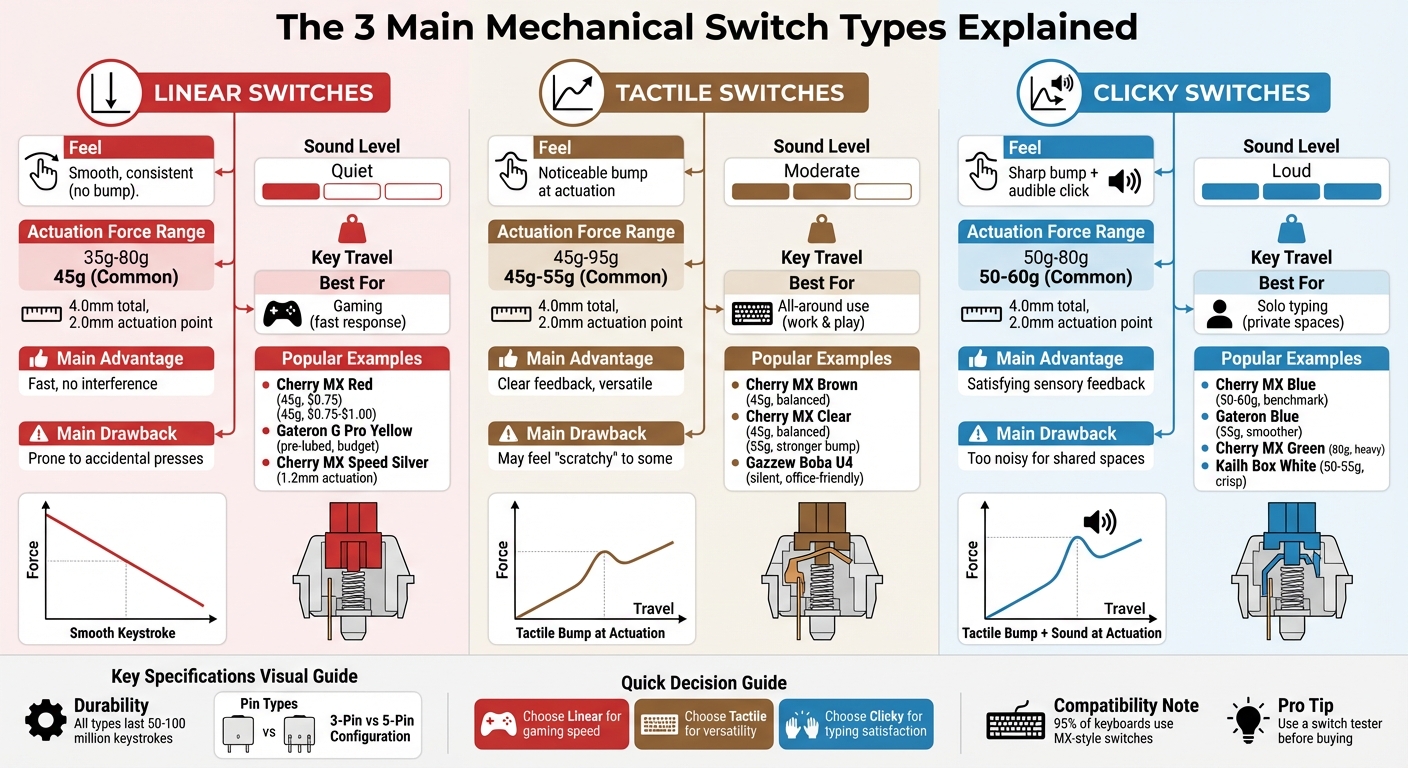
Mechanical Keyboard Switch Types Comparison Guide
When it comes to mechanical keyboards, the type of switch you choose can completely change your typing or gaming experience. The three main types - linear, tactile, and clicky - each offer a distinct feel and sound. These differences come down to the internal mechanics of the switch, affecting how the key responds when pressed. Whether you prefer a smooth glide, a tactile bump, or an audible click, there’s a switch type tailored to your needs. Let’s break down what makes each one unique. For a deeper dive into the basics, check out our mechanical keyboards 101 guide.
Linear Switches
Linear switches are all about smooth, uninterrupted motion. From the moment you press the key to the point it bottoms out, there’s no tactile bump or audible click - just a clean glide. As Corsair puts it:
Linear switches are so named due to their smooth and consistent travel. The feeling you get from pressing a linear switch is the same all the way down the keystroke until you bottom out.
This smoothness makes linear switches fast and quiet, which is why they’re a favorite among gamers. With no resistance to slow you down, they’re ideal for rapid, repeated keypresses - perfect for fast-paced games like shooters or MOBAs. If shaving milliseconds off your reaction time matters, linear switches might be your go-to.
Tactile Switches
Tactile switches are designed with a noticeable bump at the actuation point, giving you physical feedback when the keypress registers. This tactile confirmation enhances accuracy, making it easier to type or game with intention.
Noise-wise, tactile switches sit in the middle - they’re quieter than clicky switches but louder than linear ones. This balance makes them versatile, suitable for both work and play. Whether you’re typing emails in an office or gaming at home, tactile switches offer a solid compromise. They’re often recommended as the "all-around" option for users who need a keyboard that performs well in multiple scenarios.
Clicky Switches
Clicky switches combine the tactile bump with an audible click, giving you both physical and sound feedback when the key actuates. Corsair describes this combination perfectly:
Clicky switches are functionally similar to tactile switches, with the same bump partway down the keystroke. Unlike the tactile switches however, when you overcome this bump, there's a click noise.
This combination makes clicky switches a favorite among writers and typists who enjoy the satisfying sound of each keystroke. However, they’re also the loudest option. If you’re in a shared space, the constant clicking might irritate others. For that reason, they’re best suited for private environments where the noise won’t be an issue, whether you’re working on a novel or gaming solo.
Switch Specifications Beginners Should Know
Once you've chosen a switch type, it's important to understand two key factors that influence how a switch feels: actuation force and key travel distance.
Actuation Force and Bottom-Out Weight
Actuation force refers to the pressure needed to press a key just enough for the keystroke to register. Measured in grams, most mechanical switches fall within the 45g to 60g range. For example, lighter switches like Gateron Clears require only 35g, while heavier options like Gateron Greens demand up to 80g.
Bottom-out weight, on the other hand, is the force required to press the key all the way down until it hits the keyboard's base plate. This force is always higher than the actuation force because of the added spring resistance. For instance, while a Cherry MX Red has an actuation force of 45g, its bottom-out weight is closer to 60g.
As the KBE Team puts it:
Actuation force is one of the factors that affect a keyboard's performance. It is the amount of pressure needed to press down a key and record a keypress.
Lighter switches (35g–45g) are often faster to press and can help reduce fatigue during extended gaming sessions. Heavier switches (60g–80g), however, provide more resistance, which can help avoid accidental keypresses and give a more controlled typing experience. But as Jeremy Laukkonen from Lifewire notes:
The harder it is to push, the quicker your hands (and wrists) can tire out.
If you're undecided, using a switch tester kit to compare weights - like 45g versus 65g - can help you find your preference before investing in a full keyboard.
Key Travel Distance
Paired with actuation force, key travel distance describes how far a key moves from its resting position to being fully pressed. For most mechanical switches, the total travel distance is 4.0mm, with the actuation point (where the keystroke registers) at 2.0mm. This means the keypress is detected about halfway through the press.
Some switches, known as speed switches, shorten the actuation distance to around 1.1mm or 1.2mm for faster response times. This feature is particularly appealing to competitive gamers. However, while shorter travel distances can feel snappier, they may also lead to finger fatigue for those who tend to press keys all the way down. On the other hand, the standard 4.0mm travel provides a more deliberate feel, which helps reduce accidental presses during everyday typing.
Switch Compatibility and Pin Types
When choosing switches for your keyboard, it's important to check their pin configuration. This determines whether the switches will fit your board and function correctly. Getting this wrong could leave you with non-working switches - or worse, a damaged PCB. Here's a breakdown of the two main pin types and the MX-style standard to help you make the right choice.
3-Pin vs. 5-Pin Switches
Mechanical switches come in two main configurations: 3-pin (plate-mounted) and 5-pin (PCB-mounted). Both types feature two metal pins that transmit the electrical signal and one large plastic pin in the center for alignment. The key difference? 5-pin switches include two extra plastic legs on the sides, which provide additional stability by anchoring directly into the PCB.
- 3-pin switches are more universally compatible, fitting both 3-pin and 5-pin sockets.
- 5-pin switches, however, require a matching 5-hole socket unless you modify them.
To determine your keyboard's compatibility, remove a keycap and switch (if your keyboard is hot-swappable) and count the holes in the socket. If there are five holes, you can use either switch type. If there are three, you'll need 3-pin switches - or you’ll need to modify your 5-pin ones.
Luckily, converting 5-pin switches for 3-pin sockets is straightforward. As Jeff from MechanicalKeyboards.com explains:
"If you find yourself with PCB-mounted switches but need them to fit a plate-mounted setup, you can easily convert them by trimming off those extra 2 plastic pins."
Simply use flush cutters to snip off the two extra plastic legs, making sure not to damage the metal pins or the central alignment pin. Many enthusiasts prefer buying 5-pin switches since they can always be trimmed down if needed, whereas 3-pin switches cannot be altered to provide the extra stability of 5-pin options.
MX-Style Switches and Compatibility
The term MX-style refers to the standard design for most mechanical switches. These switches are known for their cross-shaped stems and specific pin layout. Approximately 95% of modern mechanical keyboards use this standard, which means switches from brands like Cherry, Gateron, and Kailh are generally interchangeable - provided your keyboard supports MX-style sockets.
However, MX-style switches are incompatible with keyboards designed for Optical or Hall Effect (HE) switches, as these technologies rely on entirely different connection methods. As Kinetic Labs explains:
"Differing switch technologies are not compatible with each other, so if your keyboard supports MX-style, it won't fit optical switches and vice versa."
Before purchasing switches, check your keyboard's product description for terms like "hot-swappable" and confirm it uses MX-style technology. Be cautious with budget keyboards under $40, as they may use smaller "Outemu-style" sockets that might not fit standard MX switches. When in doubt, double-check your keyboard's compatibility before placing an order.
How to Choose the Right Switch Type
When it comes to picking the perfect switch for your keyboard (see our Mechanical Keyboards 101 guide for more basics), your choice should reflect how you plan to use it and where you'll be using it. Different switch types cater to different needs, so understanding their characteristics is key. For gamers, linear switches are often the top pick. Their smooth, uninterrupted action allows for quick responses and fewer distractions. As Azzief Khaliq from Voltcave puts it:
"Linear switches generally work best for gaming. Their smooth, consistent response makes them 'disappear' under your fingers and lets you concentrate fully on the game."
If you're looking for a versatile option that balances typing and gaming, tactile switches are a solid choice. These switches provide a noticeable bump for feedback without being overly noisy. HHKB highlights their versatility, noting that "Tactile switches are all-purpose performers, perfect for those who use their keyboards for work, play, and leisure." On the other hand, clicky switches - while satisfying for solo typists - are a no-go in shared spaces. Corsair doesn't mince words: "Clicky switches are a cardinal sin for office workers, but a popular choice, nonetheless."
Your typing style is another factor to consider. If you tend to press keys hard, go for switches with an actuation force above 60g to avoid bottoming out. For lighter typists, switches with an actuation force under 50g can help minimize finger fatigue. For context, most laptop keyboards require about 43g of force, which serves as a good reference point for a lighter feel.
Switch Type Comparison
| Switch Type | Feel | Sound Level | Best For | Main Advantage | Main Drawback |
|---|---|---|---|---|---|
| Linear | Smooth, consistent | Quiet | Gaming | Fast response with no interference | Prone to accidental keypresses |
| Tactile | Noticeable bump | Moderate | All-around use | Clear feedback without excessive noise | May feel "scratchy" to some users |
| Clicky | Sharp bump + click | Loud | Solo typing | Satisfying sensory feedback | Too noisy for shared spaces |
Before committing to a full keyboard, try out a switch tester that includes multiple options. Better yet, consider a hot-swappable keyboard. This lets you swap out switches without soldering, making it easy to adjust as your preferences evolve.
Common Switch Examples for Beginners
Here’s a breakdown of popular switches to help beginners pick the right type for their needs.
Linear Switch Examples
Cherry MX Red is a go-to choice for those new to linear switches. As Keebnews explains:
The Cherry MX Reds are THE classic mechanical keyboard switch - it's the most popular linear switch in the world and has been for decades.
With a 45g actuation force and a lifespan exceeding 100 million keystrokes, these switches are known for their reliability and ease of use. Pricing typically falls between $0.75 and $1.00 per switch.
For budget-conscious builders, Gateron G Pro Yellow switches come pre-lubed to ensure smoother keystrokes. If speed is your priority, Cherry MX Speed Silver offers an ultra-responsive 1.2mm actuation point with the same 45g force, making it a favorite for fast-paced gaming.
Now, let’s dive into tactile switches, which provide physical feedback with every press.
Tactile Switch Examples
Cherry MX Brown is a widely recommended tactile switch, offering a gentle 45g bump without creating too much noise. Switch and Click describes it as:
Browns are typically recommended as the 'balanced' option, ideal for both gaming and typing.
If you prefer stronger feedback, Cherry MX Clear delivers a more noticeable tactile bump and requires a heavier 55g actuation force, peaking at 95g.
For cost-effective alternatives, Gateron Brown and Kailh Box Brown provide similar tactile experiences without straining your budget. Need a quiet option? Gazzew Boba U4 switches use silicone dampeners to minimize noise while maintaining satisfying tactile feedback, making them perfect for office settings.
Next, we’ll look at clicky switches for those who enjoy both tactile and audible feedback.
Clicky Switch Examples
Cherry MX Blue is the benchmark for clicky switches, offering a sharp click sound, 50–60g actuation force, and a durable 100-million keystroke rating. If you’re looking for a smoother, more affordable alternative, Gateron Blue switches are a solid option. They require around 55g of force and are often noted for being less "scratchy" than Cherry’s version.
For typists who prefer heavier feedback, Cherry MX Green provides a robust click with an 80g actuation force. Meanwhile, the Kailh Box White offers a crisp clicking feel at 50–55g and features a dust-resistant "box" design for added durability. One important tip: avoid lubricating clicky switches, as it can dampen or ruin their signature sound.
Other Switch Technologies
While traditional mechanical switches are the most common, optical and Hall-effect switches offer intriguing alternatives with their unique designs and advantages.
Optical switches rely on infrared light beams instead of metal contacts to detect keystrokes. When you press a key, it either blocks or unblocks an infrared sensor, instantly registering the input. This design eliminates the need for a debounce delay - a brief pause that prevents unintentional double-presses. As Aida Tang from Keychron notes:
Optical switches are faster than the traditional switch as no physical contact is needed to send an electrical signal; eliminating the need for a debounce delay.
Hall-effect switches, on the other hand, use magnets and sensors. Each key contains a magnet in its stem, and pressing the key moves the magnet closer to a sensor on the PCB. The sensor detects changes in the magnetic field to register the keystroke. These switches offer features like adjustable actuation points, with travel distances ranging from 0.4 mm to 3.6 mm, and "Rapid Trigger", which resets keys instantly as they move upward - an appealing feature for competitive gamers.
Both optical and Hall-effect switches boast impressive durability, often rated for over 100 million keystrokes. Their contactless operation reduces wear and eliminates the risk of corrosion, contributing to their extended lifespan.
However, these advanced switches require specialized PCBs and are not compatible with standard MX-style keyboards. You can't simply swap them into a typical MX-style hot-swap board. Additionally, the selection of optical and Hall-effect switches is far more limited compared to the extensive variety of traditional mechanical options.
For gamers seeking faster actuation and precision, these technologies deliver noticeable performance benefits. But for those who enjoy the tactile feedback and sound profiles offered by mechanical switches, the traditional options still reign supreme. For newcomers, optical and Hall-effect switches showcase just how diverse the world of keyboards can be beyond the standard mechanical designs.
Conclusion
Mechanical keyboard switches might seem complex at first, but understanding their three main types makes things much clearer. Linear switches offer a smooth press, Tactile switches provide a noticeable bump, and Clicky switches add an audible click to that bump. Each type caters to different preferences, whether you're into competitive gaming, professional typing, or just enjoying the feel of your keyboard.
Switch selection plays a huge role in shaping your keyboard experience. As The Keeblog aptly puts it:
"If keycaps determined the 'look' of your custom mechanical keyboard, the switches will determine the 'feel' and 'sound'."
When choosing switches, pay attention to specs like actuation force (commonly 35g to 80g) and travel distance (usually 3.0 to 4.0 mm). These factors can make a big difference in comfort and help reduce finger fatigue. Also, check your keyboard's compatibility: does it support 3-pin or 5-pin switches, and is it hot-swappable? If you're unsure, a switch tester can help you feel the differences before committing.
For those ready to dive in, KeebsForAll has a wide selection of over 175 switches. Options range from budget-friendly choices like the Gateron KS-9 G Pro 3.0 Black at just $0.24 per switch to high-end picks like the Gateron Luciola Linear at $0.75 per switch. Whether you're building your first keyboard or upgrading an old one, there's something for every budget and preference. Head over to KeebsForAll to start customizing your perfect keyboard today.