
Keyboard Plate Materials: Pros and Cons
[ Back to Mechanical Keyboards 101 ]Choosing the right keyboard plate material can drastically change how your keyboard feels and sounds. Each material offers unique characteristics for typing comfort, sound profile, and durability. Here's a quick breakdown:
- Soft Materials (PP, PC, POM): Provide a cushioned, quieter typing experience, ideal for long sessions.
- Stiff Materials (Steel, Brass, Aluminum): Offer firm feedback and crisp sound, great for gaming or precision typing.
- Balanced Options (FR4, Carbon Fiber): Combine moderate firmness and sound, suitable for versatile use.
Quick Tip: Match softer plates with linear switches for smoothness, and stiffer plates with tactile switches to enhance feedback.
Below, you’ll find detailed pros and cons for each material to help you decide.
Comparing 8 keyboard plate materials sound (PP, PC, POM, FR4, AL, Steel, Brass, CF) foamless linear
sbb-itb-3cb9615
Pros and Cons by Material
Below is a detailed breakdown of the advantages and disadvantages of various plate materials, helping you choose the best fit for your typing needs.
PP (Polypropylene) Plate
Pros:
- Highly flexible and bouncy: As the softest plate material, it offers a cushioned, springy typing experience.
- Quiet typing: Produces a muted, low-pitched sound.
- Comfortable for extended use: The soft bottom-out reduces finger fatigue during long typing sessions.
Cons:
- Stability issues: Its flexibility can make switches feel less secure.
- Not ideal for gaming: The softness doesn't provide the firm feedback needed for fast-paced gaming.
PC (Polycarbonate) Plate
Pros:
- Rich "thocky" sound: Absorbs vibrations to create a muted, satisfying sound.
- Comfortable flexibility: Offers a cushioned typing feel, great for office work.
- Budget-friendly: A cost-effective option.
- Enhances RGB lighting: Its translucent nature allows lighting to shine through beautifully, especially when paired with linear switches with light guides.
Cons:
- Softness can affect stability: May feel wobbly for those who prefer firmer feedback.
- Potential for warping: Can bend under heavy use or pressure.
- Less tactile precision: The softer feel can dull tactile bumps.
POM (Polyoxymethylene) Plate
Pros:
- Smooth, "creamy" sound: Known for its pleasant acoustic profile.
- Ideal for linear switches: Its ultra-smooth surface complements these switches.
- Balanced flexibility: Slightly firmer than PC but still soft and cushioned.
- Good sound absorption: A quieter option for those who prefer subtle typing sounds.
Cons:
- Prone to deformation: Can lose shape under heavy pressure or use.
- Muted sound may not appeal to all: Some might find it too quiet.
- Limited tactile feedback: Its softness doesn't highlight tactile bumps as much as stiffer materials.
FR4 Plate
Pros:
- Balanced feel: Offers a neutral typing experience.
- Mid-toned sound: Produces a "thocky" sound that's neither too loud nor too muted.
- Works with all switch types: Compatible with linear, tactile, and clicky switches.
- Material consistency: Made from the same fiberglass composite as PCBs, ensuring reliability.
Cons:
- Moderate firmness: While versatile, it may not feel as rigid as metal plates, which some gamers prefer.
Aluminum Plate
Pros:
- Trusted standard: Widely used and reliable.
- Lightweight yet strong: Combines durability with minimal weight.
- Consistent feedback: Provides a firm, predictable typing feel.
- Gaming-friendly: Supports quick actuation for fast-paced gaming.
Cons:
- High-pitched sound: Produces a bright tone that might lack the warmth some users prefer.
Carbon Fiber Plate
Pros:
- Light and stiff: Combines metal-like rigidity with minimal weight.
- Responsive typing: Delivers a firm, snappy feel, ideal for competitive gaming.
- Durable: High strength-to-weight ratio ensures longevity.
- Modern aesthetic: Adds a sleek, high-tech look to your keyboard.
Cons:
- Sharp sound profile: Some may find its acoustics harsh or overly bright.
- Pricey: Costs more than aluminum or plastic alternatives.
- Stiffness can cause fatigue: Extremely firm feedback may not suit long typing sessions.
Copper Plate
Pros:
- Heavy and stable: Adds weight, reducing deformation.
- Solid feedback: Offers consistent typing without the harshness of steel.
- Rich sound: Produces a resonant tone with pronounced upper frequencies.
Cons:
- Very heavy: Adds significant weight, making the keyboard less portable.
- Noisy: Its loud sound might not suit quiet environments.
Brass Plate
Pros:
- Luxury feel: Adds weight and a premium look to your build.
- Great for tactile switches: Enhances the crispness of tactile bumps.
- Warm, resonant sound: Produces a satisfying "clack" with depth.
- Aging charm: Develops a unique patina over time.
"Brass plates are very popular when using tactile switches as the typing experience is quite nice and has a very solid feel to it." - Preston S., Kinetic Labs
Cons:
- Heavy: One of the heaviest materials, adding bulk to your keyboard.
- Potential resonance: May produce a "pingy" sound if not dampened.
- Expensive: Costs more than aluminum or plastic options.
Steel Plate
Pros:
- Ultimate durability: The most rigid material with no flex.
- Loud, clear sound: Produces a sharp "clack" for those who love audible feedback.
- Consistent firmness: Provides a stiff typing experience across all keys.
- Long-lasting: Maintains its shape even under heavy use.
Cons:
- Heaviest option: Adds substantial weight, reducing portability.
- Metallic ping: Can create unwanted resonance or ringing.
- Fatigue risk: Extreme firmness may tire fingers during long typing sessions.
- Very loud: Its bright sound might not be suitable for shared spaces.
Material Comparison Table
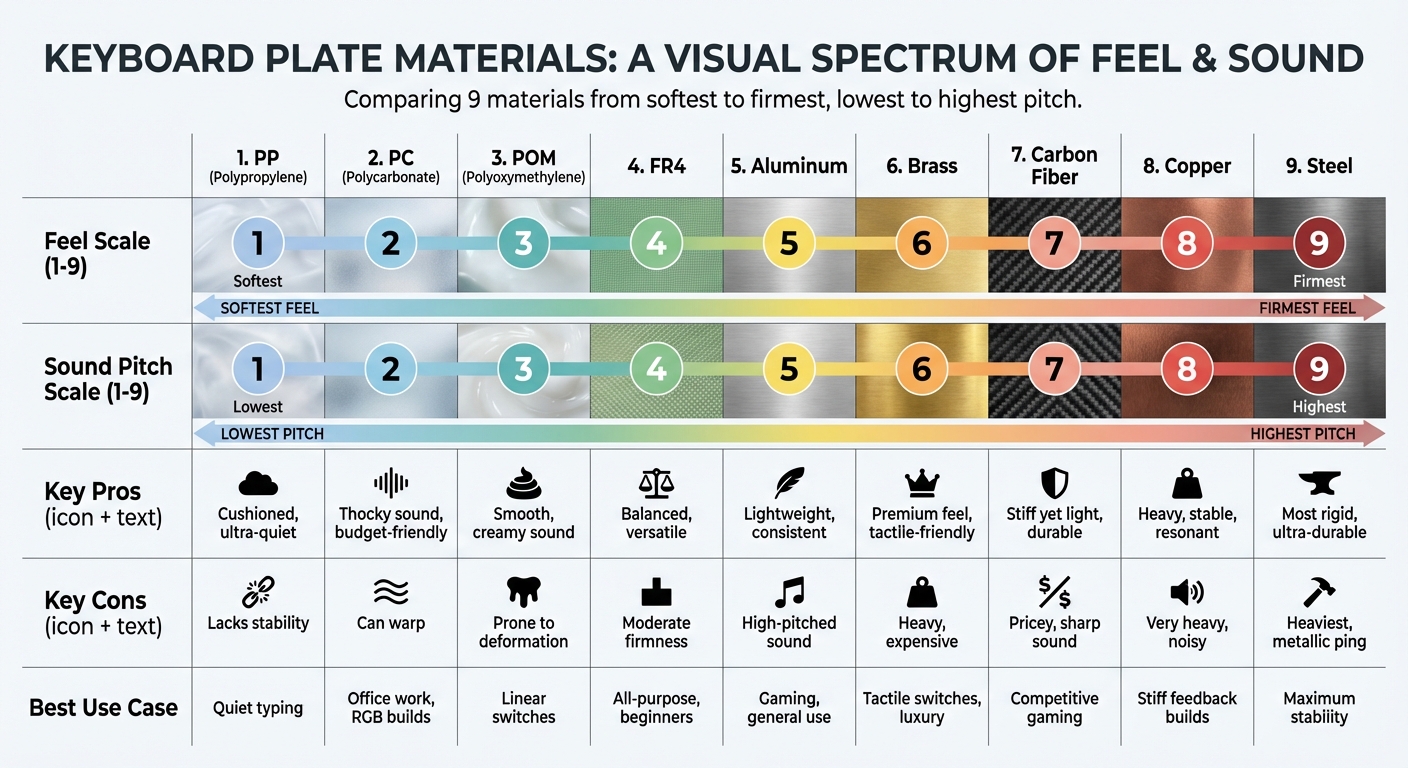
Keyboard Plate Materials Comparison: Feel, Sound, and Best Use Cases
Here's a quick guide to help you compare nine keyboard plate materials and find the best match for your setup:
| Material | Feel (Soft to Firm) | Sound (Low to High Pitch) | Pros Summary | Cons Summary | Best Use Case |
|---|---|---|---|---|---|
| PP (Polypropylene) | 1 (Softest) | 1 (Lowest) | Highly flexible; ultra-quiet; cushioned bottom-out | Lacks stability; too soft for gaming | Perfect for quiet typing and comfort-focused builds |
| PC (Polycarbonate) | 2 | 2 | Soft and bouncy; flexible; affordable; works well with RGB-enabled keyboards | Can feel unstable; prone to warping | Suited for office work, gasket mounts, and RGB-heavy designs |
| POM (Polyoxymethylene) | 3 | 3 | Smooth, "creamy" sound; balanced flex; effective dampening | Susceptible to deformation; reduces tactility | Great for linear switches and quieter setups |
| FR4 | 4 | 4 | Balanced feel and neutral sound; versatile with different switches | Moderate firmness might lack rigidity for some | Excellent for all-purpose builds and beginners |
| Aluminum | 5 | 5 | Lightweight; consistent feedback; widely available; gaming-friendly | Produces higher-pitched sound; potential metallic ping | Ideal for gaming, general use, and tactile switches like the Tecsee Sapphire V2 |
| Brass | 6 | 6 | Adds premium weight; enhances tactile feedback; warm sound; patinas naturally | Heavy; costly; prone to oxidation | Best for tactile switches and luxury builds |
| Carbon Fiber | 7 | 7 | Lightweight yet stiff; responsive; durable | Expensive; sound quality depends on weave | Designed for competitive gaming and advanced builds |
| Copper | 8 | 8 | Provides stable, resonant feedback | Extremely heavy; high cost | Suitable for builds requiring stiff feedback and louder acoustics |
| Steel | 9 (Firmest) | 9 (Highest) | Very rigid; highly durable; keeps its shape | Heaviest option; produces high-pitched ping; harsh bottom-out | Best for maximum stability and budget-conscious builds |
Plate thickness and mounting style also play a key role in how a plate feels. For example, thinner flex-cut plates (1.2 mm) can add flexibility even to stiffer materials, while a gasket mount softens the overall feel compared to a top mount. Use this table as a starting point to determine which plate material aligns with your needs before diving into more detailed selection tips.
Choosing the Right Plate Material
When selecting a plate material for your keyboard, it’s all about matching the material to your typing preferences and priorities. Are you after comfort, quiet operation, or firm feedback? Here’s a breakdown to help you decide.
If you value a softer, quieter typing experience - ideal for long work sessions - materials like PP, PC, and POM are excellent choices. These plates provide a cushioned feel and muted acoustics, making them great for reducing noise during extended use.
For those who want a more premium, weighty feel, Brass and Copper are worth considering. Brass, in particular, enhances tactile feedback and delivers a dense, resonant sound. Aluminum, on the other hand, offers a crisp and consistent typing experience, making it a versatile option across different switch types.
Looking for something balanced? FR4 strikes a middle ground with its blend of flexibility and firmness. It creates a neutral sound profile that works well with various builds. If you need maximum durability and stiffness, Steel is the way to go - it eliminates flex entirely and produces a sharp, clacky sound.
KeebsForAll's Freebird kits provide a great way to explore these material options. For example, the Freebird TKL supports plates made from Aluminum (available in multiple colors), White POM, Polycarbonate, Black FR4, and Brass, all priced at $28.50. The Freebird 60 works with KFA 60% Universal plates, while the Freebird 75 offers Aluminum, POM, PC, and FR4 plates. If you want to experiment without committing to soldering, these kits are hot-swappable, with prices starting at $19.00 for FR4 or POM, $22.00 for Aluminum, and $45.00 for Brass.
"FR4 to me now is what I would consider in the 'stiff' but comfortable category, which is good for keyboards that use softer mounting styles like gasket/o-rings." - alphadecay, KeebTalk
Finally, consider how your plate complements your switches and mounting style. Softer plates pair well with linear switches, enhancing their smoothness, while stiffer materials can highlight the tactile bumps of tactile switches.
Conclusion
Choosing the right keyboard plate material is all about matching it to your typing needs and preferences. Stiffer materials like steel, brass, and aluminum deliver firm feedback and a crisp, pronounced sound - ideal for performance-focused setups. On the other hand, softer materials like PP, PC, and POM create a cushioned feel with quieter, deeper acoustics, making them perfect for long, relaxed typing sessions. Then there’s FR4, which strikes a balance between the two, offering a neutral feel and sound that suits a variety of builds.
Your choice should reflect how you plan to use your keyboard. KeebsForAll simplifies this process with its diverse lineup of options. The Freebird series includes plates made from Aluminum, POM, PC, FR4, and Brass, while the KFA 60% Universal plates are designed to fit a range of keyboard configurations. This variety ensures there's something for every typing style and preference.
FAQs
How do plate thickness and flex cuts change the feel?
Plate thickness and the presence of flex cuts play a big role in shaping your typing experience. Thicker plates deliver a firm, rigid feel with minimal flex. This setup often results in a higher-pitched sound and a more solid, consistent feedback. On the other hand, thinner plates or those designed with flex cuts introduce more give. This creates a softer, springier typing feel and produces deeper, more resonant acoustics. Flex cuts, in particular, reduce the stiffness of the plate, making typing more comfortable while subtly changing both the tactile response and sound profile.
Which plate works best with my mount style?
The choice of plate material plays a big role in shaping your typing experience. If you’re after a firm, precise feel, materials like steel or aluminum are excellent options. On the other hand, for a softer and quieter typing experience, polycarbonate or other plastic-based materials are better suited.
Dense metals such as brass or steel not only offer a rigid feel but also produce a higher-pitched sound, which can work well with specific mounting styles. Ultimately, the best plate material comes down to your personal preferences for both typing feel and sound.
Will a plate swap noticeably change sound and feel?
Swapping out a keyboard plate can make a noticeable difference in both the sound and feel of your keyboard. The material of the plate plays a big role in shaping the acoustics and how stiff or flexible the typing experience feels. Each material has its own characteristics, so it’s worth thinking about how these align with your personal preferences for sound and typing comfort before making a choice.