
Split vs Standard Keyboards: Ergonomics Compared
[ Back to Mechanical Keyboards 101 ]Split keyboards reduce strain on your wrists, shoulders, and back. Unlike standard keyboards, which force your hands and arms into fixed positions, split keyboards allow you to position each half independently. This flexibility helps align your wrists and arms naturally, reducing the risk of discomfort and long-term injuries like carpal tunnel syndrome or repetitive strain injuries.
Key differences:
- Wrist Positioning: Standard keyboards often cause a 10°–12° outward wrist bend (ulnar deviation). Split keyboards reduce this to 2.5°–5°.
- Forearm Rotation: Split keyboards with tenting features reduce forearm pronation by up to 20°.
- Shoulder Posture: Standard keyboards pull shoulders inward, while split keyboards align arms with shoulder width, promoting better posture.
- Customization: Split keyboards offer adjustable angles, tenting, and layouts for improved comfort.
Research shows users adjust to split keyboards within 2 hours of practice, with many reporting improved typing comfort. If you type for extended periods, switching to a split keyboard can help prevent strain and improve your overall health.
Ergonomic Differences Between Split and Standard Keyboards
Wrist and Forearm Positioning
Standard keyboards often cause wrists to bend outward toward the pinky (a position known as ulnar deviation), while keeping forearms flat on the desk. This posture increases strain on the wrists. Specifically, standard keyboards create an ulnar deviation of 10°–12°, whereas split keyboards reduce this angle to a more comfortable 2.5°–5°, allowing hands to align more naturally with the forearms.
The National Institute for Occupational Safety and Health (NIOSH) highlights this benefit:
"The finding that split keyboards place the wrist closer to a neutral posture in the radial/ulnar plane substantially reduces one occupational risk factor of work-related musculoskeletal disorders (WMSDs): ulnar deviation of the wrist."
Some split keyboards also offer a feature called tenting, where the keyboard halves tilt vertically. This design shifts the forearms from a flat position to a more natural handshake angle. For example, a 30° tilt can reduce forearm pronation by approximately 20°. Studies further reveal that the left wrist typically experiences greater deviation on standard keyboards, making the ergonomic benefits of split designs even more pronounced.
Shoulder and Upper Back Posture
Keyboard design doesn’t just impact wrists - it also plays a role in shoulder and upper back posture. Standard keyboards force your arms into a central position, pulling the shoulders inward and increasing tension in the upper back. In contrast, split keyboards allow each half to be placed at shoulder width, keeping your arms parallel rather than angled inward. This setup encourages a more open chest posture and helps prevent shoulder rounding during extended typing sessions. Lowering the height of a split keyboard can further reduce strain by lowering your elbow position and minimizing shoulder elevation.
Research backs these benefits. Vertical split keyboards, for instance, improve neutral typing movements significantly - up to 78% for radial/ulnar movements compared to just 25% on traditional keyboards, and 71% for flexion/extension versus 44%. Additionally, they reduce muscle activity in the forearm extensors, which can help decrease overall physical strain during long typing sessions. These adjustments not only improve posture but also contribute to better long-term health outcomes, as explored in later sections.
Customization and Adjustment Options
Adjustable Angles and Separation
Most standard keyboards offer minimal customization - usually limited to flip-out feet for a slight tilt. Split keyboards, on the other hand, let you adjust each half independently, aligning them to match your shoulder width. This eliminates the cramped arm positioning that traditional keyboards often cause.
Tenting is another standout feature. By elevating the inner edges of the keyboard, it positions your hands in a more natural "handshake" posture. Studies suggest that a tenting angle between 20° and 30° can reduce forearm pronation to around 45°. Additionally, you can tweak the opening angle (the angle between the left and right halves). A slant of 10° to 12.5° helps keep the wrist in a near-neutral position, minimizing strain. Some models even offer a negative slope, where the front of the keyboard is higher than the back. Pairing this setup with a wrist rest can bring wrist extension close to 0°, offering even more comfort.
These positional adjustments are just the beginning - split keyboards also shine in their hardware flexibility.
Switch, Keycap, and Layout Options
Split keyboards often come with hotswap sockets, making it easy to swap out switches without soldering. Whether you prefer traditional MX-style switches or low-profile Choc switches, there's room to experiment with different typing feels. Case materials also vary widely, from durable aluminum for better acoustics to more budget-friendly options like FR4, acrylic, or even 3D-printed designs.
Another feature that sets split keyboards apart is their columnar stagger layouts, where keys are arranged in vertical columns. This design reduces finger travel and helps minimize strain during long typing sessions. On top of that, open-source firmware like QMK, VIA, and ZMK allows for complete key remapping and advanced layer programming - capabilities that most standard keyboards simply don’t offer.
If you're looking to learn more about mechanical keyboards and dive into the world of split models, KeebsForAll (https://keebsforall.com) offers a wide range of components, including switches, keycaps, and accessories, to help you build or customize your setup. For those who want to try a pre-built option before committing to a custom build, the KFA Marketplace (https://kfamarketplace.com) is a great place to find second-hand, assembled split keyboards from other enthusiasts.
And if you're worried about adapting to a split keyboard, don't be. Experienced typists typically get the hang of it in about 10 minutes and reach standard typing performance within 2 hours.
Typing Experience and Desk Setup
Typing Speed and Adjustment Period
Switching from a standard keyboard to a split keyboard can take some getting used to. Standard keyboards rely on your existing muscle memory, but split keyboards introduce a different key layout that requires a brief adjustment period. During this time, you might notice small typing errors as your hands adapt to the new setup.
Interestingly, research suggests that seasoned typists can match their performance on split keyboards after just two hours of practice. Some users even report typing faster once fully adjusted.
"The results indicated that after just 2 h of orientation and practice, the participants could perform as well on the SA [split adjustable] keyboard as on the flat keyboard." - PubMed Abstract
For beginners, starting with a 60% layout (which keeps the number row) can make the transition easier. This layout strikes a balance between compactness and usability. Smaller layouts, like 40% boards, can be more challenging because they require mastering advanced layer configurations.
Desk Space and Peripheral Access
Split keyboards don’t just change how you type - they also influence how you organize your workspace. While standard keyboards work well in compact setups, split keyboards are better suited to desks with more depth. This extra space allows you to position the two halves at shoulder width for an ergonomic typing posture.
One major advantage of split keyboards is their flexibility in peripheral placement. You can position your mouse or trackpad between the two halves, keeping it closer to your body’s midline. This setup minimizes shoulder movement, reduces arm strain, and enhances comfort during long work sessions.
"The ability to position each half independently allows finer control over alignment than any fixed board can offer." - Brian, Founder, The Hearthful Home
To make the most of a split keyboard, ensure your desk is deep enough to support both halves while providing proper arm support. A well-thought-out setup not only improves ergonomics but also enhances overall comfort and flexibility.
Are Split Keyboards Better For Ergonomics?
sbb-itb-3cb9615
Long-Term Health Benefits
One of the biggest advantages of split keyboards is their ability to help prevent repetitive strain injuries that can develop after years of daily typing. Unlike standard keyboards, which often force your body into awkward and potentially harmful positions, split keyboards are designed to keep your joints in more natural, neutral positions, reducing the risk of work-related musculoskeletal disorders.
Research from Cornell University back in October 1999 highlighted this benefit. Professor Alan Hedge and researcher Timothy Muss conducted a study involving 12 experienced typists using sensor-equipped gloves. Their findings were striking: with split keyboards, wrists entered the highest risk zone only 2% of the time, compared to 12% with traditional keyboards.
"A prototype vertical split keyboard (VK) allows two to three times more typing movements to stay in safe, low-risk positions for carpal tunnel syndrome compared with a traditional keyboard." - Alan Hedge, Professor of Design and Environmental Analysis, Cornell University
The ergonomic benefits of split keyboards come from tackling three major risk factors:
- Reducing ulnar deviation: This is the outward bending of the wrist, which can compress the carpal tunnel.
- Adjustable tenting: By slightly angling the keyboard, this feature helps minimize forearm pronation (the palm-down position that increases muscle strain).
- Proper spacing: Separating the keyboard halves to align with shoulder width prevents the hunched posture that often leads to tension in the shoulders, neck, and upper back.
"The finding that split keyboards place the wrist closer to a neutral posture in the radial/ulnar plane substantially reduces one occupational risk factor of work-related musculoskeletal disorders (WMSDs): ulnar deviation of the wrist." - Richard W. Marklin, Professor, Marquette University
These benefits aren't just theoretical. Professor David Rempel of the University of California, Berkeley observed that "clear evidence of a health benefit of the split keyboards emerged in the late 1990s". For those who spend hours typing every day, maintaining neutral body positions can significantly reduce the cumulative stress on tendons, nerves, and muscles. This, in turn, lowers the risk of developing chronic pain or injuries that could impact your ability to work comfortably over the long term.
The practical advantages of split keyboards set the stage for a detailed comparison in the next section.
Comparison Table: Split vs Standard Keyboards
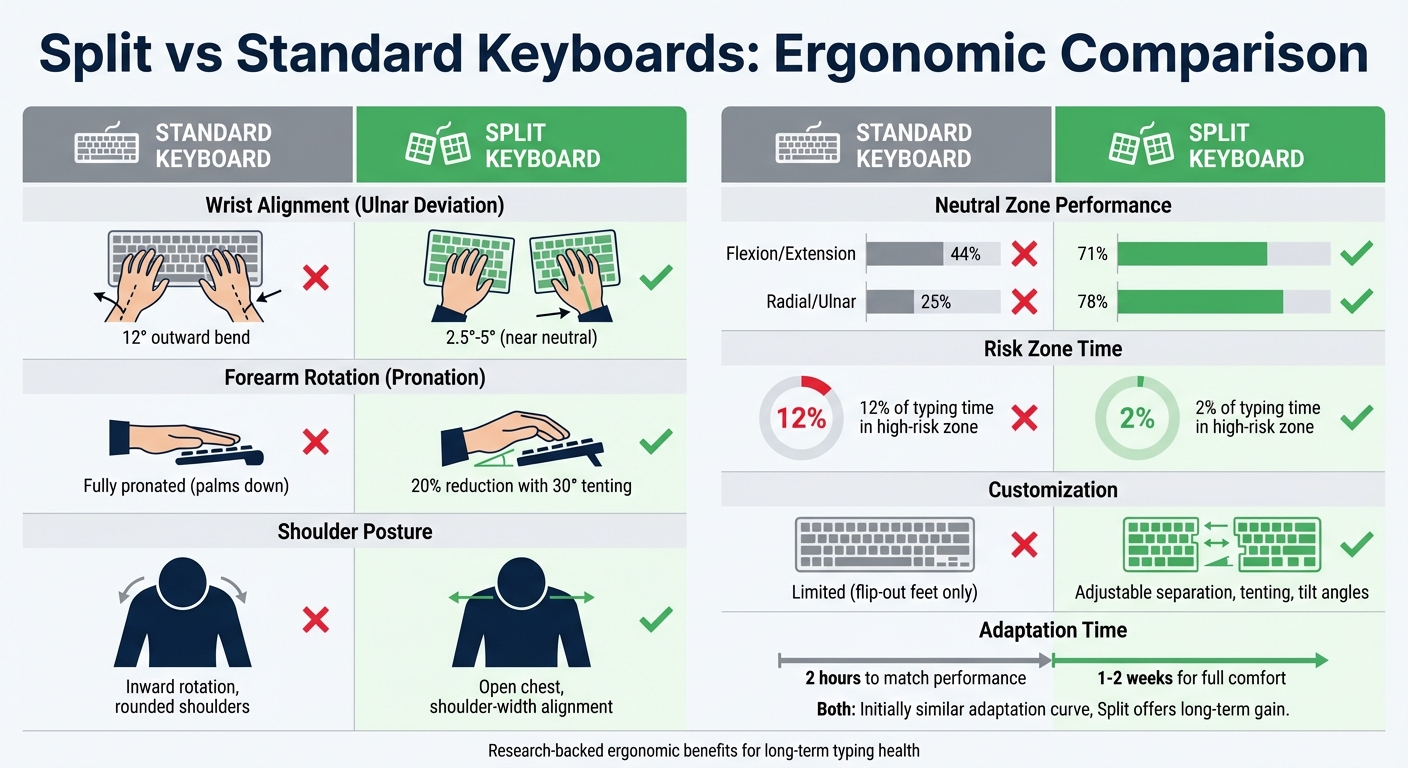
Split vs Standard Keyboard Ergonomics Comparison Chart
Here's a side-by-side look at how split and standard keyboards measure up on key ergonomic and practical factors:
| Feature | Standard Keyboard | Split Keyboard |
|---|---|---|
| Wrist Alignment | Promotes outward bending of wrists (~12° ulnar deviation) | Keeps wrists in a neutral position (within 5° of neutral) |
| Wrist Extension | Commonly higher due to a positive back-tilt design | Lowered by using flat or reverse-tilt configurations |
| Forearm Rotation | Fully pronated (palms face downward) | Less pronation with tenting; a 30° tilt reduces pronation by ~20% |
| Shoulder Posture | Encourages inward rotation and rounding | Supports a more open chest with adjustable shoulder-width spacing |
| Neutral Zone Performance | 44% safe flexion/extension and 25% safe radial/ulnar movements | 71% safe flexion/extension and 78% safe radial/ulnar movements |
| Customization | Limited to fixed geometry and flip-out feet | Offers adjustable separation, tenting, and tilt angles |
| Mouse Placement | Requires reaching around the keyboard, increasing strain | Allows mouse to be positioned between keyboard halves, reducing shoulder strain |
| Portability | Simple plug-and-play setup | Needs careful cable management and consistent placement for optimal use |
The numbers don’t lie - split keyboards clearly promote healthier wrist, forearm, and shoulder positions. For instance, they achieve 71% safe flexion/extension and 78% safe radial/ulnar movements, compared to just 44% and 25% with standard keyboards. While they do take up more desk space and require a bit more setup, the ergonomic benefits make them a compelling choice for anyone prioritizing comfort and long-term health at their workstation.
Split Keyboards Available at KeebsForAll

Split Keyboard Models
KeebsForAll features the Freebird Collection, offering three models designed with ergonomic comfort in mind: the Freebird60, Freebird75, and Freebird TKL. Each keyboard is built with CNC-machined aluminum and includes hot-swappable PCBs. This means you can swap out mechanical switches without soldering - a great way to test different actuation forces and tactile feedback, helping to reduce finger strain.
The Freebird models also support multiple layout configurations, allowing you to set up your keyboard to fit your workflow. For instance, you can opt for a split backspace or split spacebars to position secondary keys where your fingers naturally rest. Pricing starts at $160.00 for the Freebird60 Full Kit, $199.00 for the Freebird75, and $249.99 for the Freebird TKL. All models include USB-C connectivity and programmable firmware, enabling you to create custom layers and macros for a more tailored typing experience. These features combine to deliver a balance of performance and ergonomic precision.
Customization Tools and Accessories
To further enhance comfort and functionality, KeebsForAll offers a range of tools and accessories. The KFA Switch Opener ($19.00) allows easy access to switch internals for maintenance, while Krytox 205 g0 Lubricant (starting at $7.95) helps reduce friction within switches. Learning how to lube mechanical keyboard switches ensures smoother, quieter keystrokes - perfect for shared workspaces or environments where noise reduction matters.
These customization options are designed to tackle common ergonomic challenges. Programmable layouts bring frequently used keys closer to the home row, minimizing finger movement and improving typing efficiency. Whether you're building your first split keyboard or enhancing an existing setup, these tools give you the flexibility to fine-tune your typing experience for maximum comfort and performance.
Conclusion
Split keyboards are designed to keep your wrists in a neutral position and align the keyboard halves at shoulder width, which helps reduce strain during typing. Research highlights that vertical split keyboards can significantly improve wrist posture, keeping wrists in a neutral zone 71% of the time for flexion/extension and 78% for radial/ulnar movements. When combined with tenting, these keyboards further minimize forearm pronation, addressing one of the key contributors to repetitive strain injuries.
Most users adapt to split keyboards quickly, typically regaining their original typing speed within one to two weeks. Many also report noticeable relief from musculoskeletal discomfort with consistent use. This natural feedback loop encourages healthier typing habits throughout the day.
These ergonomic benefits align perfectly with the advanced features of modern split keyboards. Take KeebsForAll's Freebird Collection, for instance. With its hot-swappable PCBs, programmable firmware, and multiple layout options, it allows users to customize everything from key placement to switch feel - no soldering required. This level of adjustability ensures you can create a setup that fits your unique anatomy and typing style, whether you're addressing current discomfort or aiming to prevent future issues.
Ergonomic keyboards are becoming increasingly popular as their health benefits become clearer. If you're looking to enhance your typing comfort and reduce strain, investing in a split keyboard could be a game-changer.
FAQs
What split keyboard settings should I start with?
To set up your keyboard for better ergonomics, place the two halves shoulder-width apart and angle them slightly inward. This positioning helps align your hands naturally with your forearms, reducing both wrist strain and awkward bending (called ulnar deviation). Aim to keep your wrists in a neutral position. Over time, make small tweaks to the distance and angle to enhance comfort and create a setup that promotes healthier typing habits in the long run.
Do split keyboards help with existing wrist pain?
Split keyboards are designed to support a more natural wrist posture by decreasing wrist angles. This ergonomic setup can help ease existing wrist pain and may reduce strain over time. For those dealing with discomfort, they could be a practical option worth considering.
How do I set up my mouse with a split keyboard?
When setting up your mouse with a split keyboard, angle the keyboard halves inward so your hands line up naturally with your forearms. This helps reduce strain on your wrists. Position the mouse close to the keyboard halves and at the same height to avoid unnecessary reaching. To maintain comfort, adjust your workspace to encourage a neutral posture - keep your back straight, shoulders relaxed, and ensure your chair and desk are at appropriate heights.