
Checklist for Buying Second-hand Keyboards
[ Back to Mechanical Keyboards 101 ]When buying a second-hand mechanical keyboard, it's important to focus on three key areas: knowing your needs, evaluating listings carefully, and testing thoroughly upon arrival. Here's a quick summary of the process:
- Define your needs: Decide on the keyboard layout (full-size, TKL, 65%, etc.), switch type (linear, tactile, clicky), and your budget. Consider potential repair costs and whether extras like detachable cables or hot-swappable switches are included.
- Check listings and sellers: Look for clear photos, detailed descriptions, and seller ratings. Ask questions about key functionality, modifications, and included accessories to avoid surprises.
- Test the keyboard: Use online tools to check for issues like dead keys, chattering, or faulty backlighting. Inspect the physical condition, including key alignment, stabilizers, and cables.
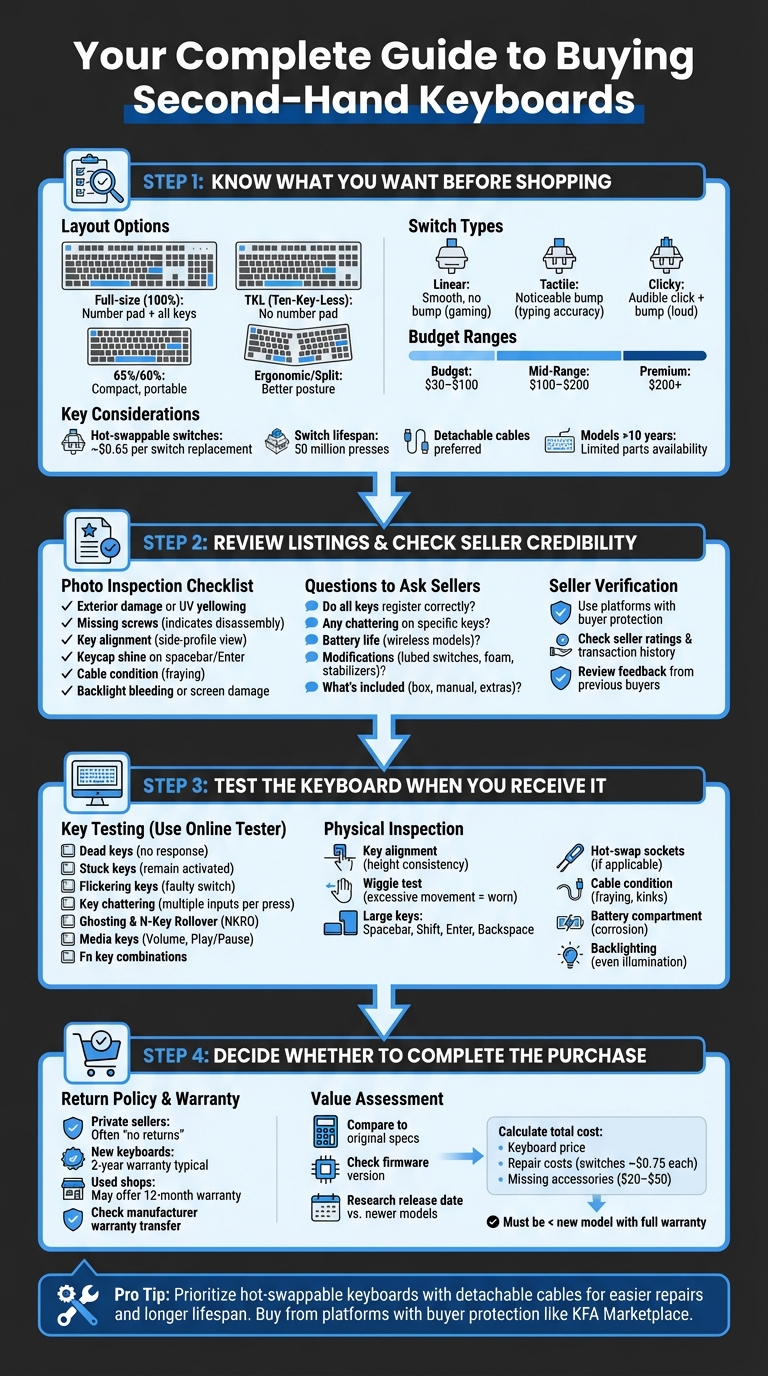
4-Step Checklist for Buying Second-Hand Mechanical Keyboards
Check the switches when you buy a used mechanical keyboard! #keyboard #keyboards #mechanicalkeyboard
sbb-itb-3cb9615
Step 1: Know What You Want Before Shopping
Having a clear plan before you start shopping is key to making a safe and informed purchase. To narrow down your options, focus on three main factors: layout, switch type, and budget. These will help you filter out keyboards that don’t suit your needs and zero in on the ones that do.
Pick Your Keyboard Layout
The layout determines how much space your keyboard takes up and which keys are readily accessible. A full-size (100%) keyboard includes everything - number pad, function row, and arrow keys - making it great for tasks like data entry but requiring a lot of desk space. If you want to save space, a TKL (Ten-Key-Less) layout removes the number pad but keeps the function row and arrow keys, making it a favorite for gaming setups.
For even smaller setups, 65% and 60% keyboards are compact and portable. However, they often lack dedicated function rows and arrow keys, so you’ll need to learn function layers to access missing commands. If wrist strain is a concern, consider ergonomic or split layouts like the "Alice" design, which can improve your typing posture with angled or boomerang-shaped key arrangements.
Decide on Switch Type
The type of switches under the keycaps affects how your keyboard feels and sounds. Linear switches are smooth and consistent, with no tactile bump, making them ideal for fast-paced gaming since there’s no resistance. Tactile switches provide a noticeable bump with each press, which helps improve typing accuracy. For a louder, typewriter-like experience, clicky switches add an audible "click" along with the tactile bump, though they may not be suitable for shared spaces due to the noise.
If you’re buying a used keyboard, hot-swappable models are worth prioritizing. While switches are typically rated for 50 million presses, issues like "chattering" can arise earlier. Hot-swappable boards allow you to replace faulty switches individually for about $0.65 each. Non-hot-swap boards, on the other hand, require more expensive and time-consuming desoldering. For reliability, Cherry MX and Razer switches are often recommended in the second-hand market.
Set Your Budget
Used mechanical keyboards usually fall into three price categories: Budget ($30–$100), Mid-Range ($100–$200), and Premium ($200+).
When deciding on your budget, keep potential repair costs in mind. For wireless keyboards, aging batteries might eventually limit them to wired use. For wired models, prioritize those with detachable cables - if a fixed cable breaks, the keyboard could become unusable. Extras like dust covers, carrying cases, or premium keycaps can add $20–$50 in value, so check if they’re included in the listing. It’s also worth researching the keyboard’s original release date; models older than 10 years may have limited availability for replacement parts.
Once you’ve settled on your layout, switch type, and budget, you’ll be ready to evaluate the credibility of sellers in the listings.
Step 2: Review Listings and Check Seller Credibility
Once you’ve nailed down your requirements, it’s time to dive into listings and ensure the seller is trustworthy. This step involves carefully analyzing photos, descriptions, and asking the right questions to avoid scams or defective purchases.
Examine Photos and Product Descriptions
Start by taking a close look at the listing photos. Check for any exterior damage, UV yellowing, or scuffs. Missing screws might hint at unauthorized disassembly or previous issues with the keyboard. To assess key alignment, look at side-profile photos of the keyboard - uneven key heights could mean worn-out springs. Pay attention to keycap shine, especially on heavily used keys like the spacebar and Enter key.
Inspect the electronic components and ports as well. Frayed or worn cable ends, especially on older models, can be a red flag. For keyboards with backlighting or LCD screens, watch for signs of backlight bleeding, missing characters, or damage to the liquid crystal display. The product description should also mention whether the keyboard has issues like chattering (double-typing) or dead keys. If you’re considering a hot-swappable model, note that individual switches can be replaced for around $0.65 each.
"Missing screws can indicate that the owner (or someone else) has taken an item apart in some way, and this could mean that it has malfunctioned in the past." - Debbie Poyser & Derek Johnson, Sound Advice
Once you’ve reviewed the photos and description, follow up with the seller to confirm these details.
Ask Sellers These Questions
After your visual inspection, it’s time to get answers directly from the seller. Here are some key questions to ask:
- "Do all keys register correctly, and is there any chattering on specific keys?".
- For wireless keyboards: "How many hours of use do you get on a single charge?" This will give you an idea of the battery’s condition.
- "Are there any modifications like lubed switches, added foam, or swapped stabilizers?". If modifications like bolt-modding or screw-modding are mentioned, ask for internal photos to verify the quality of the work.
Also, confirm hardware details. Test the USB port’s stability and ensure it provides a secure connection. Ask what’s included with the purchase - such as the original box, manual, extra keycaps, or power adapter. Finally, ask why they’re selling the keyboard. A straightforward answer can help gauge their honesty.
Check Seller Ratings and Platform Protection
Stick to platforms that offer buyer protection policies to lower the risk of fraud. For instance, the KeebsForAll marketplace (kfamarketplace.com) specializes in second-hand mechanical keyboards and provides safeguards for buyers purchasing from third-party sellers. Review the seller’s ratings and transaction history to see if previous buyers had issues like misrepresented products or delays in shipping. Sellers with detailed feedback and a track record of successful sales are generally more reliable.
Step 3: Test the Keyboard When You Receive It
Once you've confirmed the seller's credibility and double-checked the product details, the next step is crucial - testing the keyboard as soon as it arrives. This ensures you catch any problems the seller might have overlooked or, in some cases, deliberately ignored.
Test All Keys and Features
Start by systematically testing every key using an online keyboard tester. Look out for common issues like:
- Dead keys: Keys that don't respond or light up.
- Stuck keys: Keys that remain activated even after release.
- Flickering keys: This could indicate a faulty switch.
To check for key chattering, press each key multiple times at varying speeds and pressures. If a key registers multiple inputs from a single press, it might be chattering. A real-time log on the tester can help you identify this issue.
"Key chattering occurs when a single press registers as multiple inputs... A chattering key will appear to flicker or flash rapidly, indicating a faulty mechanical switch." - Keyboard-Testing.com
Next, test for ghosting and N-Key Rollover (NKRO). Try holding down common key combinations like W+A+D or Shift+W+Space while pressing additional keys to see if they all register. A true NKRO keyboard should recognize every key pressed simultaneously. For full-size keyboards, don't forget to test media keys like Volume or Play/Pause. Keep in mind, some of these functions might require specific drivers, so browser-based testers might not detect them. Also, the Fn key often won’t light up during testing since it works as a hardware modifier. To check it, hold Fn and press another key (e.g., Fn + 1 should output F1).
While testing, listen closely as you type. Any unusual noises - like loud clicking, metallic rattles, or inconsistent sounds - can signal worn-out dampening materials or loose internal components. Vary your typing pressure from light taps to firm presses to ensure the switches are reliable under different conditions.
Once you're satisfied with the keyboard's electronic performance, move on to assessing its physical condition.
Inspect Physical Condition
Take a close look at the keyboard from various angles to spot any alignment issues. Keys that sit noticeably higher or lower than their neighbors might point to internal wear or damaged dampening materials. Gently wiggle each key - excessive movement could mean worn switches or stabilizers.
Pay extra attention to larger keys like the Spacebar, Shift, Enter, and Backspace. Pressing these keys on different sides can help you detect tilting or rattling, which often indicates stabilizer problems. If the keyboard is hot-swappable, remove a few keycaps to inspect the PCB. Look for loose hot-swap sockets or damaged pads, which could result from improper switch insertion. If a specific key isn’t working, try removing the switch and use metal tweezers to bridge the PCB pads where the switch pins connect. If the key registers, the switch is likely faulty; if not, the issue might be with the socket or PCB trace.
Lastly, examine the cable for signs of wear, such as fraying or persistent bends ("memory" kinks). For wireless keyboards, open the battery compartment and check for any signs of corrosion or leakage. If the keyboard has screens or backlighting, ensure they function evenly without flickering or dim spots.
Step 4: Decide Whether to Complete the Purchase
Once you've confirmed the keyboard's performance and condition, the next step is to decide if it aligns with your expectations for value and protection. This decision hinges on understanding your buyer protections and determining if the keyboard offers genuine worth.
Understand Return Options and Warranty Coverage
Start by reviewing the seller's return policy. Many private sellers operate under a strict "no returns" rule. As Debbie Poyser and Derek Johnson from Sound on Sound point out:
Private vendors offer no money‑back guarantees it's definitely a case of caveat emptor.
Next, check if the keyboard still has an active manufacturer warranty. New keyboards often come with a 2-year warranty, and some manufacturers extend this coverage for free if you register the product online. If you're buying from a shop that deals in used gear, they might offer a 12-month warranty. This can provide peace of mind, especially for fragile components like OLED screens or hot-swappable boards.
Compare Specs and Assess Value
Take a close look at the keyboard's current condition and compare it with the manufacturer's original specifications. Pay attention to details like the firmware version, which is usually displayed during power-up. If the firmware is outdated, you might need to update it. Also, research the keyboard's release date and see how it stacks up against newer models. If a newer version is available, the price of the used keyboard should reflect that.
Don't forget to factor in repair costs and the expense of any missing accessories. For instance, individual mechanical switches for hot-swappable boards are relatively inexpensive, costing about $0.75 each. However, repairs for non-hot-swappable boards or replacing screens can be pricey. Missing items like dust covers, carrying cases, or cables can also add to your total cost. Make sure the combined cost of the keyboard, repairs, and accessories is still lower than buying a brand-new model with a full warranty.
Conclusion
Buying a used mechanical keyboard can be a smart way to save money, but it requires a thoughtful approach. By planning ahead, carefully reviewing listings, and thoroughly testing the keyboard, you can avoid hidden issues and unexpected repair costs. As Debbie Poyser and Derek Johnson wisely point out:
Buying used gear works out well most of the time, but there are some dodgy items out there, and since private vendors offer no money‑back guarantees it's definitely a case of caveat emptor.
It's important to remember that used keyboards can come with risks. Mechanical switches might not last their full 50-million cycle lifespan, and problems like worn-out dampening materials, cable damage, or battery degradation often go unnoticed in photos. Having a structured checklist can help you spot these issues before they become costly. This is why buying from a reputable seller is so crucial.
The platform you choose to buy from plays a big role, too. Private sales often lack buyer protections, so opting for trusted marketplaces like KFA Marketplace can help ensure transparency and reduce uncertainty. These platforms often provide better insights into the gear's usage history, giving you more confidence in your purchase .
For long-term value, consider hot-swappable keyboards, as their switches can be replaced individually for about $0.75 each. Also, prioritize models with detachable cables and test all ports, screens, and additional features before committing to a purchase.
With the right tools and approach, you can score premium mechanical keyboards at budget-friendly prices while minimizing risks. Stick to the checklist, ask the right questions, and you'll enjoy both savings and top-notch performance for years to come.
FAQs
What’s the safest way to avoid scams when buying used keyboards?
When purchasing used keyboards, it's important to take a few precautions to avoid scams. Start by researching the seller - check reviews, ratings, or any available feedback to ensure they're trustworthy. Always verify the keyboard's condition, either through detailed photos or, if possible, an in-person inspection. Stick to reputable marketplaces that have clear policies or offer trade-in warranties. Be wary of deals that look unrealistically cheap - they're often red flags. Above all, prioritize safety and trustworthiness over the allure of a quick bargain.
How can I tell if a used keyboard’s switches are worn out?
Worn-out switches can lead to key chatter, where one press mistakenly registers multiple times due to deteriorated metal contacts. Other warning signs include keys feeling inconsistent, unusually stiff, or sticky - often the result of wear or debris buildup. To diagnose the issue, press each key and check for smooth movement, quick responsiveness, and no unintended double inputs. If these problems persist, replacing the switches might be necessary to regain full functionality.
Which problems are deal-breakers vs cheap fixes on a used board?
When considering a used keyboard, major hardware problems should be deal-breakers. Issues like cracked keycaps, damaged PCBs, or faulty switches can severely affect performance and durability. Similarly, visible physical damage - such as broken case parts - can signal deeper problems.
On the other hand, minor issues like cosmetic wear, loose stabilizers, or dirt are often easy and inexpensive to fix. A good cleaning, a few adjustments, or small repairs can usually take care of these problems. Just make sure the keyboard's core functionality remains intact before committing to a purchase.