
How Plate Materials Affect Typing Feel
[ Back to Mechanical Keyboards 101 ]When building or customizing a mechanical keyboard, the plate material you choose significantly impacts both the typing feel and sound. Here's what you need to know:
- Typing Feel: Rigid materials like aluminum or steel provide a firm, precise feel, while softer materials like polycarbonate (PC) or POM offer a cushioned, flexible typing experience.
- Sound Profile: Metals produce sharper, higher-pitched sounds ("clack"), while softer materials create deeper, muted tones ("thock").
- Compatibility: Most plates are 1.5mm thick to fit standard MX-style switches. Options like FR4, aluminum, brass, and PC are common and cater to different preferences.
- Durability: Metals like steel and brass are tough, while plastics like polycarbonate are reliable but less rigid.
If you're new to mechanical keyboards, starting with a versatile material like FR4 or aluminum is a safe choice. For enthusiasts, experimenting with different plates can help fine-tune your keyboard’s performance.
| Material | Feel | Sound Profile | Price Range |
|---|---|---|---|
| Polycarbonate | Flexible | Deep, muted "thock" | $15–$30 |
| POM | Smooth, soft | Quiet, creamy | $25–$45 |
| FR4 | Balanced | Neutral, "poppy" | $10–$25 |
| Aluminum | Firm | Bright, crisp "clack" | $20–$40 |
| Brass | Rigid, heavy | Deep, bassy | $40–$80+ |
| Steel | Ultra-stiff | Sharp, metallic | Varies |
Choose based on your preferences for feel, sound, and use case. For long typing sessions, softer plates like PC reduce fatigue. For gaming, rigid plates like aluminum or brass enhance precision.
How Plate Material Shapes the Typing Experience
Stiffness vs. Flexibility
The stiffness of a keyboard plate plays a major role in defining how it feels to type. Materials like brass, steel, and thick aluminum create stiff plates, resulting in a firm, solid bottom-out when you press a key. On the other hand, flexible materials such as polycarbonate (PC) and POM work like shock absorbers, offering a slight bounce instead of a hard stop. As one reviewer described it:
"Some users describe the feeling of typing on a polycarbonate plate as 'typing on a cloud' compared to the hardness of metal." - Coffeekeys
This softer, more cushioned feel can make long typing sessions more comfortable. If you're looking for something in between, FR4 is a great option. It provides clear tactile feedback without being overly harsh, making it less likely to cause fatigue. Plus, it’s relatively affordable, typically costing between $10 and $25.
These material characteristics set the foundation for how individual preferences and other factors can further shape your typing experience.
Practical Typing Considerations
The differences between stiff and flexible plates become even more pronounced when combined with your choice of switches and mounting style. For instance, heavy tactile switches like Holy Pandas perform best with stiffer plates, such as those made of aluminum or brass. These rigid plates help preserve the sharp, tactile bump that defines these switches. Using a more flexible plate, like one made of PC, can dampen that bump, leaving the keystroke feeling less precise and more "mushy".
Mounting style also plays a big role. A gasket-mounted case naturally adds some flexibility to the keyboard. Pairing this with a flexible plate, such as PC or POM, can create a highly cushioned typing experience - perfect for tasks like long-form writing or programming.
Plate thickness is another factor to consider. As mechanical engineer Seb_Zeppelin explains:
"In a keyboard plate, stiffness varies with height. Doubling the thickness will therefore increase the stiffness by a factor of 8."
The standard plate thickness is typically 1.5 mm, as it strikes a good balance between compatibility with switches and predictable flex behavior. However, even small changes in thickness can have a noticeable impact on how the keyboard feels, even if the plates are made from the same material.
These tactile nuances are crucial to understanding the typing experience before diving into how plate material also affects keyboard acoustics.
sbb-itb-3cb9615
How Plate Materials Affect Keyboard Sound
Tone and Resonance
The material of a keyboard plate doesn’t just influence how it feels - it plays a key role in shaping its sound. Think of it as an acoustic filter: when the switch stem hits the housing, vibrations travel into the plate. Dense and rigid materials reflect these vibrations as higher frequencies, while softer materials absorb them, resulting in lower-pitched tones.
Take aluminum, for example. With a stiffness (Young's Modulus) of about 70 GPa, it produces sound frequencies above 2,000 Hz, delivering that sharp, crisp "clack" sound. On the other hand, polycarbonate, which is much softer at around 2.2 GPa, creates frequencies below 500 Hz, producing the deep, muted "thock" that many keyboard enthusiasts love. Somewhere in the middle is FR4, with frequencies between 500 Hz and 1,000 Hz, offering a balanced, "poppy" sound that pairs well with most switch types.
"If you are chasing a specific sound - whether it is a sharp 'clack' or a deep 'thock' - the plate material is the most important variable after the switches themselves." - Shark Attack
Metal plates, like steel or aluminum, often transmit vibrations into the case, which can lead to an unwanted metallic "ping." In contrast, plastic and composite materials absorb more energy, reducing that ringing effect.
Tuning Keyboard Acoustics
The acoustic qualities of your plate work hand-in-hand with tactile feedback, completing your keyboard's overall feel and performance. Knowing your plate's natural sound profile is a great starting point when fine-tuning your keyboard's acoustics. From there, you can make modifications to achieve your ideal sound.
For instance, if you're using an aluminum plate and notice a metallic "ping", adding high-density Poron case foam can dampen frequencies in the 1–2 kHz range while preserving the plate's rigidity. If you're after a softer, smoother sound, combining an FR4 plate with IXPE switch pads can reduce harshness by dampening frequencies above 4 kHz while maintaining clarity in the mid-range.
Want maximum "thock"? Pair a polycarbonate plate with lubricated linear switches and thick PBT keycaps. Just be careful not to over-tighten the case screws, as too much tension on a polycarbonate plate can create stiff spots that interfere with its natural resonance.
| Material | Sound Pitch | Acoustic Character | Best Switch Match |
|---|---|---|---|
| Steel | Very High | Sharp, loud, metallic | Clicky |
| Aluminum | High | Crisp, "clacky", clean | Clicky / Tactile |
| FR4 | Medium | Neutral, "poppy", balanced | All-rounder |
| POM | Low–Medium | Smooth, "creamy", quiet | Linear |
| Polycarbonate | Very Low | Deep, muted, "thocky" | Linear |
| Brass | Low/Deep | Rich, bass-heavy, resonant | Tactile / Linear |
How to Choose the Right Plate Material
Identifying Your Typing and Sound Preferences
Start by figuring out how you want your keyboard to feel and sound.
For feel, decide whether you prefer a firm and precise bottom-out or something softer and more flexible. If you lean toward firmness, materials like aluminum or brass are ideal. On the other hand, if you enjoy a bouncier, more forgiving feel, consider flexible options like polycarbonate (PC) or POM. Also, think about how your chosen plate material will interact with your switch type to maintain either precision or comfort.
When it comes to sound, revisit the acoustic profiles discussed earlier. If you’re aiming for a deeper "thock", softer plastics are your best bet. For a sharper "clack", metals will deliver the crispness you’re looking for.
Once you've nailed down your preferences for feel and sound, you can choose a material that aligns perfectly with your goals.
Matching Preferences to Plate Materials
Now, connect your preferences to the right material.
"FR4 is the most accurate material available for pure keyboard acoustics." - Shark Attack
Here’s a quick breakdown of options:
- FR4 ($10–$25): Balanced sound profile, great for pure acoustics.
- Polycarbonate (PC) ($15–$30): Offers a muted, softer feel with a bit of bounce.
- Aluminum ($20–$40): Provides firmness and a bright, crisp tone.
- Brass ($40–$80+): Known for its rigidity and rich, deep bass tones.
Compatibility and Durability
Beyond sound and feel, don’t overlook compatibility and durability.
Your plate should ideally be 1.5mm thick for MX-style switches. Also, check that the stabilizer cutouts match your setup. For example, plate-mounted stabilizers clip directly into the plate, while PCB-mounted (screw-in) stabilizers need specific cutouts to fit through.
When it comes to durability, metals like aluminum, brass, and steel are incredibly tough. Polycarbonate is also reliable under normal conditions - after all, it’s the same material used in bulletproof glass. However, acrylic is a bit of a wildcard. While it looks great, it’s brittle and can crack easily if dropped or over-tightened. If you go with acrylic, handle it carefully to avoid damage.
Alu vs Brass vs FR4 vs POM vs Polycarbonate Plate (Linear)
Common Plate Materials Compared
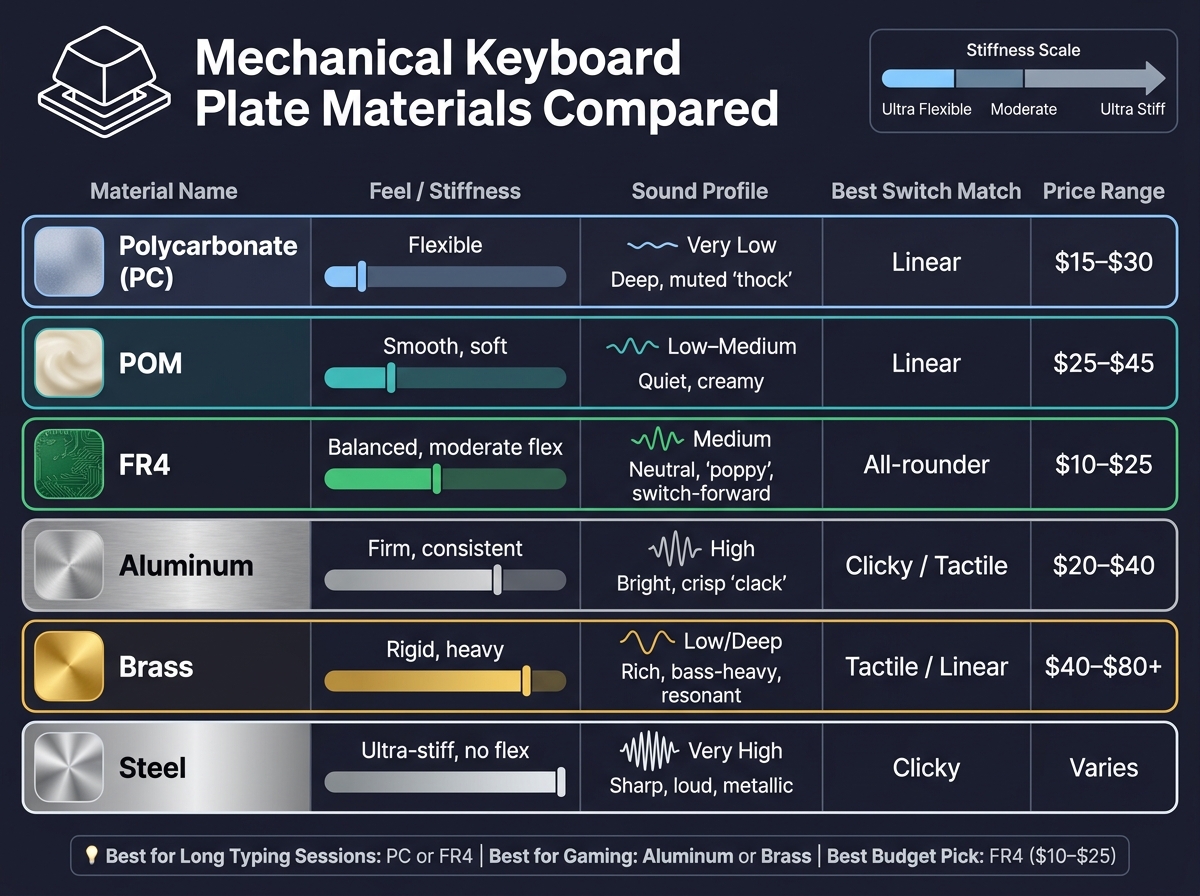
Mechanical Keyboard Plate Materials Compared: Feel, Sound & Price
Polycarbonate and POM Plates
Let’s start with two materials known for their softer, more forgiving typing response. Polycarbonate (PC) is a favorite among keyboard enthusiasts who enjoy a cushioned feel. It offers noticeable flex, dampens vibrations, and produces a low-frequency sound - typically under 500 Hz - resulting in a deep, muted "thock." This sound profile, paired with lubed linear switches, creates a quiet and comfortable typing experience that many people love.
On the other hand, POM (short for polyoxymethylene or acetal) delivers a smooth typing feel with minimal bounce. It’s a low-friction material that produces a quiet, creamy sound, making it ideal for quieter settings like offices or for those who prefer a more understated acoustic profile. POM plates are generally priced between $25 and $45.
Aluminum and FR4 Plates
Aluminum is a classic choice for its moderate stiffness, durability, and bright, crisp "clack" sound that resonates above 2,000 Hz. This material is widely used due to its reliability and versatility, whether for gaming or everyday typing. For instance, the MonsGeek M1W V3 HE-SP keyboard features an aluminum plate that enhances its sharp, clacky sound profile.
FR4, a fiberglass-epoxy composite commonly used in PCB manufacturing, offers a middle ground between stiff metals and flexible plastics. With a Young's Modulus of around 24 GPa (compared to aluminum’s ~70 GPa), it provides more flex than metal but is firmer than polycarbonate. Its neutral sound lets the switches’ natural tones shine through, making it a versatile option.
Brass, Copper, and Steel Plates
Now, let’s talk about the heavier, more rigid materials. Brass is known for its weight and rigidity, giving keyboards a premium feel. It produces a deep, bass-heavy resonance, and its ability to develop a natural patina over time adds a vintage charm. Brass plates typically range from $40 to over $80, depending on the design.
Copper shares similar characteristics with brass, offering comparable hardness and stability. It’s particularly effective at enhancing the tactile feedback of switches, making it a popular choice for tactile switch builds.
Steel is the stiffest of the three and provides maximum stability. However, its sharp, metallic resonance can sometimes lead to an unwanted "ping" if not properly dampened. Steel plates are often chosen for their durability and distinct sound profile.
Here’s a quick comparison of the materials, focusing on their feel, sound, and price range:
| Material | Feel | Sound Profile | Price Range |
|---|---|---|---|
| Polycarbonate | Flexible | Deep, muted "thock" | $15–$30 |
| POM | Smooth, forgiving | Quiet, creamy | $25–$45 |
| FR4 | Balanced, moderate flex | Neutral, switch-forward | $10–$25 |
| Aluminum | Firm, consistent | Bright, crisp "clack" | $20–$40 |
| Brass | Rigid, heavy | Deep, bass-heavy | $40–$80+ |
| Steel | Ultra-stiff, no flex | Loud, sharp, metallic | Varies |
Conclusion: Finding the Right Plate for Your Build
When it comes to creating your ideal keyboard experience, the plate material you choose plays a huge role in determining both the feel and sound of your build. Materials like polycarbonate and POM deliver a softer, muted "thock", while aluminum and brass produce a sharper, more resonant "clack." If you're unsure where to start, FR4 offers a balanced, budget-friendly option that pairs well with almost any switch type.
For those who type for extended periods, softer plates such as polycarbonate or FR4 can help reduce fatigue, offering a more comfortable experience. On the other hand, if you're gaming or need quick, precise feedback, rigid plates like aluminum are often the go-to choice. It’s also worth considering how your switches interact with different materials - linear switches tend to pair well with polycarbonate, while tactile switches shine with aluminum or brass.
If you’re eager to try out different options, KeebsForAll offers the Freebird Series, which includes custom keyboard kits in layouts like 60%, 75%, and TKL. Starting at $165.00, the Freebird60 Full Kit supports plate swapping between materials like aluminum, brass, POM, and FR4. This makes it an excellent way to experiment and find the right balance of sound and feel for your build.
"The plate material is the most important variable after the switches themselves" for achieving a specific sound profile. - Shark Attack
FAQs
Will a different plate change how my switches feel?
Switching to a different plate material can definitely change how your keyboard switches feel. It affects things like stiffness, flexibility, and the overall typing experience. Picking the right plate material is key to getting the typing feel and performance you’re aiming for.
What plate helps reduce keyboard ping?
A flexible plate, such as polycarbonate, works to reduce keyboard ping by absorbing vibrations and softening high-frequency resonance. This design choice helps cut down on case ping and metallic ringing, resulting in a quieter and smoother typing experience.
Do I need a 1.5 mm plate for my build?
A plate with a thickness of 1.5 mm is widely regarded as the standard in the keyboard community. It strikes a solid balance between rigidity and compatibility, making it suitable for most keyboard builds. This thickness pairs well with various switch types and layouts, making it a dependable option for both newcomers and seasoned enthusiasts.