
Checklist for Buying Keyboard Parts Online
[ Back to Mechanical Keyboards 101 ]When building a custom mechanical keyboard, planning ahead is key. The process involves selecting compatible parts, managing costs, and understanding shipping and return policies. Here's a quick guide to help you avoid common pitfalls:
- Stock Check: Ensure all required parts (PCB, switches, case, stabilizers, and keycaps) are available before purchasing.
- Compatibility: Confirm that components like switches, keycaps, and stabilizers match your layout and PCB type.
- Shipping & Returns: Review delivery timelines, fees, and return policies to avoid surprises.
- Budgeting: Calculate total costs, including tools, accessories, and shipping. Look for keyboard kits or discounts to save money.
- Authenticity: Buy from trusted retailers to ensure quality parts and avoid counterfeits.
Building your keyboard can be a rewarding experience if you plan carefully and follow these steps. Read on for detailed tips to simplify the process.
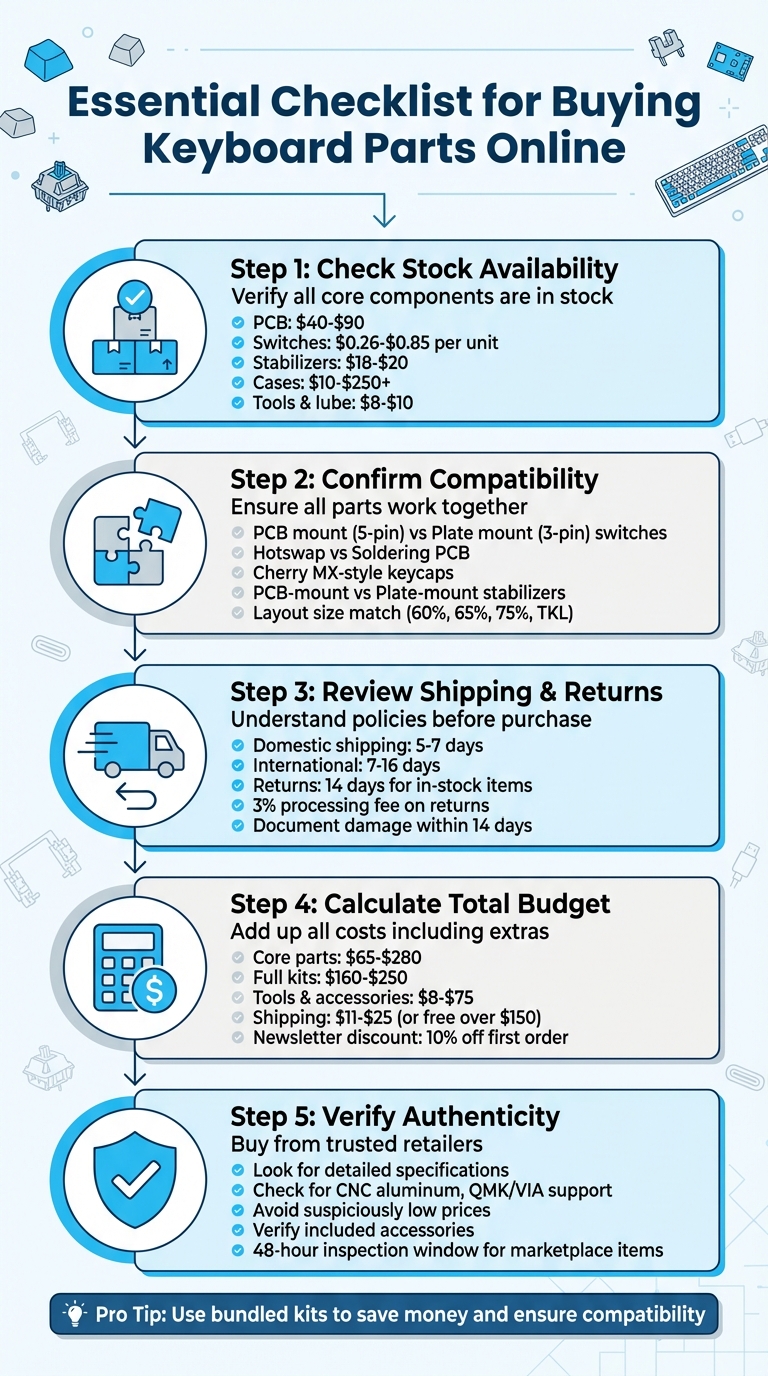
5-Step Checklist for Buying Custom Keyboard Parts Online
Fantastic Keyboard Parts And Where To Find Them | Custom Keyboard Beginners Guide
sbb-itb-3cb9615
Check Stock Availability Before Ordering
Nothing halts a keyboard build faster than discovering a key component is out of stock. Before you hit "buy", make sure every essential part is available. This includes your PCB, case, switches, stabilizers, and keycaps.
Verify Stock for Core Components
Start by checking the availability of the main components for your build. Here’s a quick breakdown of typical costs:
- PCB: Prices usually range from $40.00 to $89.99.
- Switches: These cost between $0.26 and $0.85 per unit.
- Stabilizers: Premium options like Durock V2 or AEBoards Staebies are priced around $18.00 to $20.00.
- Cases: Basic plastic cases start at about $10.00, while high-end aluminum cases can go beyond $250.00.
- Other essentials: Don’t forget small but crucial items like Krytox 205g0 lubricant ($7.95–$9.95) and a switch opener.
When selecting specific variants, such as a keycap set or switch color, double-check that the "Add to Cart" button is active. This is especially important for items with multiple options, as some variations may be unavailable.
Use Retailers with Real-Time Stock Information
Shopping at stores with real-time stock updates can save you a lot of frustration. Look for retailers that display clear labels like "[IN-STOCK]" or "Sold Out" directly on product thumbnails and titles. For example, KeebsForAll includes "[IN-STOCK]" in its product listings and generally ships orders within 24 hours. However, during busier times, processing may take up to 72 business hours. For domestic orders, delivery typically takes 5–7 business days, while international shipping ranges from 7–16 days.
"If you've ever found yourself frustrated by keycap stores with pages full of frustrating out-of-stock choices, KeebsForAll may provide just the change of pace you need." – HHKB
To stay ahead of restocks, check for "New & Restocked" sections on retailer websites. Popular items like Gateron or Cherry MX switches often sell out quickly but are frequently replenished. Many stores also offer project update pages or Discord communities where you can track restocks and receive real-time alerts. These tools can help ensure your cart is filled with items that are actually available.
Confirm All Parts Work Together
Before you make any purchases, double-check that all the components you’ve selected are compatible with one another. This step ensures everything fits and functions correctly, preventing frustrating assembly issues later on. Think of it as the final puzzle check to ensure all pieces come together seamlessly.
Match Keycaps, Switches, and PCBs
Start by confirming that your switches are compatible with your PCB. There are two main types of switches to consider: PCB mount switches (5-pin) and plate mount switches (3-pin). PCB mount switches include two extra plastic pins for added stability, while plate mount switches only have the metal contact pins. If you’re using a 3-pin PCB but have 5-pin switches, you’ll need to clip off the extra plastic legs to make them fit.
Next, determine if your PCB supports hotswap or requires soldering. A hotswap PCB lets you easily install and remove switches without using tools, making it a convenient option for beginners. On the other hand, solder PCBs require you to permanently attach each switch with a soldering iron, which is more labor-intensive but offers a sturdy connection.
When it comes to keycaps, make sure they’re designed for Cherry MX-style stems and match your keyboard layout, whether it’s ANSI or ISO. Pay close attention to the bottom row key sizes. Most layouts use a 6.25u spacebar, but some may require a 7u spacebar instead.
Verify Stabilizer and Plate Specifications
Once you’ve confirmed the compatibility of your switches and keycaps with the PCB, turn your attention to the stabilizers and plate.
Stabilizers come in two main mounting styles: PCB-mount (screw-in or clip-in) and plate-mount. Check your PCB’s specifications to see which type is required, as these two styles are not interchangeable. For standard layouts, you’ll typically need several 2u stabilizers for keys like Shift, Enter, and Backspace, along with one stabilizer for the spacebar (either 6.25u or 7u, depending on your layout).
Your choice of plate material also plays a role in the typing experience. Aluminum and brass plates provide a firmer, more rigid feel, while materials like polycarbonate (PC) and POM offer more flexibility. FR4 sits somewhere in the middle in terms of stiffness. Additionally, ensure the plate’s mounting style matches your case and layout size (e.g., 60%, 65%, 75%, TKL) and aligns with your PCB.
To simplify the process, tools like Keyboard Part Picker can help you cross-check compatibility across vendors, showing layout, footprint, and mounting details before you commit to a purchase. Similarly, platforms like KeebsForAll provide detailed compatibility information on their product pages, making it easier to ensure all your components work together without a hitch.
Review Shipping and Return Policies
Once you've ensured compatibility, it's time to dive into shipping and return policies. Knowing these details ahead of time can help you avoid unexpected fees or hassles. With the right parts in hand, understanding these policies is the final piece of your build strategy. Start by comparing shipping costs and delivery timelines, then carefully review the return terms.
Compare Shipping Costs and Delivery Times
Shipping fees and delivery times vary depending on the retailer's location and the carrier they use. For international orders, the typical delivery window ranges from 7 to 16 days.
"In stock orders typically ship within 24 hours, but please allow up to 72 business hours for dispatch from our warehouse." - KeebsForAll
If you're based in the U.S., choosing retailers with domestic fulfillment centers can help reduce both shipping costs and delivery times. For example, KeebsForAll operates out of Los Angeles, CA, which shortens delivery windows for U.S. customers. Shipping a single keyboard via UPS Ground generally costs between $11.00 and $25.00.
Keep in mind that free shipping often excludes pre-orders, oversized items, or shipments to Alaska and Hawaii. For expensive orders, consider purchasing shipping insurance to safeguard against potential loss or damage during transit.
Check Return and Warranty Terms
Before completing your purchase, take a close look at the retailer’s return and warranty policies. Most retailers allow returns for in-stock items within 14 days of receipt. For instance, KeebsForAll accepts returns on unused in-stock items within this timeframe but charges a 3% processing fee and does not refund the original shipping costs.
Certain items, like lubricants, pre-order products, and marketplace purchases, are often final sale. Additionally, some brands may be sold "as-is", meaning no returns or exchanges are offered.
"International customers are responsible for any import duties, taxes, or fees incurred upon delivery, which are determined based on factors such as declared value, tariff classification, and local regulations." - KeebsForAll
If your order arrives damaged or incomplete, act quickly. Document any issues by taking high-resolution photos of the shipping package and its contents. Most retailers require this proof within 14 days to process replacement requests. For warranty protection, check the duration and terms - some manufacturers provide transferable warranties lasting up to 12 months.
Calculate Total Cost and Stay Within Budget
When building a custom keyboard, staying within your budget is just as important as selecting the right components. Beyond the core parts, there are tools, accessories, and shipping fees to consider. Breaking down these costs ahead of time can help you avoid any surprises when it’s time to check out.
Add Up All Costs Including Shipping
Start by listing all the components you'll need. The core parts - keyboard case, PCB, switches, keycaps, and stabilizers - can range from $65 to $280, depending on the materials and features. For instance, Freebird kits are priced between $160.00 for a Full Kit and $249.99 for the TKL version.
Don’t forget to include tools and maintenance supplies. Essentials like Krytox 205g0 switch lubricant (priced between $7.95 and $9.95), lube brushes (around $9.99 for a 3-pack), and tools such as switch pullers or keycap pullers are must-haves for assembly. If you’re adding personal touches, set aside funds for extras like desk mats (ranging from $19.19 to $29.99) and custom coiled USB cables. Switch packs typically cost between $4.20 and $11.70, while complete PBT keycap sets can range from $45.00 to $74.99.
Shipping fees are another factor. Costs vary depending on your location and the size of your order. Some retailers offer free shipping if you spend over a certain amount - for example, orders exceeding $150 may qualify for free shipping.
"Please be safe while shopping and spend wisely. Don't put yourself in a bad situation financially for a hobby." - Alexotos
To save even more, consider bundled kits that combine multiple components.
Find Bundle Deals to Save Money
Bundled kits can be a cost-effective way to source your components while keeping shipping fees low. Full kits, like those in the Freebird series, combine the case, PCB, and stabilizers at competitive prices. This eliminates the hassle of ordering parts from multiple vendors, which can add to your shipping costs.
Take advantage of newsletter discounts - many retailers offer 10% off your first purchase when you sign up for their email list. Checking the “Sale” section regularly can also uncover deals on accessories like springs, plates, and lubricants, with discounts ranging from 8% to 33%. For instance, the Freebird60 Case Only is often marked down from $90.00 to $75.00 during sales, and Krytox 205g0 lubricant may drop to $7.95 from $9.95.
Another way to save is by bundling your orders to qualify for free shipping. Ordering multiple components from a single trusted retailer can help you avoid paying separate fees for each item.
For a smoother purchasing experience, consider using a reliable vendor like KeebsForAll. Their bundled kits and in-stock items can simplify your shopping process while keeping expenses under control. Once you’ve tallied up your total costs, double-check product quality to ensure your build meets your expectations.
Confirm Product Quality and Authenticity
When building a reliable keyboard, ensuring the authenticity of your components is just as important as compatibility and shipping. Genuine parts offer durability and performance, while counterfeit components can lead to malfunctions or even damage. Before making any purchase, it's essential to double-check the quality and authenticity of what you're getting.
Buy from Trusted Sources with Clear Specifications
Choose retailers that provide detailed technical specifications. Look for features like CNC machined aluminum cases, QMK/VIA support for PCBs, and recognized brand-name components such as TX AP screw-in stabilizers. A legitimate keyboard kit should clearly outline these details.
Retailers who work directly with manufacturers for custom orders or group buys tend to have stricter quality control measures in place. For example, KeebsForAll's Freebird series highlights specifics like case materials, mounting styles, and included stabilizers in their product descriptions.
"Rest assured, all our KFA products adhere to our stringent quality standards, using premium materials that guarantee unmatched durability." - KeebsForAll
Be cautious of red flags that may indicate counterfeit products. These include suspiciously low prices, poorly printed or misaligned markings on components, and missing documentation such as warranty cards or certificates. Even weight discrepancies can signal counterfeit cases, as inferior materials often feel lighter or heavier than specified.
By confirming these technical details, you not only ensure quality but also gain peace of mind.
Review What's Included with Each Product
Once you've verified the specifications, check that the product package includes everything promised. Carefully read product descriptions to confirm what’s included. A "full kit" should specify if it comes with stabilizers, dampening foam (case, plate, or navigation foam), O-rings, screws, or even carrying cases. The difference between a $160.00 kit and a $249.99 kit often lies in these extra accessories and the quality of materials used.
For second-hand or marketplace purchases, make sure the platform inspects items before shipping. Some retailers evaluate product conditions in their warehouses and provide documentation of included items. If you're buying a used keyboard through a verified marketplace, keep in mind that you usually have only 48 hours to report any issues or concerns about authenticity.
KeebsForAll ensures high standards, so you can trust that their components will meet your expectations and perform as promised.
Conclusion
Building a custom mechanical keyboard requires careful planning and attention to detail. By checking stock availability, ensuring compatibility between components, reviewing shipping policies, calculating overall costs, and verifying the authenticity of your purchases, you can sidestep common challenges that often trip up beginners. Following these steps makes the entire process smoother and more enjoyable.
KeebsForAll simplifies this journey with real-time stock updates through options like Group Buy, Pre-Order, or In-Stock, all of which ship within 24–72 business hours. Their Full Kits - such as the popular Freebird series - take the guesswork out of compatibility by including a CNC aluminum case, a hot-swappable PCB, and perfectly matched stabilizers, all designed to work together effortlessly.
For those looking for second-hand components, the KFA Marketplace offers inspected and verified products, ensuring peace of mind with every purchase.
Whether you’re assembling your first compact 60% keyboard or upgrading to a TKL layout, this checklist helps you stay on track and within budget. Plus, new customers can kick off their builds with a 10% discount by signing up for the newsletter.
FAQs
How do I make sure all my keyboard parts are compatible?
To make sure all your keyboard parts fit together perfectly, begin by pinpointing your keyboard’s layout (like ANSI or ISO), size (such as 60%, TKL, or full-size), and switch stem type. These details are key to matching your keycaps, switches, stabilizers, plate, and PCB correctly.
A compatibility tool can be a lifesaver here, helping you confirm that all your chosen components will work together without a hitch. Taking this step upfront saves you from the frustration of mismatched parts and makes the assembly process much smoother.
What should I look for in shipping and return policies when buying keyboard parts online?
When going through shipping and return policies, it's important to check the estimated shipping times. These typically range from 24 to 72 business hours but can take longer during holidays or group buys. See if optional insurance is offered, and don’t forget to look for any extra charges tied to international shipping, like customs duties.
For returns, make sure you understand the requirements. Most policies specify that items must be unused and returned within 14–30 days. Watch out for restocking fees or non-refundable shipping costs, and note any exclusions, such as pre-orders, lubricants, or items bought through second-hand platforms. Knowing these details upfront can save you from unexpected hassles and make your shopping experience much smoother.
How can I make sure keyboard parts I buy online are authentic?
To make sure your keyboard parts are genuine, stick to buying from reliable sellers or platforms known for their trustworthy reputation. Check out seller ratings, read reviews, and pay attention to feedback from other buyers. If you can, ask for proof of ownership, like receipts or dated product photos. Platforms like KFA Marketplace can be a smart choice since they offer protections such as refunds if the item doesn’t match the description. These simple precautions can help you shop with confidence and steer clear of counterfeit items.