
ANSI vs ISO: Typing Efficiency Compared
[ Back to Mechanical Keyboards 101 ]When choosing between ANSI and ISO keyboard layouts, it boils down to your typing habits, language needs, and regional availability. ANSI is widely used in the U.S., Canada, and Asia, offering a simpler layout with a horizontal Enter key and a wider left Shift key. ISO, popular in Europe and South America, features an L-shaped Enter key, a smaller left Shift key, and an extra key for multilingual support.
Key Takeaways:
- ANSI: Better for English-only users, faster typing with closer Enter and Shift keys, and broader compatibility with custom keyboard parts.
- ISO: Ideal for multilingual typists, supports accented characters via Alt Gr, but may feel less ergonomic for some.
Quick Comparison:
| Feature | ANSI Layout | ISO Layout |
|---|---|---|
| Enter Key | Horizontal rectangle | L-shaped (2 rows) |
| Left Shift Key | Wide (2.25u) | Smaller (~1.25u) |
| Backslash Key | Above Enter key | Left of Enter key |
| Key Count | 104 keys | 105 keys |
| Right Alt Key | Standard Alt | Alt Gr (for special chars) |
If you're a programmer, gamer, or English-only typist, ANSI is likely the better fit. ISO is more suited for those frequently typing in European languages. Your comfort and familiarity with a layout often matter more than the physical differences.
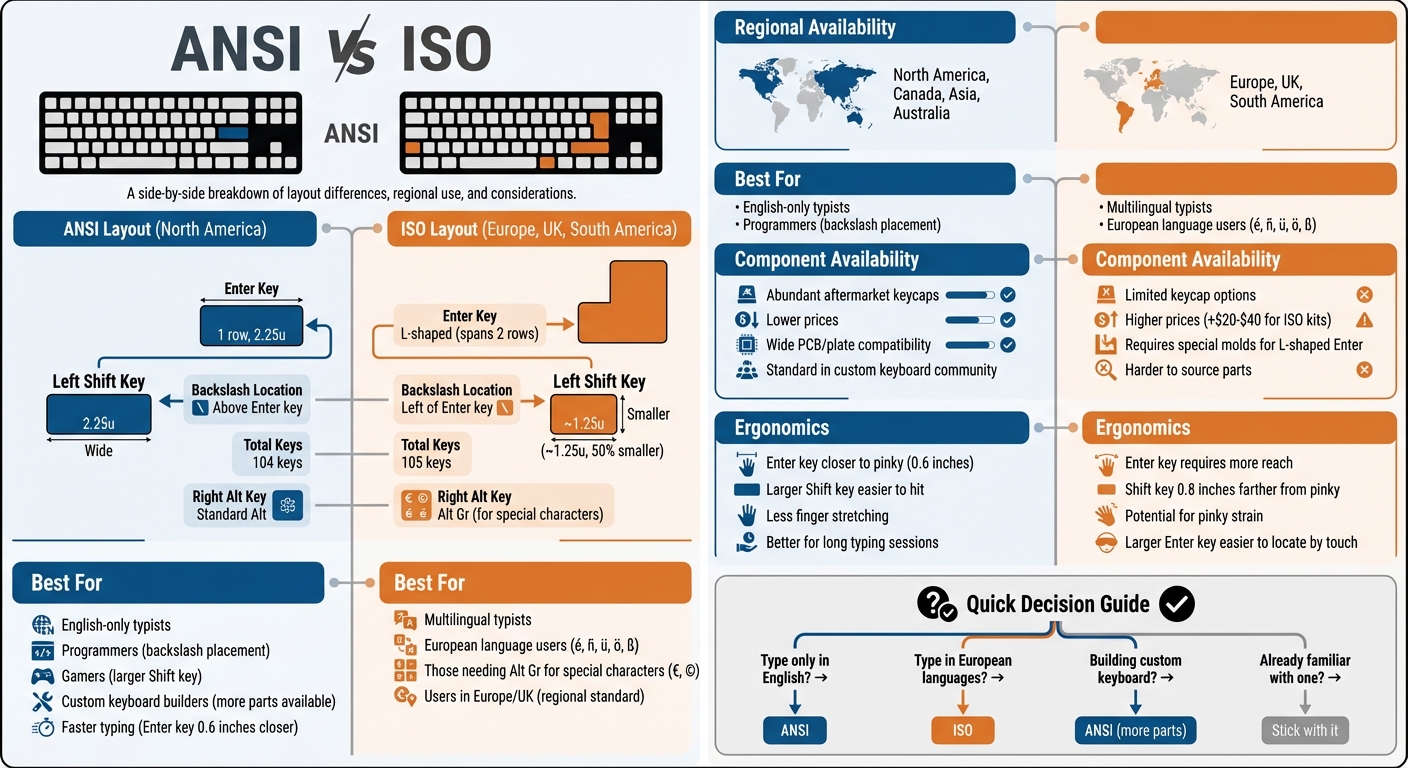
ANSI vs ISO Keyboard Layout Comparison Chart
ANSI vs ISO Keyboard Layout: Which One is Superior?
sbb-itb-3cb9615
Physical Differences Between ANSI and ISO Layouts
The structural differences between ANSI and ISO keyboard layouts directly impact how your fingers move across the keys. An ANSI keyboard typically has 104 keys, while an ISO keyboard includes 105 keys. That one additional key results in some rearrangement of frequently used keys, which can influence typing habits and ergonomics. Here’s a breakdown of the key differences that affect everyday use.
Enter Key Shape and Size
One of the most noticeable differences is the Enter key. On an ANSI keyboard, the Enter key is a smaller rectangular shape (about 2.25u), while the ISO layout features an upside-down L-shaped Enter key that spans two rows. The larger L-shaped key can be easier to locate by touch, but it’s positioned slightly farther from the right pinky finger, which might slow down key presses.
"Some claim that typing is easier with an ANSI keyboard because the enter key is closer to the right pinky finger, so that's worth considering for the Monkeytype leaderboards." - Corsair
This difference in placement has its trade-offs. ANSI’s compact Enter key may lead to accidental presses on the Backslash key, while ISO’s larger key can introduce a delay in activation due to its extended spacing.
Left Shift Key Length
The left Shift key also varies significantly between the two layouts. ANSI keyboards feature a wide 2.25u left Shift key that aligns naturally under the pinky, making it easy to press. In contrast, the ISO layout reduces the left Shift key to about 1.25u - approximately half the size - and shifts it about an inch away from the pinky’s default position on the home row.
For gamers who depend on quick Shift key presses, this extra reach can create ergonomic challenges. On the other hand, multilingual users may appreciate the additional key next to the ISO left Shift, which allows easier access to characters like "ß" or accented letters without complicated key combinations.
"Its 50% smaller size in the ISO layout takes the left Shift key about 1 inch further away from the pinky's natural position, which can result in ergonomic issues." - Kinetic Labs
The repositioning of nearby keys, like the Backslash, further complicates muscle memory for those switching between layouts, especially when sourcing compatible keycaps.
Backslash Key Location
The Backslash key is another area where ANSI and ISO layouts diverge. On ANSI keyboards, the Backslash key is located directly above the Enter key, making it convenient for programmers who frequently type backslashes or pipe symbols (|). In the ISO layout, this key is moved to the left of the Enter or left Shift key, depending on the regional standard.
For users accustomed to the ANSI layout, this change can disrupt established typing patterns. However, some ISO users enjoy the flexibility of remapping the extra key for custom shortcuts, adding a layer of personalization.
| Feature | ANSI Layout | ISO Layout |
|---|---|---|
| Enter Key | Horizontal rectangle (1 row) | L-shaped (2 rows) |
| Left Shift Key | 2.25u (wide) | ~1.25u (short) |
| Backslash Location | Above Enter key | Left of Enter key |
| Key Count (Full) | 104 keys | 105 keys |
| Right Alt Key | Standard Alt | Alt Gr (special characters) |
Key Count and Language Support
The key count difference between ANSI (104 keys) and ISO (105 keys) might seem trivial, but that extra key plays a big role in supporting multiple languages. In the ISO layout, the left Shift key is shortened to make room for an additional key between it and the "Z" key. This adjustment enhances the keyboard's ability to accommodate various languages, as explained below.
Another key distinction is the replacement of the standard right Alt key with "Alt Gr" (Alternate Graphic) on ISO keyboards. This key unlocks a third layer of characters, allowing direct access to symbols like the Euro (€), copyright (©), and diacritical marks - no need for memorizing alt codes. For English-only users, however, the smaller left Shift key might feel awkward and could even slow down typing speed.
"ISO's 105-key design accommodates accents (é, ñ, ü) and special characters, acting like a multilingual diplomat." - Yong-Qiu
Multilingual Typing Advantages
For those who type in European languages such as German, French, Spanish, or Nordic dialects, the ISO layout is a game-changer. The Alt Gr key simplifies typing accented letters (é, ñ, ü, ö) and regional symbols like the German ß or British £, eliminating the need for tedious alt-code sequences.
"The unique Alt Gr function on the ISO layout is essential for languages that require characters with diacritics, like accents over letters." - Kinetic Labs
On the other hand, for English-only typists in countries like the U.S., Canada, or Australia, the ANSI layout is often the better choice. Its larger left Shift key is easier to reach and better suited for fast, efficient typing. While the ISO layout's multilingual features are invaluable for some, they offer little advantage for monolingual users focused on speed and simplicity.
Regional Availability and Component Sourcing
Where you live can significantly impact how easy (or hard) it is to build or customize a mechanical keyboard. In North America and Asia, the ANSI layout reigns supreme, while Europe and the UK stick with the ISO standard. This geographical divide creates a noticeable gap in the availability and pricing of aftermarket components.
The custom keyboard community leans heavily toward ANSI. Most PCBs, mounting plates, and keycap sets are designed with ANSI in mind - or exclusively for ANSI. If you're in the U.S., this means you have an abundance of options. But for ISO users in Europe, the story is different. Many European enthusiasts even switch to ANSI layouts just to tap into the wider range of aftermarket parts.
"Keycap sets are always available in ANSI, but not always ISO. It's for this reason alone that we prefer ANSI layouts. You have far more options for aftermarket keycaps." - Corsair
ISO-compatible keycap sets are more expensive because they require unique molds for the L-shaped Enter key and additional keys to fit the shorter left Shift. This added complexity drives up costs, and budget-friendly keycap sets often skip ISO compatibility altogether.
Finding Compatible Keycaps and Parts
This imbalance makes sourcing ISO-compatible parts more of a challenge. If you're building an ISO keyboard, expect to put in extra effort. Most custom keycap group buys cater to ANSI layouts, leaving ISO users searching for "ISO-UK" kits, "International Kits", or "NorDeUK" add-ons to complete their build. These kits often add $20–$40 to the total price and can be hard to find.
"Most after-market keycaps are made using ANSI layout. However, you may still be able to find keycap sets that include extra keys for your ISO layout, but they usually come with a higher price tag." - The Kapco
The physical differences between ANSI and ISO layouts make switching between them nearly impossible. The L-shaped Enter key and shorter left Shift on ISO boards require entirely different PCB traces, mounting plates, and case cutouts. You can't just swap keycaps - you'd need to overhaul the entire keyboard's internals. For U.S.-based builders using ANSI keyboards, compatibility is rarely an issue. Retailers like KeebsForAll (https://keebsforall.com) primarily stock ANSI-compatible products, ensuring smooth compatibility across switches, keycaps, and PCBs.
Typing Speed and Comfort Comparison
When it comes to typing speed, neither ANSI nor ISO layouts hold a definitive edge - it all boils down to familiarity. Research indicates that ANSI keyboards often allow faster typing for those accustomed to the layout. This is largely because the Enter key is about 0.6 inches closer to the pinky’s natural resting position, and the larger left Shift key (2.25u) is easier to hit consistently.
On the other hand, ISO keyboards come with a larger Enter key, which might seem like a win for accuracy. However, its placement requires a more extended reach, forcing your pinky to stretch further every time you press it. The smaller ISO left Shift key (1.25u) is nearly 50% smaller and sits approximately 0.8 inches farther from your pinky’s natural position. For touch typists who rely on quick capitalization or shortcuts, this extra reach can lead to more errors and increased hand fatigue during long typing sessions.
"Enter and Left Shift is pressed at least hundreds, if not thousands of times per day and they're about 1 unit (20 millimeters = 0.8 inch) farther from the center on the ISO layout."
- László Monda, Founder, Ultimate Hacking Keyboard
This subtle but important difference in key placement explains why familiarity with a layout is so crucial. Extended use of ISO keyboards can lead to pinky discomfort due to repetitive over-stretching. For experienced ANSI users in the U.S., switching to ISO introduces a learning curve that disrupts established muscle memory, potentially affecting productivity in the short term.
The Role of Familiarity and Muscle Memory
Beyond the physical layout, typing comfort is deeply tied to muscle memory. Years of using an ANSI keyboard train your fingers to instinctively find the Enter and Shift keys. Switching to ISO disrupts this rhythm, often leading to mistakes - like hitting the backslash instead of Enter. The time it takes to adjust varies: some users adapt quickly, while others find the process more challenging.
"If you have used one keyboard layout for many years, then using another will prove difficult since this can feel like reprogramming muscle memory."
For most U.S.-based typists working primarily in English, ANSI remains the more practical choice. Its ergonomic design, with the closer placement of the Enter and Shift keys, minimizes strain and helps maintain typing speed. ISO keyboards, however, may be better suited for those who frequently type in languages requiring special characters.
Conclusion
Your choice between ANSI and ISO keyboards boils down to location, language needs, and what you're already comfortable with. ANSI keyboards, with their 104 keys and wide horizontal Enter key, are the standard in North America, Canada, Australia, and many parts of Asia. Their design is often seen as more comfortable for English typists because the Enter and left Shift keys are closer to the home row, reducing finger strain during long typing sessions.
On the other hand, ISO keyboards, featuring 105 keys and the distinctive L-shaped Enter key, are the norm across Europe and South America. The extra key and the AltGr function are especially helpful for multilingual typists who need to type accented characters or special symbols. However, if you're used to the ANSI layout, the smaller left Shift key and the farther-reaching Enter key on ISO keyboards might feel awkward at first, requiring some time for your muscle memory to adapt.
"The actual practical differences are minor, with preferences usually stemming from whatever layout the person in question grew up using."
- Corsair
For U.S.-based English typists, ANSI tends to be the better option. Gamers appreciate the larger left Shift key for quick in-game actions, while programmers value the consistent placement of the backslash key above the Enter key. Meanwhile, if you frequently type in European languages or are already accustomed to ISO keyboards, sticking with that layout might make more sense.
Ultimately, neither layout is inherently better for typing speed or efficiency - it’s all about what feels natural to you. Familiarity with a layout plays a much bigger role than the small physical differences between the two designs. ANSI offers more customization options and ergonomic benefits for many users, while ISO caters to those needing multilingual compatibility and regional standards. If you're building a custom mechanical keyboard, platforms like KeebsForAll provide plenty of ANSI-compatible components to help you craft your perfect setup.
FAQs
How hard is it to switch from ISO to ANSI?
Switching from ISO to ANSI tends to be simpler than going the other way. This is largely because the ANSI layout features a longer left Shift key and a more straightforward key arrangement. The biggest adjustment is getting used to the larger left Shift key and the different shape of the Enter key. Since ANSI layouts are the standard in the US, finding compatible parts and customizing your keyboard is usually pretty easy, making the transition relatively smooth with a bit of practice.
Can I type accents on an ANSI keyboard without Alt Gr?
Typing accents on an ANSI keyboard is possible without relying on the Alt Gr key by using simple shortcuts.
- On Windows: Hold Ctrl and use specific key combinations. For example, press Ctrl + ` followed by a vowel to type characters like à, è, ì, ò, or ù.
- On macOS: Hold down the letter key, and a menu will appear with accent options. Select the desired accent by pressing the corresponding number or clicking it.
These shortcuts make adding accents straightforward and efficient.
Do ISO keycaps and plates cost more in the U.S.?
Yes, ISO keycaps and plates tend to be more expensive in the U.S. because they are specifically designed to fit European keyboard layouts. ISO keycap sets usually start at around $32, but the price can vary depending on the materials used and the brand.