
PCB Layouts vs Keycap Profiles: Compatibility Guide
[ Back to Mechanical Keyboards 101 ]When building a custom keyboard, ensuring your PCB layout and keycap profile are compatible is crucial. The PCB determines the switch placement and layout, while the keycap profile affects the shape and height of your keys. Misalignment can lead to wobbly keys, gaps, or even unusable keycaps.
Key Compatibility Factors:
- Stem Type: Most keycaps fit Cherry MX-style "+" stems. Low-profile PCBs need specific keycaps.
- Layout Alignment: Ensure key sizes (e.g., spacebars, modifiers) match your PCB layout.
- Profile Requirements: Sculpted profiles (e.g., Cherry, SA) vary in row height, while uniform profiles (e.g., DSA, XDA) work well for layouts like ortholinear.
Common PCB Layouts:
- 60%: Compact, 61 keys. Typically uses 6.25u spacebar. Popular profiles: Cherry, OEM, DSA.
- 75%: Adds function row, arrow keys. Watch for 1.75u right Shift.
- TKL (Tenkeyless): Removes numpad. Compatible with most keycap sets.
- Ortholinear: Grid layout. Best with uniform profiles like DSA.
- Low-Profile: Requires low-profile keycaps (e.g., Kailh Choc).
Popular Keycap Profiles:
- Cherry: Low height, sculpted for comfort.
- OEM: Slightly taller, standard on prebuilt keyboards.
- SA: Tall and retro-styled, ideal for aesthetics.
- DSA/XDA: Uniform height, great for ortholinear boards.
- Low-Profile: Designed for ultra-slim keyboards.
Pro Tip: Double-check your PCB's layout and keycap set for specific key sizes like spacebars or shifts to avoid compatibility issues. For 75% or 65% layouts, look for sets with "multi-layout" kits.
Quick Comparison
| PCB Layout | Compatible Profiles | Key Sizes | Common Issues |
|---|---|---|---|
| 60% | Cherry, OEM, DSA | Standard 6.25u spacebar | Missing split backspace or 7u spacebar |
| 75% | Cherry, OEM, DSA, SA | 1.75u Right Shift, 7u space | Lack of 1.75u Shift in some sets |
| TKL (80%) | Cherry, OEM, DSA, SA | Standard sizes | Rare layout-specific key size issues |
| Ortholinear | DSA, XDA | Mostly 1u keys | Sculpted profiles cause uneven rows |
| Low-Profile | Low-profile specific | Non-standard | Standard keycaps won't fit |
Final Tip: Check keycap sets for extra key sizes or layout support to avoid mismatches. For standard MX builds, Cherry and OEM profiles are safe bets, while ortholinear boards thrive with DSA or XDA.
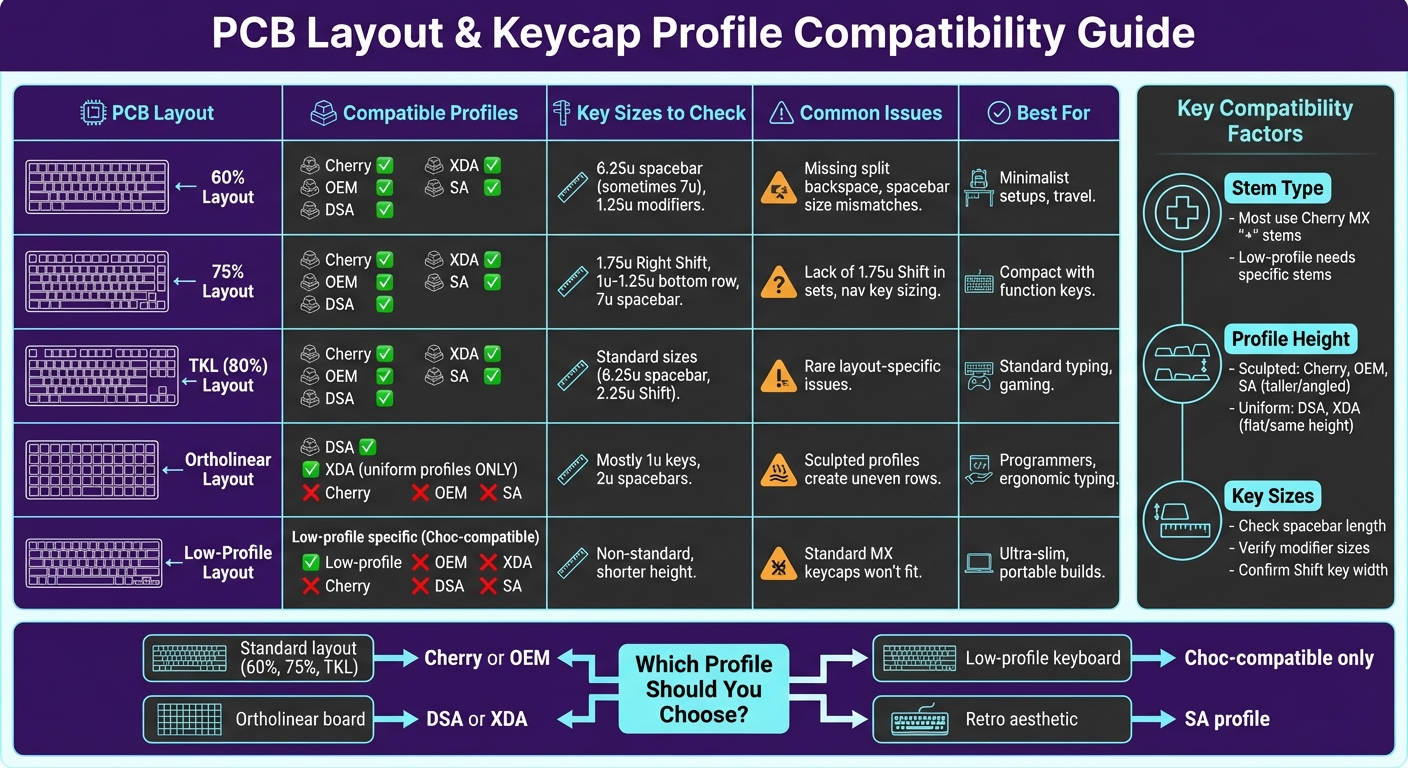
PCB Layout and Keycap Profile Compatibility Chart for Custom Keyboards
How to tell if keycaps will fit your keyboard ✏️
What Are PCB Layouts?
A PCB layout is the blueprint of your keyboard, dictating where each switch goes, how far apart they are, and the overall size and shape of the keyboard. It influences everything - from the total number of keys to the spacing between them - and determines which cases, plates, and keycaps will be compatible with your build.
Different layouts are designed to suit various typing preferences and setups. For instance, ANSI layouts, commonly used in the United States, feature a large Enter key and evenly spaced keys, making them the most familiar option for many. In contrast, ISO layouts, popular in Europe, include a smaller horizontal Enter key and a split left Shift (1.25u + 1.25u) to accommodate different typing habits. Meanwhile, ortholinear layouts arrange keys in straight columns rather than the staggered rows most keyboards use. This grid-like design minimizes lateral finger movement and is favored by programmers seeking ergonomic efficiency. Split layouts take things a step further by dividing the keyboard into two separate halves. This allows for custom positioning, promoting natural hand alignment and reducing wrist strain.
Your choice of layout affects more than just the look of your keyboard. For example, a 60% keyboard saves desk space with its compact design but requires you to access function keys through layers. On the other hand, a TKL (tenkeyless) layout retains the function row and navigation cluster while eliminating the numpad, offering a middle ground between size and functionality.
Common PCB Layouts
60% layouts are the go-to option for compact keyboards, featuring just 61 keys. These layouts omit the function row, navigation cluster, and numpad entirely, making them perfect for travel or minimalist desk setups. The bottom row usually sticks to a standard configuration with 1.25u modifiers and a 6.25u spacebar, ensuring compatibility with most aftermarket keycap sets.
75% layouts bring back the function row and arrow keys in a tighter configuration, typically offering around 84 keys. They strike a balance between space-saving and usability. However, these keyboards often have custom bottom row designs, such as 1u or 1.25u modifiers and sometimes a 7u spacebar. Make sure your keycap set includes the correct sizes, especially the 1.75u right Shift.
TKL (tenkeyless or 80%) layouts remove only the numpad from a full-size keyboard, leaving 87 keys. This layout keeps the function row and navigation cluster intact while maintaining standard ANSI or ISO key spacing. Since most keycap sets are designed with TKL boards in mind, compatibility is generally hassle-free.
Ortholinear layouts break away from traditional staggered rows by using a grid-like matrix where keys align vertically in columns. A typical ortholinear 60% board might include 64 keys arranged in a 5x15 grid. This layout mirrors natural finger movement but requires specific keycap sets, as standard sculpted profiles won’t align correctly with the straight-column design.
Up next, we’ll dive into keycap profiles - another crucial factor in making sure your keycaps and PCB layout work together seamlessly.
What Are Keycap Profiles?
A keycap profile refers to the shape, height, and sculpting of keycaps across the rows of a keyboard. It’s a key factor in how a keyboard feels and looks, influencing both typing comfort and overall aesthetics.
Keycap profiles fall into two main categories: sculpted and uniform. Sculpted profiles, like Cherry, vary in height across rows to create a natural arc that aligns with the way your fingers move while typing. For example, the bottom row is higher, and the top row slopes downward, encouraging a more ergonomic hand position. On the other hand, uniform profiles, such as DSA or XDA, maintain the same height for all keycaps, offering a consistent feel across the entire keyboard.
Taller profiles, like SA, stand out with their dramatic sculpting and retro-inspired design, while shorter profiles, such as Cherry or XDA, provide a more modern, streamlined look. The height of the keycaps also impacts typing performance: shorter profiles can make key presses quicker, while taller profiles are favored by touch typists for their enhanced tactile feedback. Understanding these differences is essential when choosing keycaps that best suit your typing style and keyboard layout.
Popular Keycap Profiles
Here’s a closer look at some of the most common keycap profiles and what makes them distinctive:
- OEM Profile: This is the default profile found on most prebuilt keyboards. OEM keycaps have a slightly curved top and increase in height from the front to the back rows, offering moderate sculpting for a comfortable typing experience. They’re taller than Cherry keycaps and are a familiar choice for everyday use.
- Cherry Profile: Known for being shorter than OEM, Cherry keycaps feature a sculpted design that balances comfort and functionality. Their lower height makes them a favorite for custom builds, offering a smooth typing feel without being overly pronounced. Many aftermarket keycap sets are designed with Cherry compatibility in mind, making them a go-to option for enthusiasts.
- SA (Signature Plastics SA) Profile: SA keycaps are tall and heavily sculpted, with spherical tops and significant height variation between rows. This profile is ideal for touch typists who rely on the feel of the home row. However, the extra height can be tiring during long typing sessions, so they’re best suited for those who prioritize aesthetics or enjoy a retro vibe.
- DSA Profile: With a flat, uniform design across all rows, DSA keycaps have subtle spherical tops that provide consistent finger movement. This profile is particularly well-suited for ortholinear keyboards, where the grid-like layout benefits from uniform key heights, ensuring smooth and predictable typing.
- XDA Profile: Similar to DSA in its uniform height, XDA keycaps take it a step further with a lower profile and wider, flatter tops. This design promotes quick key presses and gives a sleek, minimalist look. It’s a popular choice for compact builds, gaming setups, and users who prefer a typing experience similar to a laptop’s flat keys. The uniformity also allows keycaps to be swapped between rows without worrying about height differences.
- Low-Profile Keycaps: These are specifically designed for low-profile switches, such as those used in Keychron K1 and K3 keyboards. They’re shorter and feature unique stems that aren’t compatible with standard MX-style switches. If your keyboard uses low-profile switches, make sure to double-check compatibility before purchasing these keycaps, as they won’t work with standard profiles.
Understanding these profiles can help you choose the perfect set of keycaps for your typing needs, whether you’re prioritizing comfort, speed, or aesthetics.
Key Compatibility Factors Between PCB Layouts and Keycap Profiles
When putting together a custom keyboard, three key factors - stem type, row alignment, and key sizes - determine whether your keycaps will fit and align correctly. Overlooking any of these can lead to keycaps that don’t fit, look out of place, or leave gaps on your keyboard. Let’s break down how each factor impacts your build.
Stem Type and Mounting Requirements
The stem is the connection point between the switch and the keycap. Most aftermarket keycap sets, including those from KeebsForAll, are designed for Cherry MX-style stems. These stems have a "+" shape and are compatible with popular switches like MX, Gateron, and Kailh. If you’re using low-profile switches or PCBs, you’ll need low-profile keycaps to avoid clearance problems or improper seating.
Mounting height is another consideration. Standard profiles like Cherry and OEM generally fit most MX PCBs without issues. However, taller profiles, such as SA, can run into problems with high case walls, rotary knobs, or tight bezels on compact keyboards.
Row Sculpting and Layout Alignment
Sculpted profiles feature varying shapes and heights (commonly labeled R1–R5) to match the staggered layout of most keyboards. If you place an R3 keycap in an R1 row, the keyboard can look uneven and feel uncomfortable to type on. This is especially important for compact layouts like 60%, 65%, and 75%, where navigation or function keys may be arranged differently.
Uniform profiles, like DSA and XDA, eliminate this issue by having the same shape and height across all rows. This flexibility makes them a great match for ortholinear layouts, 40% boards, and custom macro pads, as you can place any 1u keycap anywhere without worrying about row mismatches.
But even with proper alignment, key sizing can introduce additional challenges.
Key Sizes and Non-Standard Layouts
Key size issues often crop up with the spacebar, Shift, and bottom-row modifiers. For example, standard ANSI layouts typically have a 6.25u spacebar, but many compact layouts - such as 60%, 65%, and 75% - use a 7u or split spacebar. Right Shift keys might measure 2.75u, 2.25u, or even be split, while left Shift keys are often 2.25u on ANSI layouts but can be 2u on smaller boards. Bottom-row modifiers like Ctrl, Alt, and Win also vary, ranging from 1u to 1.5u depending on the layout.
Thankfully, many keycap sets come with extension kits designed for non-standard layouts. KeebsForAll offers these kits alongside base sets, ensuring you have the right key sizes for configurations like 60%, 65%, and 75%. If you’re using an ISO layout, keep in mind that it requires an L-shaped Enter key and a modified left Shift, so double-check that your keycap set supports your board's layout.
Common PCB Layouts and Their Compatible Keycap Profiles
60% Layouts
60% keyboards are compact setups with just 61 keys - no numpad, no function row, and no dedicated arrow keys. These boards typically feature a 6.25u spacebar and 1.25u modifiers on the bottom row, which aligns them with most standard keycap sets.
When it comes to keycap profiles, Cherry, OEM, and DSA are excellent choices for 60% layouts. Cherry profile is lower in height and has sculpted rows, offering a comfortable typing experience. OEM, which is slightly taller, is the default profile for many prebuilt keyboards. DSA, on the other hand, has a uniform height across all rows, giving you the freedom to rearrange keys without worrying about row-specific shapes. All of these profiles use MX-style stems, ensuring compatibility with standard mechanical switches.
Before buying keycaps, double-check that the set matches your PCB's specifications. For instance, some 60% boards use a 7u spacebar instead of the standard 6.25u. A few great options for standard 60% layouts include KeebsForAll's KFA Cherry Profile Blank PBT Keysets ($36.00) and kfaPBT Cardinal Keycaps ($78.00). These are ideal for builds like the Freebird60 (starting at $160.00), which supports standard bottom row sizing.
Let’s move on to slightly larger layouts, where modifier key sizes can vary more.
75% and TKL Layouts
For those who need more keys, 75% and TKL layouts are popular choices. A 75% layout adds a function row to the compact 60% design, while a TKL (tenkeyless) layout removes the numpad from a full-size keyboard, leaving 87 keys. Both layouts are compatible with most sculpted profiles like Cherry, OEM, and SA, as well as uniform profiles like DSA and XDA. However, their modifier key sizes can vary, so you’ll need a keycap set designed for multi-layout compatibility.
A typical 75% board might include a 7u spacebar, 1.25u inner modifiers, and a 2.75u right Shift key, while TKL layouts usually stick to a 6.25u spacebar and 2.25u Shift keys. To ensure compatibility, look for keycap sets labeled as "multi-layout" or "base kit with extras", which include a variety of key sizes to accommodate these differences. Both the Freebird75 (from $199.00) and Freebird TKL (from $249.99) are designed with multi-layout support, making them versatile options for pairing with comprehensive keycap sets.
Ortholinear and Low-Profile Layouts
For more specialized designs, ortholinear and low-profile keyboards require specific keycap solutions.
Ortholinear boards feature a grid-like layout with keys arranged in straight columns instead of the staggered rows found on traditional keyboards. Since this layout relies heavily on 1u keys (even for modifiers), uniform profiles like DSA or XDA are ideal. Sculpted profiles don’t work well here because they create uneven heights across the grid, disrupting the uniformity.
Low-profile boards, on the other hand, use shorter switches like Kailh Choc, which are common in ultra-slim keyboards such as the Keychron K1 and K3 series. These switches have thinner stems and reduced travel distances, so standard MX keycaps won’t fit. Instead, you’ll need keycaps specifically designed for low-profile switches. Mixing standard and low-profile components isn’t an option due to differences in stem design and height. If you’re working on a low-profile build, make sure the keycaps are explicitly labeled as Choc-compatible or low-profile before making a purchase.
sbb-itb-3cb9615
Comparison Table: PCB Layouts vs Keycap Profiles
Here’s a quick overview of the compatibility factors we’ve covered, including PCB layouts, keycap profiles, stem types, key sizes, and common challenges.
| PCB Layout | Compatible Keycap Profiles | Stem Requirements | Key Sizes | Common Problems |
|---|---|---|---|---|
| 60% | Cherry, OEM, DSA, XDA, SA | MX-style cross stem | Standard 6.25u spacebar, 1.25u modifiers; some use 7u spacebar | Missing keys for split backspace or non-standard bottom rows; spacebar size mismatches |
| 75% | Cherry, OEM, DSA, XDA, SA | MX-style cross stem | 1.75u Right Shift needed; 1u or 1.25u bottom row keys; compact nav column | Issues with right-side navigation keys; lack of 1.75u Shift key in some sets |
| TKL (80%) | Cherry, OEM, DSA, XDA, SA | MX-style cross stem | Mostly standard sizes; full function row and nav cluster | Multi-layout PCBs may require stepped Caps Lock or split keys not included in standard kits |
| Ortholinear | DSA, XDA (uniform profiles only) | MX-style cross stem | Grid layout with mostly 1u keys; 2u spacebars are common | Sculpted profiles result in uneven row heights, reducing typing comfort |
| Low-Profile | Low-profile specific (Choc-compatible) | Low-profile stems (Kailh Choc, Keychron LP) | Non-standard spacebar sizes; shorter overall height | Standard MX keycaps are too tall; stem incompatibility with regular caps |
Before buying keycaps, double-check your PCB’s specifications - especially spacebar length, modifier sizes, and any non-standard shifts. Many compatibility issues stem from unusual key sizes rather than the keycap profile itself. If you’re using a 75% or 65% layout, look for sets marked as "multi-layout" or those with compatibility kits that include extra key sizes.
For ortholinear keyboards, stick with uniform profiles like DSA or XDA. Sculpted profiles can create an uncomfortable typing experience due to uneven row heights. And for low-profile builds, only use keycaps designed specifically for low-profile switches - standard MX caps won’t fit because of their height and stem design.
Up next, we’ll dive into compatibility details for KeebsForAll products.
Compatibility with KeebsForAll Products

The Freebird series from KeebsForAll - comprising the Freebird60, Freebird75, and Freebird TKL - features MX-style switches and hot-swap PCBs. These are compatible with Cherry, OEM, SA, DSA, and XDA keycap profiles, thanks to their standard cross-shaped MX stems.
Each Freebird model includes hot-swap sockets and multi-layout support, making it easy to swap switches and keycaps without needing to solder. They also come pre-installed with Durock V2 screw-in stabilizers, ensuring smooth alignment for larger keys like the spacebar and shift keys. Pricing starts at $160.00 for the Freebird60 full kit and goes up to $249.99 for the Freebird TKL.
When selecting a Freebird board, double-check the specifications to confirm it supports your desired layout. For instance, if you're planning a split backspace or stepped Caps Lock setup, ensure that both the PCB and your keycap set include the necessary options. The multi-layout support on Freebird PCBs allows for various custom configurations, but you'll need a keycap set with the right extras to make it work.
Pay attention to bottom-row sizes and spacebar lengths. The Freebird60 uses a 6.25u spacebar with 1.25u modifiers, while the 75% and TKL models stick to standard ANSI sizes. Look for keycap sets specifically labeled for 60%, 75%, or TKL layouts, and make sure they include extras like the 1.75u right shift, which is required for some 75% configurations.
Since Freebird keyboards are standard-height (not low-profile), they work seamlessly with any regular MX-compatible keycap profile. However, avoid keycap sets designed solely for low-profile switches, as they won’t fit properly. KeebsForAll also offers kfaPBT and Cherry Profile Blank PBT keycap sets starting at $36.00, which are designed to fit these layouts perfectly.
Next, we’ll dive into troubleshooting common compatibility issues with these setups.
Troubleshooting Common Compatibility Issues
Stem wobble happens when a keycap doesn’t fit snugly on the switch stem. For instance, standard MX keycaps won’t properly secure onto Kailh Choc switches, which use a flat, rectangular stem instead of the typical cross-shaped MX design. To fix this, use keycaps specifically made for Choc stems, like MBK or XDA-Profile Choc. On the other hand, Gateron LP switches use MX-style stems, so low-profile MX keycaps usually fit well. However, standard MX caps might fit but could feel unsteady or uneven.
Another issue to watch for is height mismatches. These occur when taller keycap profiles, such as SA or OEM, are paired with low-profile keyboards. This combination can lead to uneven typing and interference during use. To avoid this, always pair low-profile keyboards with appropriately sized keycaps for smooth performance.
Compact layouts, like 60% or 75% keyboards, often include non-standard key sizes, which can complicate keycap compatibility. For example, you may need specific sizes like a 1.75u right shift, 1.25u modifier keys, or a 6.25u spacebar. Before buying a keycap set, review your PCB's layout to ensure the set includes these sizes. For unique configurations, consider extension kits like the Keykobo Gigachild, which offers a variety of key sizes and row profiles. If you’re working with ortholinear builds, flat-profile keycaps such as DSA can help avoid sizing problems.
When troubleshooting compatibility, follow these steps: First, confirm your switch stem type and layout using a compatibility chart. If you’re unsure, reach out to the seller for clarification. For larger keys that wobble, upgrading to high-quality screw-in stabilizers like Durock V2 or AEBoards Staebies V2.1 can provide better stability. If your layout requires a unique key size not included in your set, blank keycaps from the KFA Cherry Profile Blank PBT collection can offer a clean and consistent solution.
Conclusion
When it comes to PCB layout and keycap profile compatibility, the key factors to consider are stem type, key sizes, and profile height. Most custom builds rely on Cherry MX-style cross-shaped stems, which are compatible with the majority of aftermarket keycaps. However, low-profile keyboards need specially designed keycaps due to their reduced height - standard profiles like OEM or SA simply won't fit. Always ensure the keycap set matches your PCB layout, as non-standard bottom rows often cause the most issues.
While profile choice impacts typing comfort and ergonomics, it won’t result in physical incompatibility as long as the stems align. Sculpted profiles like Cherry or OEM are optimized for comfort by aligning row heights, whereas flat profiles like DSA are ideal for ortholinear layouts. Understanding these basics can help you sidestep common mistakes in custom keyboard builds.
If you're looking for a seamless starting point, KeebsForAll's Freebird series offers fully-equipped hot-swap kits in various layouts: the Freebird60 (starting at $160.00), Freebird75 (starting at $199.00), and Freebird TKL (starting at $249.99). Each kit includes Durock V2 screw-in stabilizers and multi-layout support, making them compatible with a wide range of setups. Pair these with their kfaPBT keycap sets ($78.00) or KFA Cherry Profile Blank PBT keysets ($36.00) for a hassle-free experience. For pre-assembled options, their second-hand marketplace at kfamarketplace.com features keyboards with verified compatibility for stems, profiles, and sizes.
Before diving into your build, double-check your switch mount type, confirm key sizes for your layout, and review product specifications on KeebsForAll. Spending a few minutes upfront can save you hours of troubleshooting down the road.
FAQs
What’s the difference between sculpted and uniform keycap profiles?
Sculpted keycap profiles are designed with rows of keys that vary in height and angle, creating a typing experience that aligns with the natural curve of your fingers. This thoughtful design not only feels more comfortable but also adds a visually distinct touch to your keyboard.
On the other hand, uniform keycap profiles feature keys that are all the same height and shape. This design offers a clean, consistent appearance and is especially appealing to those who enjoy rearranging their keycaps or working with non-standard layouts due to its straightforward and adaptable nature.
How do I make sure my keycap set works with a 75% keyboard layout?
To make sure your keycap set works with a 75% keyboard layout, keep these points in mind:
- Stem type: Most keycaps are made for Cherry MX stems or switches that are compatible with them. Double-check that your keycap set fits your switches.
- Keycap profile: Ensure the profile suits the compact design of a 75% keyboard. Some profiles might feel awkward or not align properly with this layout.
- Key sizes and spacing: Confirm the set includes the right key sizes (like a smaller right Shift or non-standard bottom row) and aligns with the spacing of a 75% layout.
If you're customizing your keyboard, taking the time to verify these details can save you from unexpected issues. For options that balance quality and price, consider browsing trusted sellers like KeebsForAll.
Why don’t standard keycap profiles work with low-profile keyboards?
Low-profile keyboards aren't built to work with standard keycap profiles, and here's why: the switches and stems in low-profile designs are shorter, which leads to misalignment when trying to use standard keycaps. This mismatch can cause issues with fit and stability. Plus, low-profile keyboards are crafted to maintain a slim, sleek build, which doesn’t leave room for the taller height and larger dimensions of standard keycaps.